
apps-android-commons
 apps-android-commons copied to clipboard
 commons-app
Turning off storage permissions while downloading will cause the app to crash
Summary: Turning off storage permissions while downloading will cause the app to crash
Steps to reproduce:
- Install and open commons
- Skip the tutorial
- Click any picture in the "explore"
- Click the download icon in the upper right corner
- Give commons storage permissions
- Turn off the storage permissions of commons in the system settings
- Back to commons
- Crash
System logs:
08-22 14:06:40.791 10424 10424 E AndroidRuntime: FATAL EXCEPTION: main
08-22 14:06:40.791 10424 10424 E AndroidRuntime: Process: fr.free.nrw.commons, PID: 10424
08-22 14:06:40.791 10424 10424 E AndroidRuntime: java.lang.RuntimeException: Unable to resume activity {fr.free.nrw.commons/fr.free.nrw.commons.explore.categories.ExploreActivity}: java.lang.NullPointerException: Attempt to invoke virtual method 'java.lang.String fr.free.nrw.commons.Media.getThumbUrl()' on a null object reference
08-22 14:06:40.791 10424 10424 E AndroidRuntime:        at android.app.ActivityThread.performResumeActivity(ActivityThread.java:3863)
08-22 14:06:40.791 10424 10424 E AndroidRuntime:        at android.app.ActivityThread.handleResumeActivity(ActivityThread.java:3895)
08-22 14:06:40.791 10424 10424 E AndroidRuntime:        at android.app.servertransaction.ResumeActivityItem.execute(ResumeActivityItem.java:51)
08-22 14:06:40.791 10424 10424 E AndroidRuntime:        at android.app.servertransaction.TransactionExecutor.executeLifecycleState(TransactionExecutor.java:145)
08-22 14:06:40.791 10424 10424 E AndroidRuntime:        at android.app.servertransaction.TransactionExecutor.execute(TransactionExecutor.java:70)
08-22 14:06:40.791 10424 10424 E AndroidRuntime:        at android.app.ActivityThread$H.handleMessage(ActivityThread.java:1839)
08-22 14:06:40.791 10424 10424 E AndroidRuntime:        at android.os.Handler.dispatchMessage(Handler.java:106)
08-22 14:06:40.791 10424 10424 E AndroidRuntime:        at android.os.Looper.loop(Looper.java:201)
08-22 14:06:40.791 10424 10424 E AndroidRuntime:        at android.app.ActivityThread.main(ActivityThread.java:6861)
08-22 14:06:40.791 10424 10424 E AndroidRuntime:        at java.lang.reflect.Method.invoke(Native Method)
08-22 14:06:40.791 10424 10424 E AndroidRuntime:        at com.android.internal.os.RuntimeInit$MethodAndArgsCaller.run(RuntimeInit.java:547)
08-22 14:06:40.791 10424 10424 E AndroidRuntime:        at com.android.internal.os.ZygoteInit.main(ZygoteInit.java:873)
08-22 14:06:40.791 10424 10424 E AndroidRuntime: Caused by: java.lang.NullPointerException: Attempt to invoke virtual method 'java.lang.String fr.free.nrw.commons.Media.getThumbUrl()' on a null object reference
08-22 14:06:40.791 10424 10424 E AndroidRuntime:        at fr.free.nrw.commons.media.MediaDetailFragment.setupImageView(MediaDetailFragment.java:261)
08-22 14:06:40.791 10424 10424 E AndroidRuntime:        at fr.free.nrw.commons.media.MediaDetailFragment.displayMediaDetails(MediaDetailFragment.java:242)
08-22 14:06:40.791 10424 10424 E AndroidRuntime:        at fr.free.nrw.commons.media.MediaDetailFragment.onResume(MediaDetailFragment.java:237)
08-22 14:06:40.791 10424 10424 E AndroidRuntime:        at androidx.fragment.app.Fragment.performResume(Fragment.java:2499)
08-22 14:06:40.791 10424 10424 E AndroidRuntime:        at androidx.fragment.app.FragmentManagerImpl.moveToState(FragmentManagerImpl.java:926)
08-22 14:06:40.791 10424 10424 E AndroidRuntime:        at androidx.fragment.app.FragmentManagerImpl.moveFragmentToExpectedState(FragmentManagerImpl.java:1229)
08-22 14:06:40.791 10424 10424 E AndroidRuntime:        at androidx.fragment.app.FragmentManagerImpl.moveToState(FragmentManagerImpl.java:1295)
08-22 14:06:40.791 10424 10424 E AndroidRuntime:        at androidx.fragment.app.FragmentManagerImpl.dispatchStateChange(FragmentManagerImpl.java:2605)
08-22 14:06:40.791 10424 10424 E AndroidRuntime:        at androidx.fragment.app.FragmentManagerImpl.dispatchResume(FragmentManagerImpl.java:2577)
08-22 14:06:40.791 10424 10424 E AndroidRuntime:        at androidx.fragment.app.Fragment.performResume(Fragment.java:2505)
08-22 14:06:40.791 10424 10424 E AndroidRuntime:        at androidx.fragment.app.FragmentManagerImpl.moveToState(FragmentManagerImpl.java:926)
08-22 14:06:40.791 10424 10424 E AndroidRuntime:        at androidx.fragment.app.FragmentManagerImpl.moveFragmentToExpectedState(FragmentManagerImpl.java:1229)
08-22 14:06:40.791 10424 10424 E AndroidRuntime:        at androidx.fragment.app.FragmentManagerImpl.moveToState(FragmentManagerImpl.java:1295)
08-22 14:06:40.791 10424 10424 E AndroidRuntime:        at androidx.fragment.app.FragmentManagerImpl.dispatchStateChange(FragmentManagerImpl.java:2605)
08-22 14:06:40.791 10424 10424 E AndroidRuntime:        at androidx.fragment.app.FragmentManagerImpl.dispatchResume(FragmentManagerImpl.java:2577)
08-22 14:06:40.791 10424 10424 E AndroidRuntime:        at androidx.fragment.app.FragmentController.dispatchResume(FragmentController.java:267)
08-22 14:06:40.791 10424 10424 E AndroidRuntime:        at androidx.fragment.app.FragmentActivity.onResumeFragments(FragmentActivity.java:463)
08-22 14:06:40.791 10424 10424 E AndroidRuntime:        at androidx.fragment.app.FragmentActivity.onPostResume(FragmentActivity.java:453)
08-22 14:06:40.791 10424 10424 E AndroidRuntime:        at androidx.appcompat.app.AppCompatActivity.onPostResume(AppCompatActivity.java:173)
08-22 14:06:40.791 10424 10424 E AndroidRuntime:        at android.app.Activity.performResume(Activity.java:7438)
08-22 14:06:40.791 10424 10424 E AndroidRuntime:        at android.app.ActivityThread.performResumeActivity(ActivityThread.java:3855)
08-22 14:06:40.791 10424 10424 E AndroidRuntime:        ... 11 more
Device and Android version:
Device1: [MI CC 9e] OS version1: [MIUI 10.2.10] Device2: [PIXEL XL] OS version2: [Android 10.0]
Commons app version: App version: [2.12.3]
Screen-shots:


Hi,any update about this issue?It would be really appreciated to get your concern on this.
Hi @sjl872964789 , could you elaborate more on why you would need to turn off storage permissions for the app immediately after initiating a download?

In fact, after I closed the permissions and returned to the app after the download was complete, the app would also crash. Maybe my report is too brief. I think commons can complete this download, but it shouldn’t be required to keep storage permissions forever.

@sjl872964789 I can't seem to report this error on our latest release branches. Also from the logs, we can conclude that the app is not crashing because it needs the storage permission forever, its crashes because of a NullPointerException in MediaDetails. Can you confirm this is happening on 2.13-release, please?

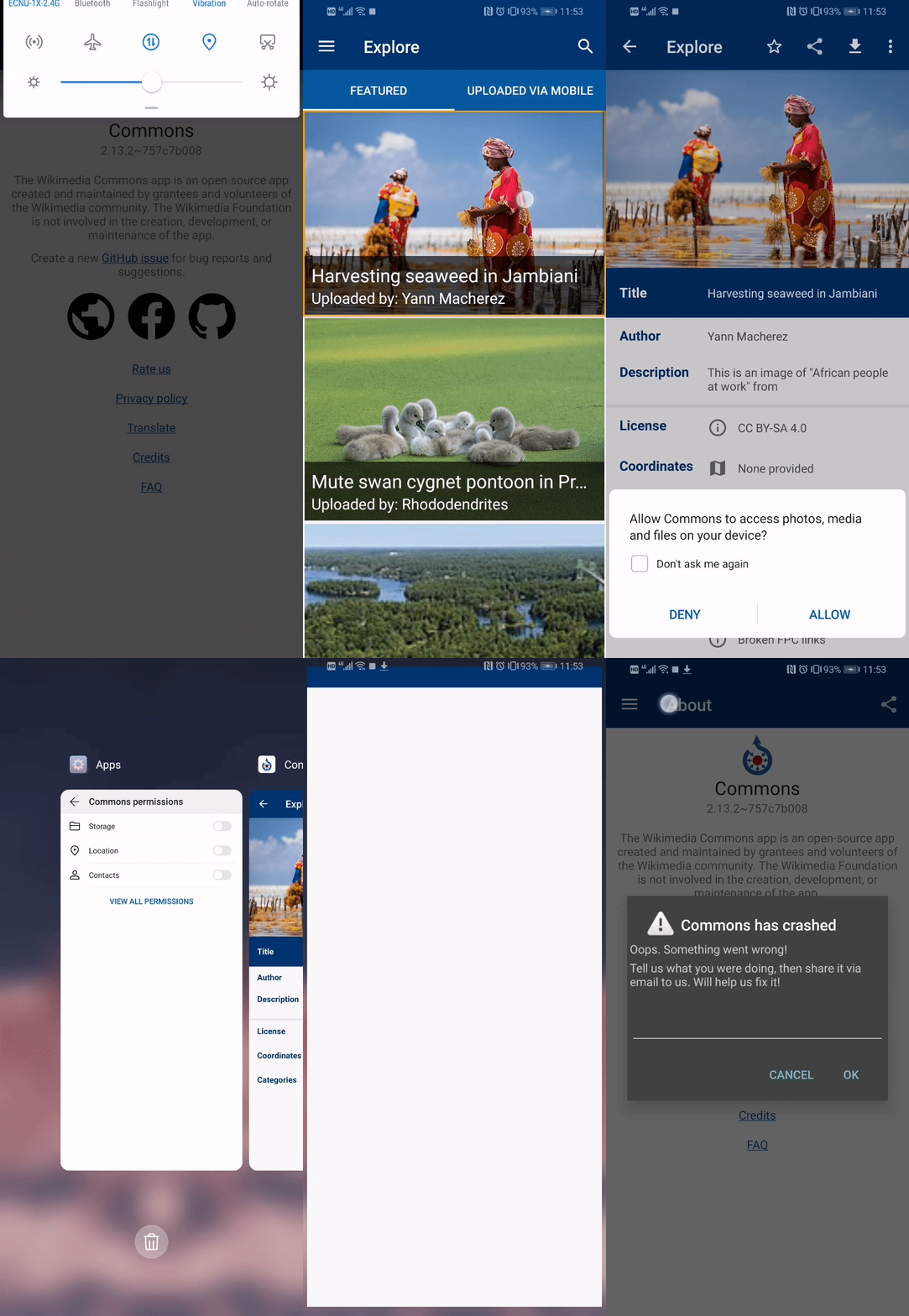 I tried on the latest version(2.13.2) and the issue still exists

I want to learn about that issue, and try to found a solution. I will tell you if I am going forward :D

Do you think is a good idea to set a listener to know if you are turning off that permission and if you do that just stop the download?
Yeah, stopping the download when the permission has been changed sounds like a better place to be in than crashing the app.

@FivelMttz Hi, I was just reading this issue and found it interesting. I am new to open source so would it be possible for you to give some updates on your progress so I can understand your approach? Thanks

Hi @FivelMttz, that’s great to hear and thank you very much, just let me know when you are free to discuss it. In the meantime, enjoy your vacation. 😊
P.S. Apologies if I have incorrectly replied to your message, it's displaying a little strangely for me.
Hi all,
Just came across this issue and decided to do some debugging.
I was able to reproduce this in the master branch and agree with @ashishkumar468 that this is not related with storage permissions. It actually seems to be related with the app's state restoration.
When permissions are changed while the app is in background, Android terminates the app's process. After doing that, when the user returns to the app, Android tries to recreate the app's state (MainActivity with all it's child Fragments). The same behavior occurs by following these steps:
- Launch the app with Android Studio
- Click any picture in the Explore tab
- Press the Home button to send the app to background
- Terminate the app in Android Studio (Logcat)
- Open the app again
This also results in a crash with the same stacktrace.
Going deeper I noticed that MediaDetailsFragment was getting the Media object from a provider, but when it's state is restored the provider seems to be missing all it's data, and so the Media object is null. It seems that this provider is not being correctly initialized.
Since the Media object was being kept in a private variable, and the Media class is Parcelable, I tried to save it in onSaveInstanceState() and retrieve it in onCreateView() to see what happens. I also moved the line where the Media object was being retrieved from the provider (onResume()) to a place where it would not be executed when the state was being restored. This apparently fixed the crash since the Media object is never null but it produced some weird side effects and is not a viable fix.
What do you guys think?

@FivelMttz Are you still working on this? In any case please let us know what is the state of this issue on your side, thanks! :-)
@marcosliberal @nicolas-raoul Preventing the crash here is very easy. Just by checking if (media != null) crash can be prevented. The main problem is the output after this. On resuming, the screen becomes blank with Toolbar and tabLayout.

Hi all,
I had some time to take a deeper look at this issue and I actually found a couple of state restoration issues on the entire fragment hierarchy that are not only causing the issue reported here but more issues in places like the explore list itself.
For instance, if we run the same steps previously stated, but instead of opening a picture before changing the permissions (or using any other method that makes android destroy the app's process) we just stay in the explore list, the app will apparently nicely recover. I say apparently, because if after the app recovers you then open any image, you will see a white screen.

So, I took some time trying to figuring out everything that was being wrongly managed in terms of state restoration related with this issue and I think I got this working.
Sorry for not previously ask you guys if I could work on this issue, but if you want, you can assign it to me and I will very soon share my solution.
@marcosliberal Looks like you've done significant work on this issue. Feel free to open a PR, we'll take a look. And yeah, next time make sure to ask before you start working 🙂
This is not a problem of "while downloading". If a user opens MediaDetailFragment from Contributions/Explore, and then disable storage permission, the app crashes also. After disabling storage permission at runtime, the app recall onCreate()

The cause of crashes are different, it depends on from where MediaDetailFragment is opened like from Contributions or from Explore.
From Contributions: IndexOutOfBoundsException


From Explore: NullPointerException


But If user doesn't open MediaDetailFragment before turning off storage permission, the app doesn't crash.
Although I can't able to reach to the solution but I'm trying. I can't able to understand that if app starts from onCreate after disabling permission at runtime then why the app only crashed when user open MediaDetailFragment before disabling the permission.
I think of a solution to save the state so that Media doesn't get null. But before that I want to understand the above reason.

@sivaraam @nicolas-raoul I figure it out and come up with a solution. Can I work on this issue?
@Ayan-10 There's an open PR from @marcosliberal. So, it's better to check with them before working on this. If there's no response from them for a couple of days, feel free to either resurrect the open PR (or) start a new one.
@marcosliberal Could you let us know if you're still working on this issue?
Hi @Ayan-10 @sivaraam,
I have a change request in my PR and I was planning to take a look at it soon.
I believe it solves this and other similar issues in the app as I described in previous comments, so maybe it would be good to give it a try 😄

@SamarthAsthan Would you mind trying? If it is fixed, please post a screencast and I will close the issue. Thanks a lot! :-)
Hi @nicolas-raoul Is anyone working on this issue? Can I take it up?

@bhavanagarlapati Please take one issue at a time. Do not hesitate to come back to this one after sending a pull request for your currently assigned one. :-)