

 comfyanonymous
[Feature request]: A list of things I noticed and I want to comment about
I'm using ComfyUI for a few days now and I find it really interesting. I find it very interesting especially for upscaling, because the workflow is simpler, IMHO. While playing around and experimenting, I noticed some things and I want to mention it here with the hope, they maybe will be revisited/changed/added/implemented.
In no particular order:
Save nodes: I find myself changing some nodes permanently, meaning either value wise or change widgets to inputs. It would be very convenient, if we could save nodes either as a "real" node or as a kind of "preset" we can later choose and not have to re-do them every time we start a new workflow.
Save workflow: I noticed, that when I save a workflow, the save name always defaults to "workflow.json" The primary question is: Do we really need the modal first, before getting to the system dialog? But either way, I would highly love to see the current workflow filename. While it's OK to have "workflow.json" on the first save with a new/fresh workflow, but after saving it once with our own name i.e. "my_settings.json", with the next save it should display "my_settings.json" and not "workflow.json" again. The same if we load a workflow. When I load "my_worflow.json" and save it, it should stay at "my_workflow.json" until I write it different.
Node lines: I like the spline display, but for more complex things, I prefer the straight variant. And then I would love to see the possibilities to manipulate the lines further. It looks like the straight variant is somehow fixed depending on the distance of the connected nodes and uses always the half of the distance. This leads often to not so clear or even hidden line flows. I would love to see the possibility, to drag the lines to where we like them to be, so we could layout some neat workflow lines. Like in the "real" workflow diagrams possible.
Nodes resizing: Currently, a node can only resized via the lower right corner. So we can only scale "from the right". But sometimes, I have nodes aligned to the right and when I resize a node, I must then re-adjust the alignment because of this. So it would be convenient to have the possibility to also resize "from the left". The best thing would be to resize from all four sides, but "from the left" would also be sufficient.
Nodes alignment: Speaking of alignment, I would love to see also to see alignments "vertical" and "horizontal". As a bonus, "even spacing" in horizontal and vertical would also be great. Would make node layouts really pretty.
Visual appearance of nodes: I'm not so a big fan of rounded boxes, even less when the are SO round. So I rather prefer "normal" boxes. I would like to have an option to set the default appearance of the boxes globally so I don't have to convert each and every single box in my layout. Maybe additional an option to set the corner radius globally.
I like how an active node is border by a thin green line. However, I personally find this line "too" thin and the color too dark. I would love to have an option to set the width of this border and also a custom color for it.
When a node is pinned, there is no indicator to show that it is. I'm aware that on an error, a node gets a red outline, so I would suggest to have pinned nodes displayed with a reddish background color (and a white/bright text color) for the title of the node.
Moar colors! I think it would be great to have the possibility for additional colors, that are even saved in a global palette for every workflow to use.
Prompt executed: I would prefer to have also hours and minutes displayed in the console at the end of the progress.
Progress display: I don't know if it's possible, but I really would like to see a some kind of progress display. Maybe an progress bar on the top of the browser window from left to right, in a choosable color and (reasonable) height.
That's it for now, I hope those things can be considered. Many thanks for this great tool. 🙂👍

Regarding having boxes as the default, you can do this yourself.
Navigate to your ComfyUI folder, go to the web folder, then extensions. EXAMPLE: C:\CUI\ComfyUI\web\extensions
Create a new file called box_default.js (Name doesn't matter)
Open up the new file and paste the following code in and save. That's it. Close out the web page and CUI, then restart it.
import { app } from "../scripts/app.js";

app.registerExtension({
    name: "alkemann.JustBoxes",
    nodeCreated(node) {
        node.shape = 1
    }
});
This was found by alkemann over on discord.
EDIT: Code box isn't working. Just tossing it as a .txt file below. Rename it from .txt to .js AFTER you've looked at it. box_default.js.txt

Thanks, this works perfectly. I hope the file doesn't get deleted when updating ComfyUI ...

You can find most of what you want in ComfyUI-Custom-Scripts.
Wow, this looks very interesting ... 😳 Will check it out and maybe I have a few suggestions, if you don't mind. 😄 Thanks! 👍
Beat me to it on Pythongosssss / ComfyUI-Custom-Scripts. All you're missing is resizing from other locations on the border.
If the connector spaghetti really annoys you there's also cg-use-everywhere which is a set of nodes that you attach to outputs of anything, set a target regex match, and they'll auto-connect to every matching input of any node of the right type through the graph. I'm planning on trying this later but it looks like a nice way to clean up some of the QRCode controlnet setups I've been doing... of course the price is that you add nodes for the broadcasts, but it's still really organized (and you can turn on the view of connections in case you break everything like I plan on doing ~20 times the first time I try it and somehow manage to screw up and use PCRE constructs that ECMAScript regex doesn't support despite not needing them at all for what I'm doing.
Global progress bar is kinda difficult since some of the samplers like kerras don't take the same amount of time per iteration and resizing and detailing messes things up more; predicting remaining time to make anything close to accurate would be fairly hard... taking overall time and averaging over runs then using that to display an estimated completion bar should work as long as you don't care whether it gets stuck at 100% every so often because a run took much longer than normal. I don't know of anywhere this is implemented though.
Save nodes is actually built in I think; select the nodes you want and right click->save nodes. That might actually save all attached so you might have to disconnect inputs and outputs first but if you're just cloning a chunk of the graph that's how you want it.
I like the hh:mm:ss display option idea and it seems kinda trivial to implement as an option within comfy itself.

If the connector spaghetti really annoys you [...]
No, it doesn't 'annoy' me, I just like to have them layed out neatly so I can see where everything goes from where to where. At least as much as possible. 😄
Global progress bar is kinda difficult [...]
Then maybe ask A1111/SD:Next what's their secret to display the progress. 🤔
Save nodes is actually built in I think; [...]
Nope, there is nothing, otherwise I would have noted it. And in the meantime I really would like to have the possibility to save whole groups with nodes in it.
If one builds a group setup that can be reused, it would be awesome if it could be saved and recalled on any (new) workflow.
Groups like for example in the provided screenshot.
Of course that would require also small additions, like moving nodes inside a group only with a modifier key (unless a 'move undo' is possible) and the possibility to collapse a group.
To be honest, this save nodes and group thing should be a high priority thing, as I see this as extremely important to have for a better and faster workflow. 👍
And while I'm writing that, this comes to my mind:
As good as the right-click menu and the double click menu are, they have their flaws. The right click is tedious to use if you need nodes multiple times that are buried a few levels down. Like the reroute node:
Right-click -> Add Node -> utils -> Reroute
Because we must click for every menu, this adds to four clicks inclusive the wasted time to exactly click on the tiny menu. And there are node packs that add even more sub layers.
The double click 'fast menu' is great ... if you know what you want and know how it is named. Something a new user like me can't efficiently use.
So, a possible solution would be to have a collapsible sidebar where all nodes are listed by (selectable) name/category/usage? and we just need to drag and drop it into the workflow. Need two Ksamplers? Drag two out. Need 6 rerouting nodes? Drag them out. Dragging out six nodes would be way faster than cloning it to six items. Exception would be, if the cloning would have an shortcut key. It would be so much easier and faster to work.
So ... there you have it. More wishes for this great project. 🙂
If the connector spaghetti really annoys you [...]
No, it doesn't 'annoy' me, I just like to have them layed out neatly so I can see where everything goes from where to where. At least as much as possible. 😄
Heh. I kinda just decided to forget about that one unless we get drill-down nodes like Houdini, and I don't think Comfy is complicated enough to justify it.
Global progress bar is kinda difficult [...]
Then maybe ask A1111/SD:Next what's their secret to display the progress. 🤔
Well like I said you average the last X runs (probably weighted) and you'll end up with a good approximation, then just tick down the time. Shark does it like that and despite their 5 minute startup time for each new lora / model combo by the 3rd set of images the estimate is already pretty accurate. For automatic / comfy there's not major startup overhead (worst case is loading a different model which is near-instant here anyway) so results should be close between runs as long as huge changes aren't made. The averaging will fix that pretty fast anyway.
When I said I didn't know of anywhere it was implemented that was a bit confusing, I meant within some custom node for comfy since practically everything shows up as a custom node sooner or later.
Save nodes is actually built in I think; [...]
Nope, there is nothing, otherwise I would have noted it. And in the meantime I really would like to have the possibility to save whole groups with nodes in it. If one builds a group setup that can be reused, it would be awesome if it could be saved and recalled on any (new) workflow. Groups like for example in the provided screenshot.
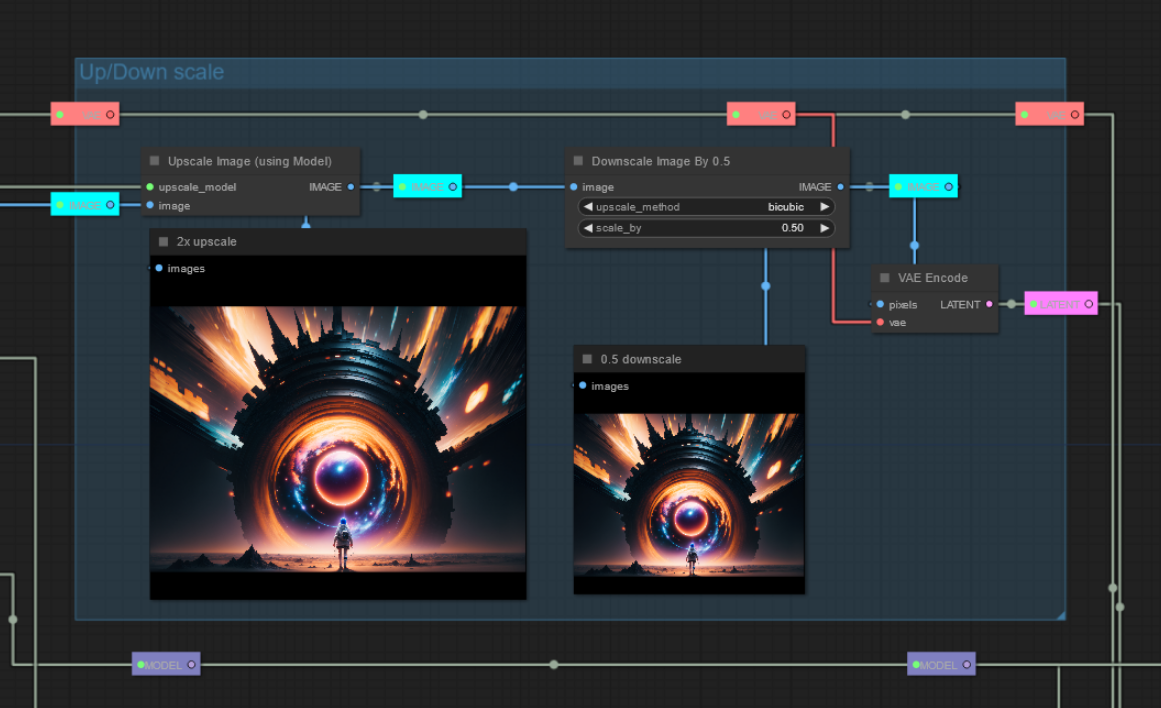
Well I have it so now I have to figure out where it's coming from, brb...
and I'm back... it's actually ComfyUI-Workflow-Component which adds an "export as component" button to the floating menu. You set it up with input and output nodes from the workflow type and can then load it into anything later. I don't know where I was getting the "save" thing from, probably yet another custom node lol.
And while I'm writing that, this comes to my mind: As good as the right-click menu and the double click menu are, they have their flaws. The right click is tedious to use if you need nodes multiple times that are buried a few levels down. Like the reroute node:
Right-click -> Add Node -> utils -> Reroute Because we must click for every menu, this adds to four clicks inclusive the wasted time to exactly click on the tiny menu. And there are node packs that add even more sub layers.
The double click 'fast menu' is great ... if you know what you want and know how it is named. Something a new user like me can't efficiently use.
My one complaint about that fast menu is when your mouse develops that double-click problem that they all do eventually it's a behavior that doesn't exist anywhere else that makes it nearly impossible to use, but it's time to get a new mouse then anyway so I can't hold that against it. I agree about the tedium of some of the menuing but I don't tend to change setups extensively once something is going.
So, a possible solution would be to have a collapsible sidebar where all nodes are listed by (selectable) name/category/usage? and we just need to drag and drop it into the workflow. Need two Ksamplers? Drag two out. Need 6 rerouting nodes? Drag them out. Dragging out six nodes would be way faster than cloning it to six items. Exception would be, if the cloning would have an shortcut key. It would be so much easier and faster to work.
I like that idea. My main display is one of the LG 28" almost-square displays rotated to portrait so I'm at 2880 pixels vertical and the extension menu was taking up lots of the vertical screen space until I pared it down a bit. My LoRA menus are still unmanagable in the default nodes, taking up well over the vertical height of the screen. The ComfyUI-Custom-Scripts loaders support sub-menuing for models and preview images but organizing them this way for those loaders makes them unreadable in the other loader nodes if you need to use one so it's a catch-22, and lately I've been having issues where setting the preview image makes them lose track of the model they were pointing at.
So ... there you have it. More wishes for this great project. 🙂
Thanks for this extensive answer. 👍 I hope that some parts will make it into ComfyUI. BTW, your suggested extension ... I don't get it how this works. 😅 Have to look at it more in detail.
Another idea that would make things easier, would if we could import workflows into another workflows. That would help with the 'custom/grouped nodes' as we then could save a group of designed nodes as JSON or preferable as PNG, and then drag'n'drop it onto the canvas and choose whether to import or replace the workflow.
seems none of the methods to make box default is working now.
my nodes are permanently rounded. and even the option of manually changing the shape to other shapes is not working.

seems none of the methods to make box default is working now.
my nodes are permanently rounded. and even the option of manually changing the shape to other shapes is not working.
@kairin It is a temporary issue in the new frontend, they are working on it: https://github.com/Comfy-Org/litegraph.js/issues/213

This doesn't seem to work with the latest version of ComfyUI portable. Has anyone found a way to make it work?
