

 colin-kiegel
Can't read highlighted test on bright terminal scheme
Due to real world brightness issues out of my control, I have to switch back and forth between a light and dark terminal scheme twice per day. rust-pretty-assertions look great in a dark scheme:
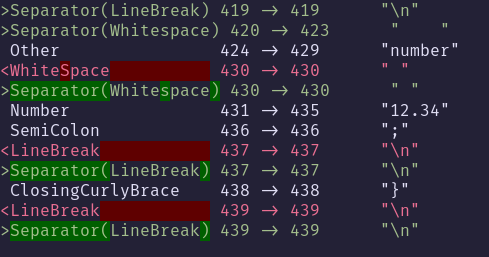
But as soon as I switch to my bright scheme, I can no longer make out the text in the highlighted sections:

(This is the Dayfox theme for Kitty)
It seems rust-pretty-assertions hard-codes the highlighted background colors, which I confirmed by setting every color in my terminal to red:
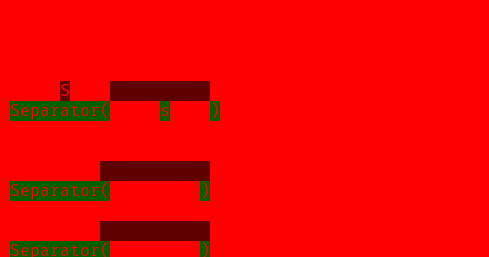
Would it perhaps be a better idea to use only ANSI color codes, so this can be controlled with the terminal's color scheme?
Is there anything I can do in the short term to keep rust-pretty-assertions usable during daytime? :smile:

Hi @Hubro, thanks for your report!
pretty_assertions already uses ANSI codes, via the yansi library internally. However, I see that the background sections are highlighted with Fixed, which as you point out is a fixed color.
The color output was originally modelled after the output of the diff-highlight utility that ships with git as a sane default - this also uses fixed color codes I believe (though I could be wrong).
I'm basically open to switching to non-fixed colors, if you can propose a format that works well for your case and for existing users? I see diffr has a slightly different output which might work.
If you could propose a PR with updated styling, I'm happy to review
