

 cogentcore
last line in label example program covered by horizontal scrollbar; vertical scrollbar missing
The label example program, when run in a window of size 608x746, a horizontal scrollbar is added as the text requires more than 608 pixels in width to be displayed. However, no vertical scrollbar is added as 746 pixels is enough to display all text vertically. However, after rendering the horizontal scrollbar, the last line (containing the text "this is after final stretch") is covered by the horizontal scrollbar. Since no vertical scrollbar is rendered, the last line cannot be displayed to the user. See attached screenshot below.
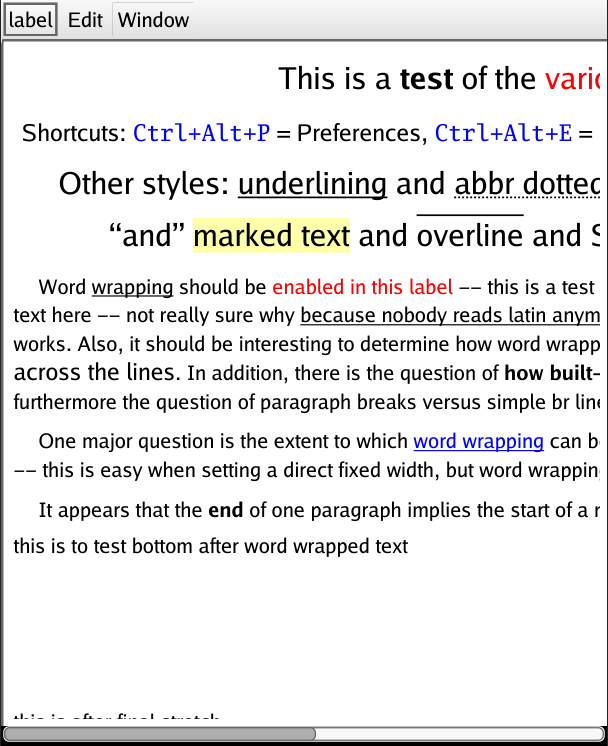
Edit: while not related to this specific issue, another issue with the label example program is that the [ctrl] + [alt] + e keyboard shortcut does not seem to open the Editor, as mentioned in the text. [ctrl] + [alt] + p works as expected, as does [ctrl] + [+/-].
Edit2: Not, pressing [ctrl] + [shift] + I does open the Editor. So the shortcut is working. The description text just needs to be updated.

Yeah this is a tricky issue for the automatic layout logic. Not sure how address without breaking other stuff -- there is definitely a tradeoff between having the layout try to do everything for you automatically, vs. being able to do something manual in this kind of case. note that it could be fixed by adding a blank line at end of last line, in this instance, which is "good enough" in my book for this, especially given that the scrollbars generally work pretty well across a wide range of cases.
someday could experiment with various iterative algorithms to update actual internal allocation after inserting scrollbars -- that can lead to catch-22 kinds of recursive layout issues, but there might be some reasonable solutions. had this issue on Qt too..

note that it could be fixed by adding a blank line at end of last line
Indeed, that would fix this specific example application. I created the issue mostly to track the more general issue, as it could occur for any GUI application. As such, it's probably better to leave this issue open until someone is brave enough to try and solve the Catch 22 you mentioned :)
This is all working for general layouts. TableView has its own specific scrollbar issues but that is a separate case.