
TabNine
 TabNine copied to clipboard
 codota
Block Certain Suggestions
please complete the following information:
- OS version: Mac Catalina
- Editor: Vscode
- Editor version:
Commit: 3a6960b964327f0e3882ce18fcebd07ed191b316
Date: 2021-11-11T20:59:05.913Z
Electron: 13.5.2
Chrome: 91.0.4472.164
Node.js: 14.16.0
V8: 9.1.269.39-electron.0
OS: Darwin x64 21.1.0
- Programming language: python
- TabNine extension version:
- 3.5.0
- Engine version (could be located within Tabnine Hub): 4.0.4-45
Issue Details:
Tanbine keeps throwing me a suggestion \n",", how do I disable this suggestion from happening?


gz#8781

Hi @xingfanxia
This indeed looks not right, since Tabnine shouldn't suggest \n at all.
When did it start happening to you? Are you working on a single file / very small project / unnamed file by any chance?
In addition, please provide the following info to help us understand what's going on:
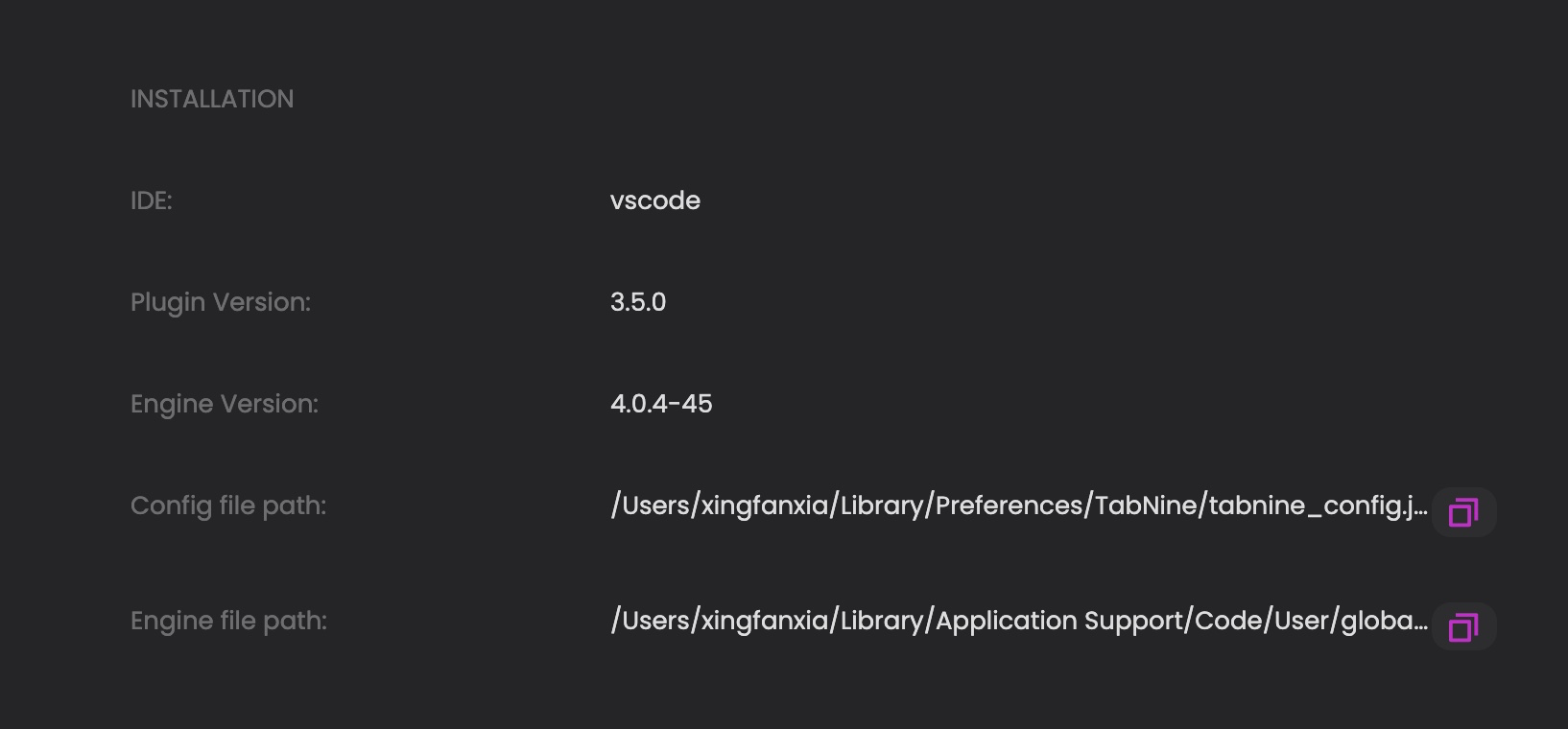
- a screenshot of your "installation info" section from the Hub
- Your config file - the path of which can be found in the Hub->installation info->config file path
Regards, Yoni

  "version": "3.9.2",
  "hide_promotional_message": false,
  "beta_enabled": "No",
  "ignore_all_lsp": false,
  "creation_time": "2021-11-13T01:18:52.936900Z",
  "guuid": "f67aba05ab9f4270ca90947cf66c4d2aa2e8764d2ecc4e8a0a4b0562efcbfaac",
  "semantic_status": {},
  "enable_telemetry": true,
  "user_understands_that_enabling_tabnine_cloud_sends_code_to_tabnine_servers": true,
  "hosted_deep_completions_enabled": "Enabled",
  "tabnine_cloud_host": null,
  "tabnine_cloud_certificate_domain": null,
  "tabnine_cloud_port": null,
  "cloud_whitelist": [],
  "num_of_suggestions": 2,
  "line_suggestions": false,
  "omit_prefix_suggestions": false,
  "team_ai_local_collection": true,
  "api_key": null,
  "api_base_url": null,
  "binary_update_interval_seconds": null,
  "local_enabled": "Yes",
  "disable_local_when_using_battery": false,
  "hide_deep_information_message": false,
  "enable_power_saving_mode": false,
  "rate_limit_interval_seconds": null,
  "rate_limit_amount": null,
  "generation": 45,
  "local_model_size": "Medium",
  "model_hash_override": null,
  "local_indexing": null,
  "heartbeat_interval_seconds": null,
  "last_service_level": {
    "TrialUntil": 365
  },
  "override_beams": null,
  "override_context_length": null,
  "onboarding": {
    "model_type": null,
    "skipped_login": false,
    "completed": false
  },
  "has_git_repos": true,
  "gusr": {
    "dgc": "f67aba05ab9f4270ca90947cf66c4d2aa2e8764d2ecc4e8a0a4b0562efcbfaac"
  },
  "exclude_file_masks": null,
  "inline_suggestions_mode": false,
  "use_specialized_model_if_available": true,
  "snippets_auto_trigger_enabled": false,
  "empty_line_suggestions": false
}```
@xingfanxia Thank you
Looking at the screenshot, it seems like you don't run any deep model at all, since you're missing "active local model" and "local model directory" properties - This can explain the garbage suggestions.
I also see that you have "Deep Completions - Cloud" enabled and yet it doesn't seem like you're getting nice results.
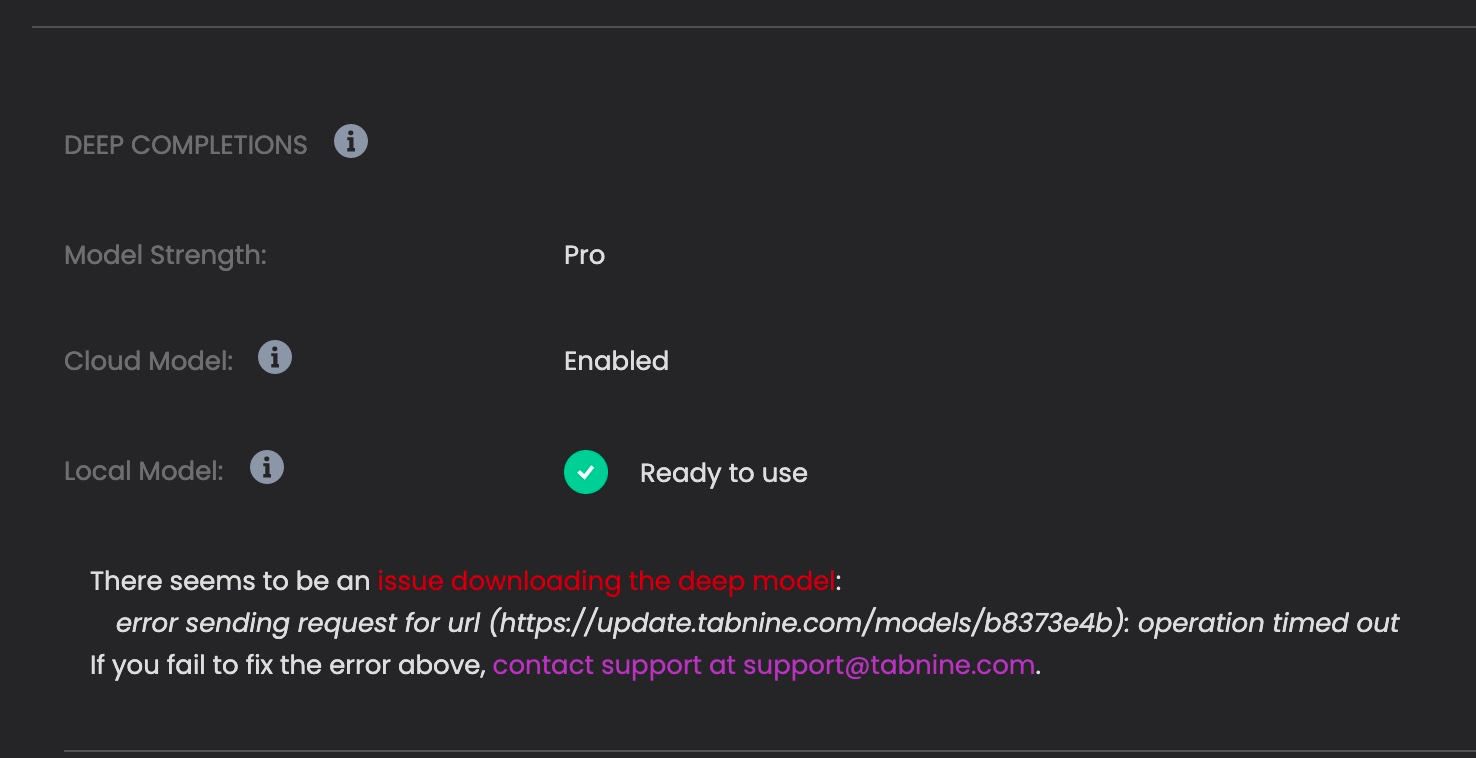
This leads me to suspect some internet issues - maybe you're behind some proxy / firewall / vpn / anything like that? Did you see any message in the Hub stating that it failed to download the model?
Attached below is my own installation info, to let you know how it should look like when you have a local model running:
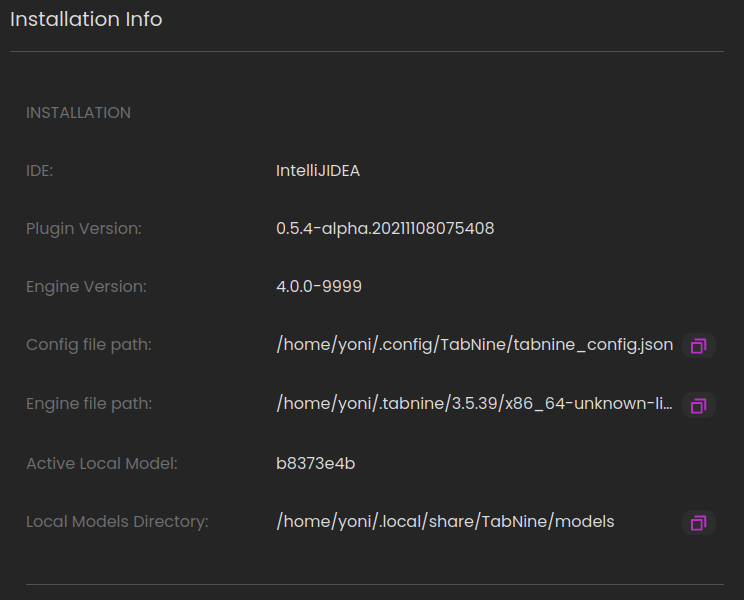
Kind regards, Yoni
@yonip23 yeah i saw, model download timeout for some reason
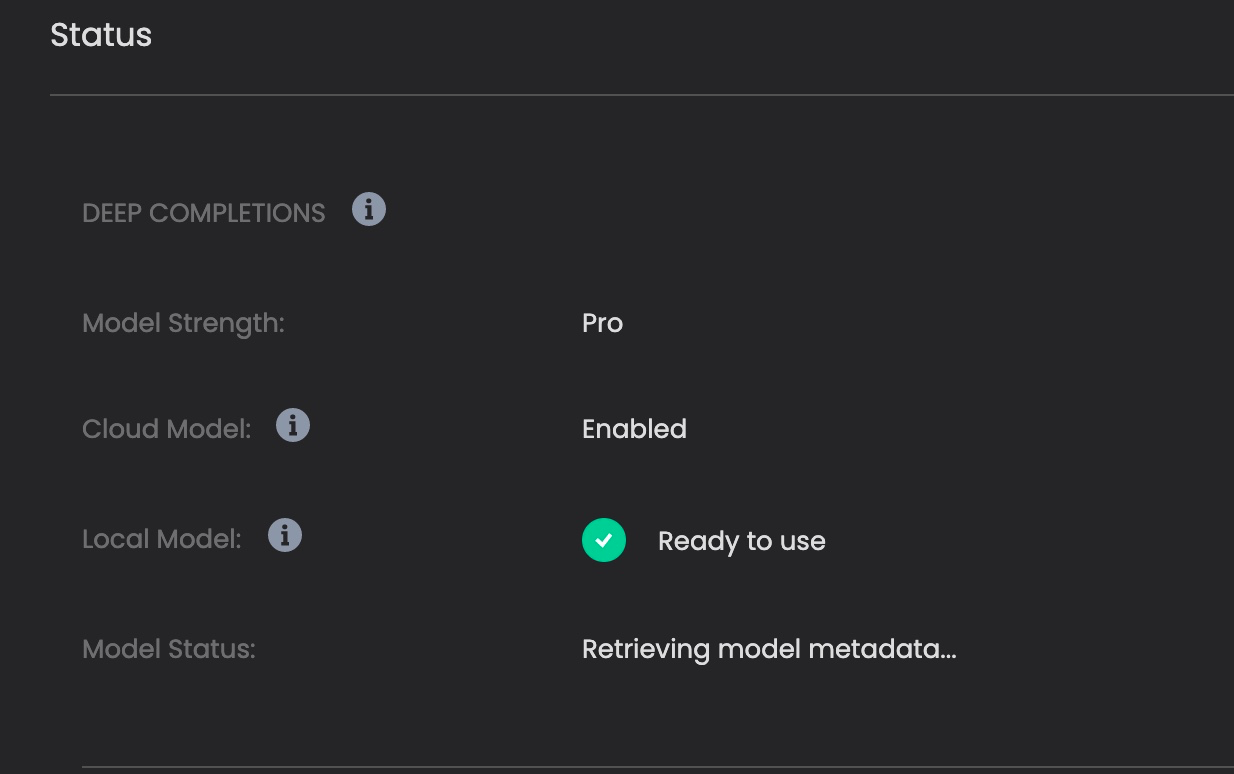
 Also this happens in a jupyter notebook, might explain the \n
@xingfanxia sure, lets try to download the model manually:
- Download the model from here: https://update.tabnine.com/models/b8373e4b
- Add a
.tabninemodelextension to the downloaded file and place the file in the following path:/Users/{UserName}/Library/Application Support/TabNine/models/. To verify, runls -la/Users/{UserName}/Library/Application Support/TabNine/models/b8373e4b.tabninemodel` in your terminal, you should get something like:
-rw-rw-r-- 1 yoni yoni 717764608 Aug 11 09:37 /home/yoni/.local/share/TabNine/models/b8373e4b.tabninemodel
(note that im using linux so the path is different) Then restart your IDE.
Let us know how did that go for you Kind regards, Yoni
@yonip23 Thank you! seems a problem downloading the file from my local machine. but can download with a remote machine.
╰─❯ wget https://update.tabnine.com/models/b8373e4b
--2021-11-17 22:37:51-- https://update.tabnine.com/models/b8373e4b
Resolving update.tabnine.com (update.tabnine.com)... 13.226.230.122, 13.226.230.115, 13.226.230.29, ...
Connecting to update.tabnine.com (update.tabnine.com)|13.226.230.122|:443... connected.
HTTP request sent, awaiting response... 301 Moved Permanently
Location: http://models.tabnine.com/models/b8373e4b [following]
--2021-11-17 22:37:51-- http://models.tabnine.com/models/b8373e4b
Resolving models.tabnine.com (models.tabnine.com)... 13.226.230.43, 13.226.230.127, 13.226.230.80, ...
Connecting to models.tabnine.com (models.tabnine.com)|13.226.230.43|:80... ^C```
local download stuck at here^^
I have the deep model now, let me see if there're any more weird suggestions

@xingfanxia Glad to hear you managed to get the model! You accidentally put the image link inside the code block so I can't see it, but anyway let us know if things are working vetter now.
Kind regards, Yoni
 Here're my configs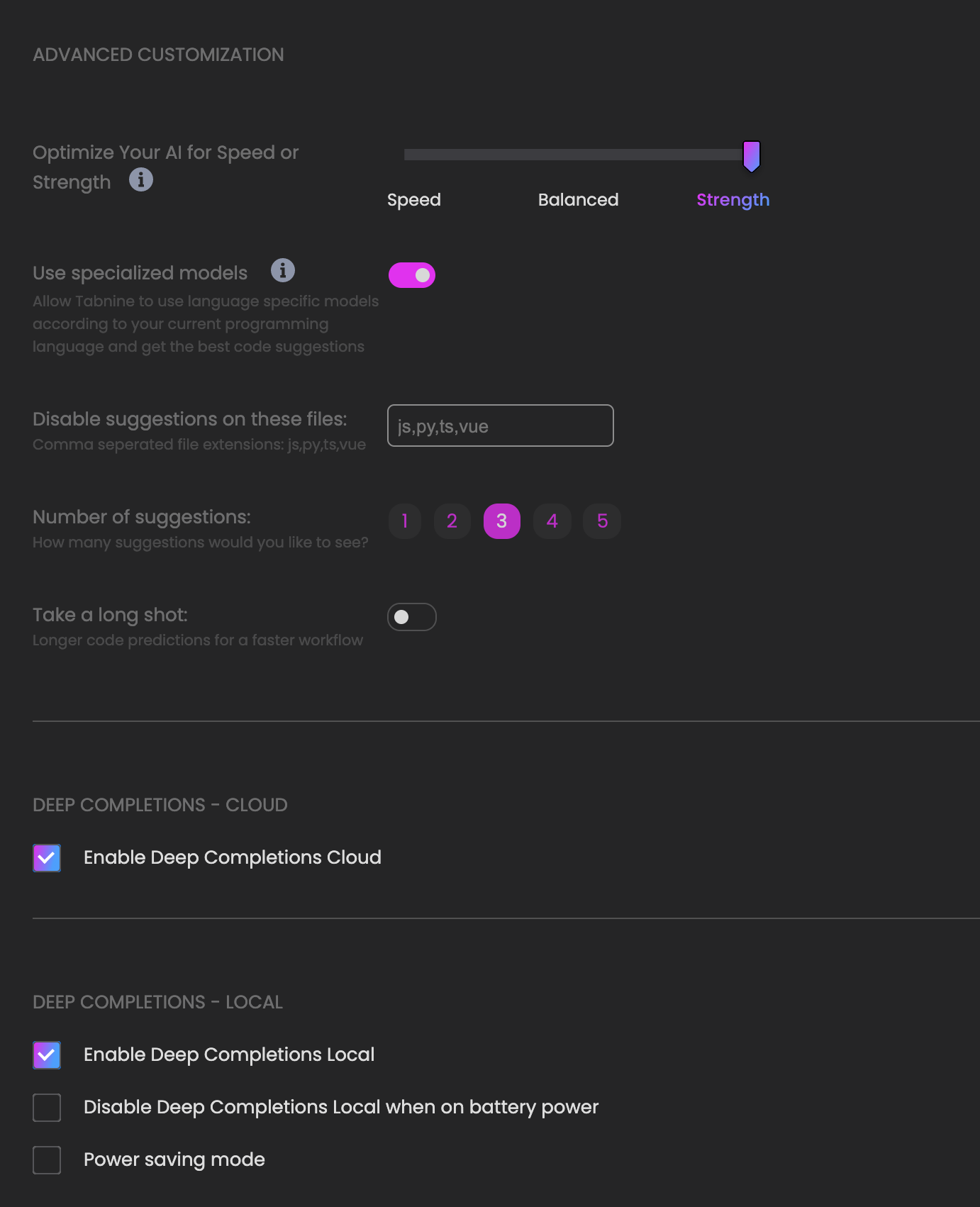
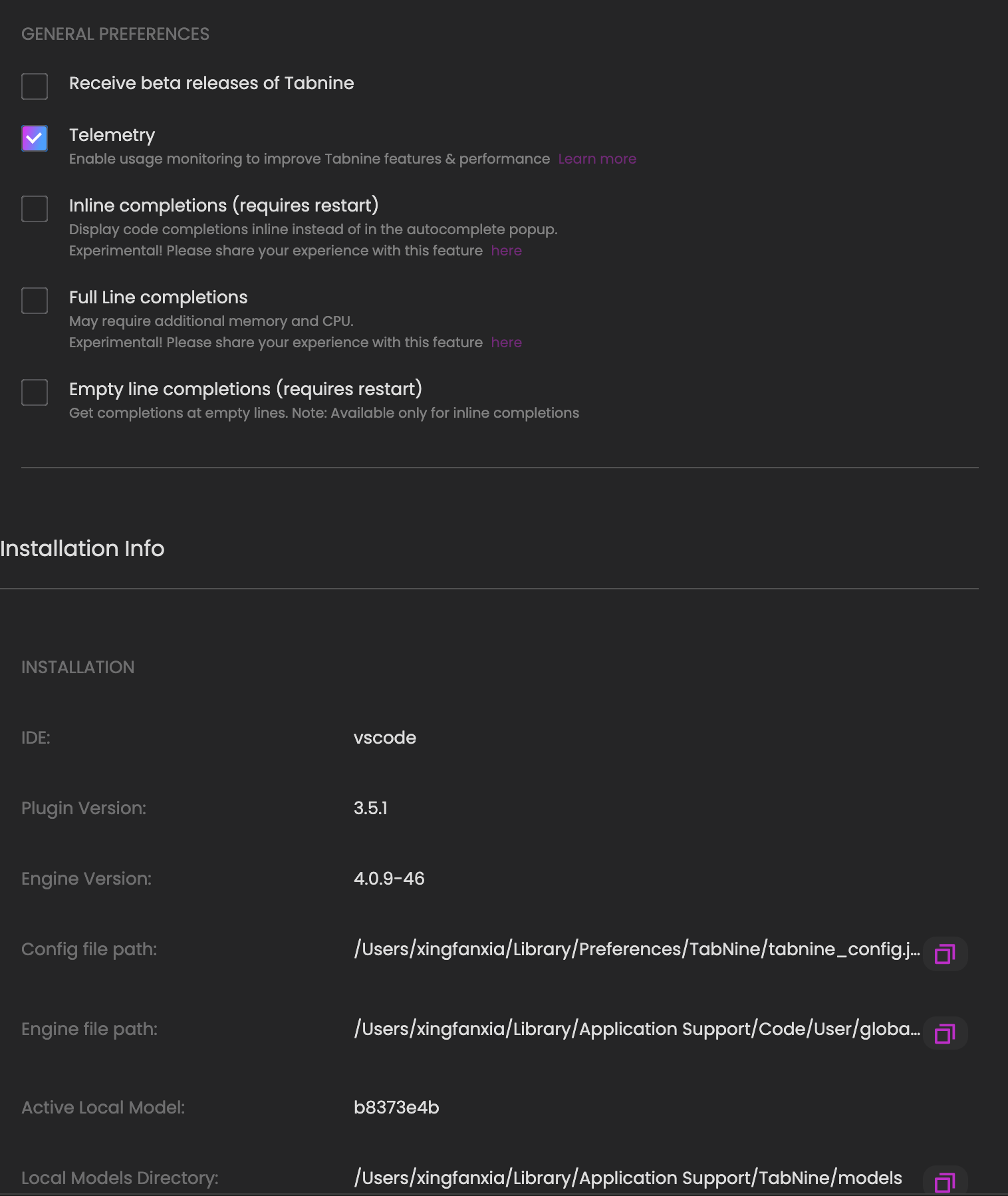

@xingfanxia it still doesn't look like tabnine's deep suggestions, and on top of that tabnine should never suggest \ns like that.
I will try to reproduce these suggestions locally based on the screenshots - if you want to attach here some code examples that would help a lot too! It needs to be from the beginning of the file up until the point where you get the bad result
In the meanwhile, I would like to take a look at your tabnine logs - to set them, open vscode's settings and search "log file path", fill in the path to wherever you want and restart your IDE.

Please wait for a bad suggestion to appear and then attach here the logs from the given location.
Thank you and best regards, Yoni
@yonip23 I think it is a problem with jupyter notebooks, it's counting the source code of jupyter notebook instead of just python cells; you could try any jupyter notebook and start typing some functions. I added a path and started coding for 10 min, restart vscode, log file still empty
╭─ ~ ··················································································· 02:51:11
╰─❯ cat /home/xingfanxia/tabninelogs/logs.log
cat: /home/xingfanxia/tabninelogs/logs.log: No such file or directory```
@xingfanxia i will try to reproduce it locally with jupyter notebooks again, tried with regular .py file and didn't get these bad suggestions - thanks for the info!
regarding the logs - they're rolling files so we add CURRENT to the latest log file, try ls /home/xingfanxia/tabninelogs
@yonip23 yeah regular py file works for me just fine as well.
ls: /home/xingfanxia/tabninelogs: No such file or directory nothing yet :(
@xingfanxia it should have created the directory if not exists, but could you try creating it manually and give it another try?
if that doesn't work, i'd appreciate it if you could run the engine from the terminal and attach here the output:
- The path to the binary is in the Hub->Installtion Info->Engine file path
- Run it like so:
<path from the hub> --log_to_stderr --log-level INFO --no_bootstrap --log_file_path=<you path>
Please wait a few seconds (like 5) before terimnating the process and sending the output.
I appreciate your cooperation, thanks a lot! Yoni
Also, could you share here exactly what is your setup?
- which plugin are you using to run notebooks on vscode (and which version)
- the notebook itself where you get the bad suggestion (only if you feel comfortable doing that of course)
- are you working on a single file or is it within a project? if you could share your
treeon this location as well that'd be great
thanks
@yonip23 no log file is created
╰─❯ /Users/xingfanxia/Library/Application\ Support/Code/User/globalStorage/tabnine.tabnine-vscode/binaries/4.0.12/aarch64-apple-darwin/TabNine --log_to_stderr --log-level INFO --no_bootstrap --log-file-path=~/Downloads/tabnine.log
[2021-11-30:23:54:06 TabNine INFO] token path: /Users/xingfanxia/Library/Preferences/TabNine/tabnine.token
[2021-11-30:23:54:06 TabNine INFO] token path: /Users/xingfanxia/Library/Preferences/TabNine/tabnine.refresh_token
[2021-11-30:23:54:06 TabNine INFO] /Users/xingfanxia/Library/Application Support/Code/User/globalStorage/tabnine.tabnine-vscode/binaries/4.0.12/aarch64-apple-darwin/TabNine --log_to_stderr --log-level INFO --no_bootstrap --log-file-path=~/Downloads/tabnine.log
[2021-11-30:23:54:06 TabNine INFO] Loading user...
[2021-11-30:23:54:06 TabNine WARN] Could not load user from cache, Falling back to authentication against Tabnine's services. error: User cache expired
[2021-11-30:23:54:06 TabNine INFO] Initializing watchdog client...
[2021-11-30:23:54:06 TabNine INFO] No private model found
[2021-11-30:23:54:06 TabNine INFO] current private model is None
[2021-11-30:23:54:06 TabNine INFO] using initial model Model {
    model_hash_override: None,
    model_size: Medium,
    base_url: "https://update.tabnine.com",
}
[2021-11-30:23:54:06 TabNine INFO] starting default model pre-loader DownloadSettings {
    api_key: None,
    meta_data_base_url: "https://api.tabnine.com",
    model: Model {
        model_hash_override: None,
        model_size: Medium,
        base_url: "https://update.tabnine.com",
    },
}
[2021-11-30:23:54:06 TabNine INFO] lunar settings update thread started (Local(Public) default local)
[2021-11-30:23:54:06 TabNine INFO] Starting private model update thread
[2021-11-30:23:54:06 TabNine INFO] active private model is None
[2021-11-30:23:54:06 TabNine INFO] Checking if private model changed
[2021-11-30:23:54:06 TabNine INFO] removing private models from cache
[2021-11-30:23:54:06 TabNine ERROR] Failed to remove private models from cache: No such file or directory (os error 2)
[2021-11-30:23:54:06 TabNine INFO] project model override feature is disabled
[2021-11-30:23:54:06 TabNine INFO] private model is same
[2021-11-30:23:54:06 TabNine INFO] sleeping for 3600s
[2021-11-30:23:54:06 TabNine INFO] Started.
[2021-11-30:23:54:06 TabNine INFO] lunar settings update thread started (Remote cloud)
[2021-11-30:23:54:06 TabNine INFO] Checking if private model changed
[2021-11-30:23:54:06 TabNine INFO] removing private models from cache
[2021-11-30:23:54:06 TabNine ERROR] Failed to remove private models from cache: No such file or directory (os error 2)
[2021-11-30:23:54:06 TabNine INFO] private model is same
[2021-11-30:23:54:06 TabNine INFO] sleeping for 3600s
[2021-11-30:23:54:06 TabNine INFO] running command "/Users/xingfanxia/Library/Application Support/Code/User/globalStorage/tabnine.tabnine-vscode/binaries/4.0.12/aarch64-apple-darwin/TabNine-deep-local" "--settings" "/Users/xingfanxia/Library/Preferences/TabNine/local.settingsMedium" "--settings-version" "1" "--log-file-path" "~/Downloads/tabnine.log" "--log-level" "INFO" "--log_to_stderr"
[2021-11-30:23:54:06 TabNine-deep-local INFO] token path: /Users/xingfanxia/Library/Preferences/TabNine/tabnine.token
[2021-11-30:23:54:06 TabNine-deep-local INFO] token path: /Users/xingfanxia/Library/Preferences/TabNine/tabnine.refresh_token
[2021-11-30:23:54:06 TabNine-deep-local INFO] parsed settings are Some(Settings { cpu_model: CpuModelSettings { rate_limit_interval_seconds: None, rate_limit_amount: None, enable_power_saving_mode: false }, download: DownloadSettings { api_key: None, meta_data_base_url: "https://api.tabnine.com", model: Model { model_hash_override: None, model_size: Medium, base_url: "https://update.tabnine.com" } }, tune: TuneSettings { enable_power_saving_mode: false, override_beams: None, override_context_length: None }, run: RunSettings { is_enabled: true, omit_prefix_suggestions: false, line_suggestions: false } })
[2021-11-30:23:54:06 TabNine-deep-local INFO] local_lock_path "/Users/xingfanxia/Library/Preferences/TabNine/4.0.12/TabNine-deep-local.lockMedium"
[2021-11-30:23:54:06 TabNine-deep-local INFO] TabNine-deep-local is already running, responding with existing port
[2021-11-30:23:54:06 TabNine INFO] TabNine-deep-local exited with status exit status: 0
[2021-11-30:23:54:06 TabNine INFO] setting default model analytics
[2021-11-30:23:54:06 TabNine INFO] Initialized team ai database successfully at: /Users/xingfanxia/Library/Application Support/TabNine/team_learning/data_dir/sdb
[2021-11-30:23:54:06 TabNine INFO] Initialized team ai learning successfully
[2021-11-30:23:54:06 TabNine INFO] Cleaned 0 old data rows from team ai local database.
[2021-11-30:23:54:06 TabNine INFO] Cleaned 0 old metadata rows from team ai local database.
[2021-11-30:23:54:06 TabNine INFO] User changed. Refreshing capabilities
[2021-11-30:23:54:06 TabNine INFO] Refreshing capabilities
[2021-11-30:23:54:06 TabNine INFO] Storing user in cache
[2021-11-30:23:54:06 TabNine INFO] User token validation succeeded
[2021-11-30:23:54:07 TabNine INFO] Checking if private model changed
[2021-11-30:23:54:07 TabNine INFO] removing private models from cache
[2021-11-30:23:54:07 TabNine ERROR] Failed to remove private models from cache: No such file or directory (os error 2)
[2021-11-30:23:54:07 TabNine INFO] private model is same
[2021-11-30:23:54:07 TabNine INFO] sleeping for 3600s```
@yonip23 microsoft official jupyter plugin https://marketplace.visualstudio.com/items?itemName=ms-toolsai.jupyter
working in a project containing multiple jupyter notebooks This thing Im working on is kinda private, I will try to make an example file
This issue has been automatically marked as stale because it has not had recent activity. It will be closed if no further activity occurs. Thank you for your contributions.
![stale[bot] avatar](https://avatars.githubusercontent.com/in/1724?v=4 "Published by a pub.dev verified publisher")