

 codota
full cpu use
please complete the following information:
- OS version: [Win 10] IDE: IntelliJIDEA Plugin Version: 0.4.7 Engine Version: 3.5.49-40
- Programming language:java
- TabNine extension version:
- Engine version (could be located within Tabnine Hub):
Issue Details: I use tabnine in Intranet,and everyone need to use proxy to access internet, and the proxy may return warning page when some website block. I open the intellij, and I see many tabnine.exe and use 100% cpu, and i cannot open tabnine by click the right bottom button in intellij. when i use normal internet,everything is ok, and it only appear in work office
gz#5378

same situation, i am working in the internal network too. maybe make tab-nine use idea's HTTP proxy settings to connect the internet is a way to fix this problem. 我就不信没人发现这个问题?一个月之前就是这样了。

Hi! When you experience that extensive memory usage, do you have the deep completions cloud or the local enabled? On Tabnine Hub, you can set and see what model is enabled.
Also, can you update the plugin version to 0.4.9? We just released it.

Hi! When you experience that extensive memory usage, do you have the deep completions cloud or the local enabled? On Tabnine Hub, you can set and see what model is enabled.
Also, can you update the plugin version to 0.4.9? We just released it.
well, I have taken your advice and updated my plugin to the latest version(0.4.9) in my idea(2021.2.2). however, it's not working. Tabnine opened many processes, each of which used 89.3M of memory and 0 CPU, and all I did was install tabnine and opened my IDEA. As for the tabnine settings, I have no way to open the tabnine settings from IDEA. I clicked the button but nothing happened, except for more and more tabnine processes. It seems that the current situation is exactly the same as before so far.

I just installed the extension for vs code aa couple of days ago, and I have noticed that randomly the CPU and RAM usage sky rocket.
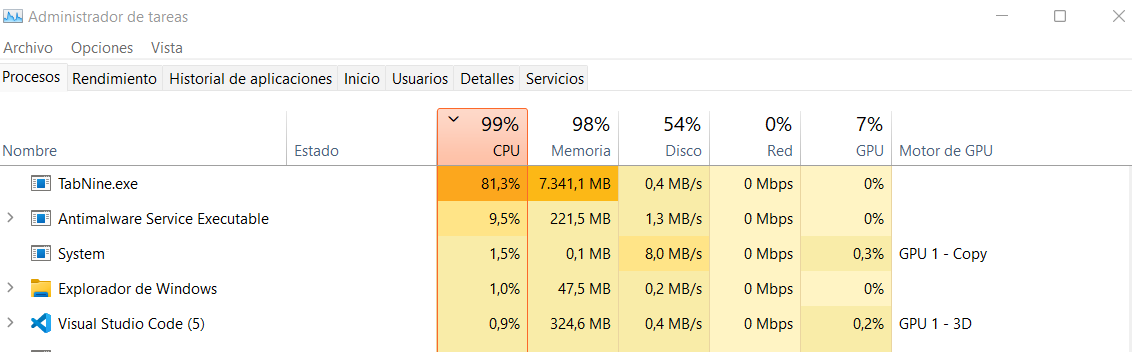
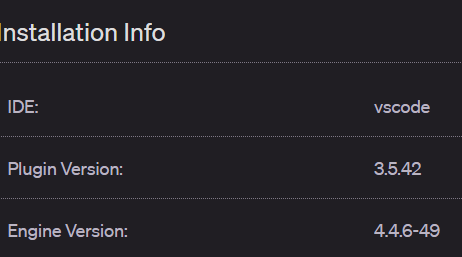
I am using windows 11.

This issue has been automatically marked as stale because it has not had recent activity. It will be closed if no further activity occurs. Thank you for your contributions.
![stale[bot] avatar](https://avatars.githubusercontent.com/in/1724?v=4 "Published by a pub.dev verified publisher")