

 codota
Tabnine settings page stuck at "Initializing..." on work machine, autocomplete not working
- OS version: Win 10
- Editor: vscode
- Editor version: 1.52.1
- Programming language: any language
- TabNine extension version: v3.2.63-35
Issue Details: I'm trying to use Tabnine on my work machine after trying it out on my personal machine. I installed the extension on VSCode from the extension marketplace and restarted VSCode to finish the installation. I tried using it on a sample file stored on the machine, but I didn't receive any autosuggestions from Tabnine. I opened the Tabnine settings page, and on the top-left page, it said "Initializing..." instead of "Ready to use" like I saw when I used it on my personal machine.
You can find the log files below:


I'm having same issue when trying to run it remotely on vscode. Locally it runs fine, but when I open a remote session it gets sucked on "Initializing". Tried several times uninstalling extension/removing all extension files/ installing again. I can't even open tabnine settings since it doesn't even start

I am having the same issue, It's a great autocompletion AI but only when it fully works. Please DEVS I know you have created a great product. Just this one issue sticks for a long time. Please try and fix it.

 it's starting for hours
Having the same issue on mac os Big Sur. its really annoying because its blocking the terminal.

Maybe this problem caused by the conflict between Vetur3.0 and Eslint. Reinstall the previous version of Tabnine may solve the initialization problem (cuz I solved through this way :) ).

I'm having the same issue. Tabnine is stuck at initializing. It previously worked, I could log in and use it, but after rebooting it got stuck again.
VSCode: 1.58.2 TabNine: 3.4.17 macOS Big Sur: 11.4
Was someone able to fix this? I've already created exceptions for all firewalls and reinstalled everything a couple of times. This is really annoying.

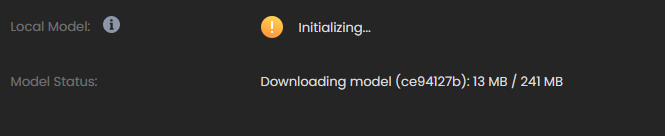 It's very large so it can happen
As you can see it's of 241 mb
It's very large so it can happen
As you can see it's of 241 mb
I updated to the latest version 3.4.22 of the VSCode Tabnine extension and the issue seems to be gone.
I had the same problem. I got mine working by deleting the extension, restarting VS Code, then downloading the extension again.


Guys, when I recently downloaded tabnine, it was not working, but then I closed and restarted vscode, this problem here is gone.


I am also receiving this issue. VSCode, VSCode Insider, all the same. I've downloaded everything, but still nothing useful.


Just to corroborate the topic, the exact same thing happens to me, even if I open 2 different VSCode windows it sometimes just finishes initializing the window that is in the foreground, the other one keeps showing the initializing alert.
But the normal thing is to be initializing both eternally.

I'm not sure that my problem is the same as yours. But my tabnine on remote machine even didn't initialize at all. The binary didn't exist in the file location where it should be.

This issue has been automatically marked as stale because it has not had recent activity. It will be closed if no further activity occurs. Thank you for your contributions.
![stale[bot] avatar](https://avatars.githubusercontent.com/in/1724?v=4 "Published by a pub.dev verified publisher")

I have this issue. On the Tabnine output this is the loop its stuck on
7:26:27 GMT+0200 (Eastern European Standard Time) [DEBUG]: Updating root paths for project Cloudon (Workspace): ["c:\Users\nikon\AppData\Local\Packages\PythonSoftwareFoundation.Python.3.12_qbz5n2kfra8p0\LocalCache\local-packages\Python312\site-packages\urllib3\edapy","d:\Cloudon\fAnazitisi"]
