

 codesandbox
Custom terminal shows, double characters while typing
🐛 bug report
Preflight Checklist
- [x ] I have read the Contributing Guidelines for this project.
- [ x] I agree to follow the Code of Conduct that this project adheres to.
- [ x] I have searched the issue tracker for an issue that matches the one I want to file, without success.
Description of the problem
I was doing folk and trying to use nest command on custom console,
But the console character repeats twice
sandbox@sse-sandbox-h1wmrj:/sandbox$ sandbox@sse-sandbox-h1wmrj: /sandbox$ nneesstt gg mmoo uusseerr
How has this issue affected you? What are you trying to accomplish?
gives incorrect command while typing on the terminal,
To Reproduce
Link to sandbox: link
Your Environment
| Software | Name/Version |
|---|---|
| Сodesandbox | Current production |
| Browser | Chrome/99.0.4844.51 |
| Operating System | M1 Monterey |

@Guiwoo - I'm afraid I don't quite understand what's happening here - nothing from CodeSandbox should be causing double inputs from peripherals.
Could you give us some reproduction steps please?

I forked one project, I open a new terminal which I can use nest command each character is displayed twice (but it works as single character) expected behavior: text should be exact same as we type
It works fine now, but I've had the same problem last week . I'm not sure what happened that time(did not get any error logs),
I did refreshing the browser and server, it didn't work at that time but a couple of minutes later it worked
- It ain't kinda happened only for me https://github.com/codesandbox/codesandbox-client/issues/4360
Thanks for the update @Guiwoo - Unfortunately without being able to replicate this consistently we wouldn't be able to do more to resolve this at the moment.
I have this issue, too. Just wanted to report in case it's helpful. This happens when I type npm:
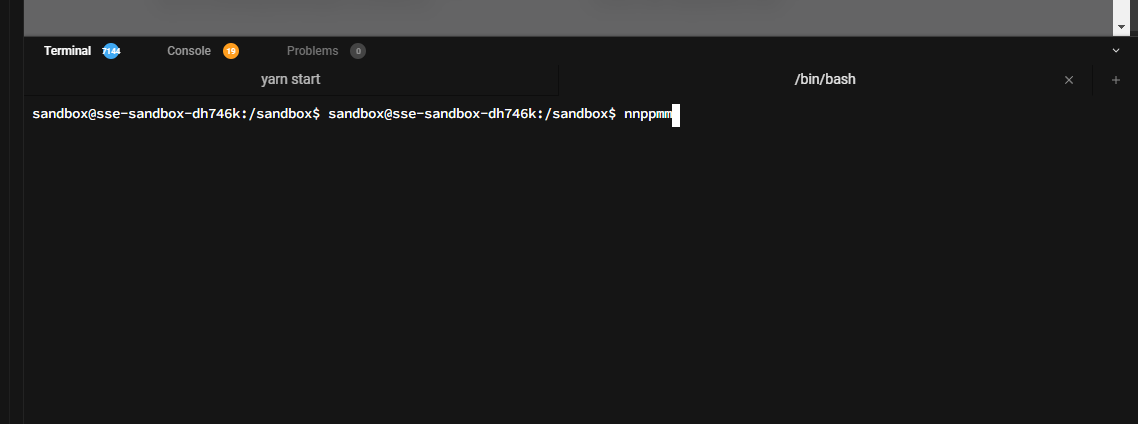
What I did was fork gatsby-starter-default (https://codesandbox.io/s/github/gatsbyjs/gatsby-starter-default) and then open a new terminal tab. I did not make any changes to the project yet. When I press backspace, both written characters are deleted and it happens for any character I type, be it a letter, number or any other character like --.
When I copy paste something, weird things are happening, too. I pasted
npm i @chakra-ui/gatsby-plugin @chakra-ui/react @emotion/react @emotion/styled framer-motion
... into the terminal, the result was
npm i @chakra-ui/gatsby-plugin @chakra-ui/react @emotion/react @emotion/styled framer-motion i @chakra-ui/gatsby-plugin @chakra-ui/react @emotion/react @emotion/styled framer-motion.
My environment:
- Windows 10, 64 bit
- Google Chrome, Version 105.0.5195.127 (Official Build) (64-bit)
- Maybe relevant extensions: uBlock Origin
After a reload, it works again and I can't reproduce it anymore either, so it seems flaky. I switched to incognito mode and logged in, but for some reason, a new terminal tab will open, but not have any content and no typing registers. After reloading twice in incognito mode, the tab shows the CLI and typing works as expected there, too.
Not sure how and why it happens, but I thought it may be helpful to report that it is not just @Guiwoo that has this issue, although it seems flaky and disappears after reloading once or twice.


I noticed that codesandbox has several interfaces. And each one works differently. In my case, the issue is reproduced in the old interface, but it is working correctly in the modern interface:
