coder
coder
Hostname changes occasionally
When I'm connected, my hostname looks like this:

However, occasionally it regresses to match the SSH config:

Note CODER: -> SSH: and mafredri/hel -> whatever that is. 😄
A simple way to reproduce:
- Connect to workspace
- Restart workspace (stop / start), don't touch VSCode (it will show an error)
- Once workspace is up and running again, dismiss the error in VS Code and let it reconnect
- Observe hostname change

@mafredri has this happened with newer versions? I feel as though this was due to the extension not starting properly.

@kylecarbs I can still reproduce it using the above steps.
I've also noticed something very odd. My workspace using the extension is named mafredri/hel (when it's not coder-vscode--*). However, I also use workspaces without the extension using plain Remote SSH. And sometimes these are named mafredri/hel too (supposed to be coder.work.main)! So it seems like maybe what our extension does somehow affects other hosts too.
I do also notice this issue. Occasionally, I also get the hostname starting with coder-vscode.
I've also noticed something very odd. My workspace using the extension is named
mafredri/hel(when it's notcoder-vscode--*). However, I also use workspaces without the extension using plain Remote SSH. And sometimes these are namedmafredri/heltoo (supposed to becoder.work.main)! So it seems like maybe what our extension does somehow affects other hosts too.
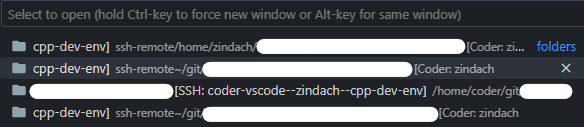
In the screenshot below, the first entry is actually pointing to a different SSH connection for an Ubuntu server (only noticable by looking at the path: /home/zindach instead of /home/coder/git). When I click on it, it also opens the "non-coder" SSH connection to my server correctly. Just the name is wrong...
Additionally, the "normal" hostname seems to break the "Open Recent" window because of the / after Coder: <username>.