

 coder
coder
[Bug]: Wrong Redirect/Landing Page in combination with Authentik for SSO authentication
Is there an existing issue for this?
- [X] I have searched the existing issues
OS/Web Information
- Web Browser: Tested with Firefox 102.0.1 and Google Chrome 103.0.5060.114
- Local OS: Arch Linux
- Remote OS: Debian GNU/Linux 10 (buster) (LXC Container)
- Remote Architecture: AMD64
-
code-server --version: 4.4.0 b088ec7adf9e17bc75215f79e21498eb40da03ed with Code 1.66.2
Steps to Reproduce
- Install code-server
- (Optional?) Disable Password authentication in code-server
- Setup Authentik (https://github.com/goauthentik/authentik)
- Setup an application + provider for code-server
- Assign the code-server application in Authentik to the Proxy outpost
- Configure Nginx to act as a reverse proxy for code-server and to use Authentik for authentication
- Navigate to your code-server instance in your browser
Expected
When you navigate to code.domain.tld you should get redirected to Authenik where you need to log in with your Authentik details. After that you should get redirected back to code.domain.tld.
Actual
When you navigate to https://code.domain.tld you get redirected to Authenik where you need to log in with your Authentik details. After that you get redirected back to https://code.domain.tld/_static/out/browser/serviceWorker.js. You then need to open https://code.domain.tld again and it all works fine. This is especially annoying if you also use the PWA (Google Chrome), where you then have to close and reopen the window.
Logs
No response
Screenshot/Video
No response
Does this issue happen in VS Code or GitHub Codespaces?
- [X] I cannot reproduce this in VS Code.
- [X] I cannot reproduce this in GitHub Codespaces.
Are you accessing code-server over HTTPS?
- [X] I am using HTTPS.
Notes
I do use the same configuration for other self hosted web services (rTorrent, Radarr, Sonarr, Lidarr, Prowlarr, PiHole), with only changes to the domain name. So I would assume that the Authenik configuration is correct. I have no clue if that issue is maybe on Authentiks side, that is possible too. Though it is weird that I end up on a site from code-server which actually exists. This makes me believe that this is a code-server issue?
If needed I can of course post my full nginx configurations.

hmm 🤔 Maybe we're using an absolute path for some auth logic where we should be using a relative path? i'm not sure. any ideas @code-asher ?

From the description it seems that Authentik is the one doing the redirection so I am not sure how code-server is affecting this.
Interesting that it redirects to the service worker. I think we will need to understand how Authentik decides where to redirect to debug this one.
The NGINX config might be of some use. I assume there is some Authentik config as well? If we can reproduce we might be able to narrow down the issue.

From the description it seems that Authentik is the one doing the redirection so I am not sure how code-server is affecting this.
Yeah I really am not sure if this is a code-server or Authentik issue. The reason why I suspect this might be on code-servers side is because I do end up on a URL where code-server does return something (the /_static/out/browser/serviceWorker.js) and because it does seem to be fine on my other domains. Though it could also be something that is misconfigured and the other domains that I proxy through Authentik are "too simple" for such an error to occur (other applications that I proxy are ruTorrent, and a few torrent-manager like sonarr, radarr, etc. I do not think that any of those sites even make the use of service workers or being a PWA. Maybe those aspects are relevant to Authentik for a reason that I can not imagine/understand :thinking: )
My nginx config is the following:
server {
    include ssl.conf;
    listen                  443 ssl http2;
    listen [::]:443 http2 ssl;
    server_name             code.domain.tld;

    proxy_buffers 8 16k;
    proxy_buffer_size 32k;

    location / {
        proxy_pass          http://CODESERVERADDRESS/;
        proxy_set_header Host $host;
        proxy_set_header Upgrade $http_upgrade;
        proxy_set_header Connection upgrade;
        proxy_set_header Accept-Encoding gzip;

        auth_request        /outpost.goauthentik.io/auth/nginx;
        error_page          401 = @goauthentik_proxy_signin;
        auth_request_set $auth_cookie $upstream_http_set_cookie;
        add_header Set-Cookie $auth_cookie;

        auth_request_set $authentik_username $upstream_http_x_authentik_username;
        auth_request_set $authentik_groups $upstream_http_x_authentik_groups;
        auth_request_set $authentik_email $upstream_http_x_authentik_email;
        auth_request_set $authentik_name $upstream_http_x_authentik_name;
        auth_request_set $authentik_uid $upstream_http_x_authentik_uid;

        proxy_set_header X-authentik-username $authentik_username;
        proxy_set_header X-authentik-groups $authentik_groups;
        proxy_set_header X-authentik-email $authentik_email;
        proxy_set_header X-authentik-name $authentik_name;
        proxy_set_header X-authentik-uid $authentik_uid;
    }

    location /outpost.goauthentik.io {
        proxy_pass          https://AUTHENTIKADDRESS/outpost.goauthentik.io;
        proxy_set_header    Host $host;
        proxy_set_header    X-Original-URL $scheme://$http_host$request_uri;
        add_header          Set-Cookie $auth_cookie;
        auth_request_set    $auth_cookie $upstream_http_set_cookie;
    }

    location @goauthentik_proxy_signin {
        internal;
        add_header Set-Cookie $auth_cookie;
        return 302 /outpost.goauthentik.io/start?rd=$request_uri;
    }
}
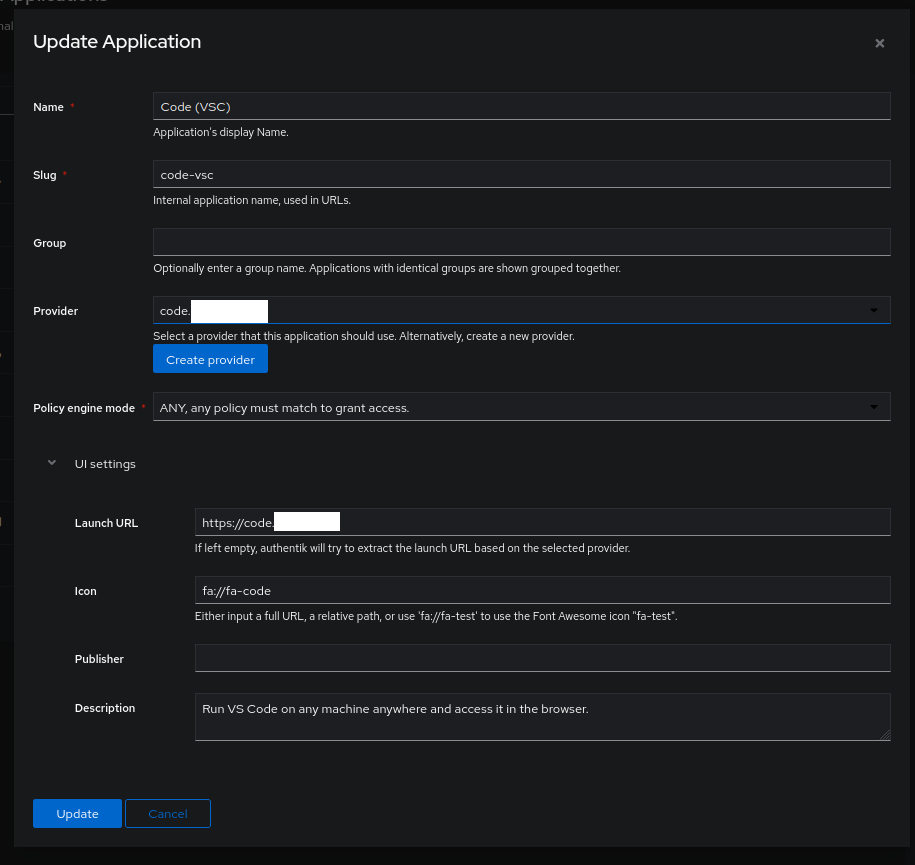
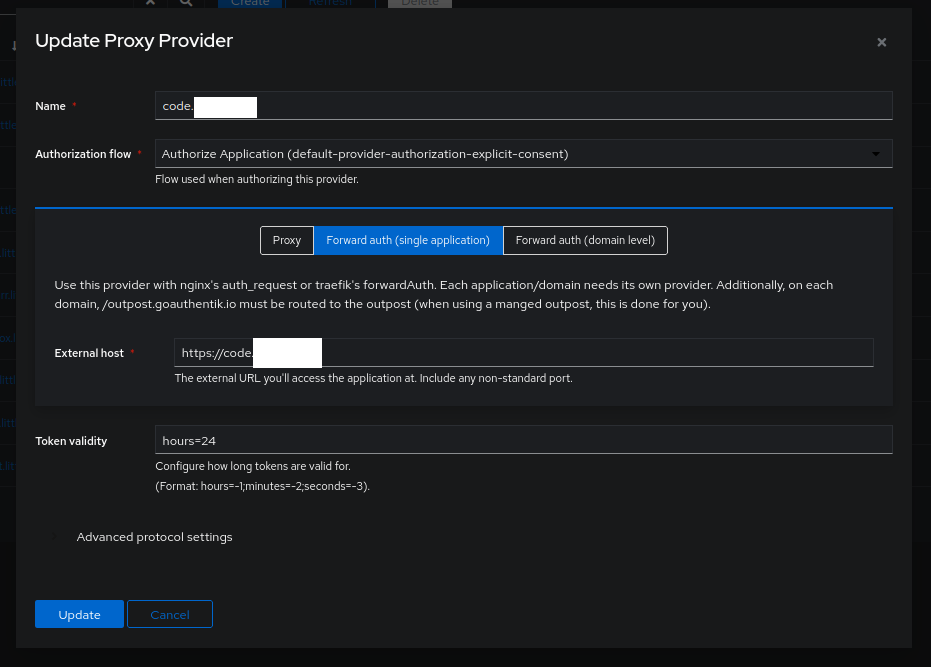
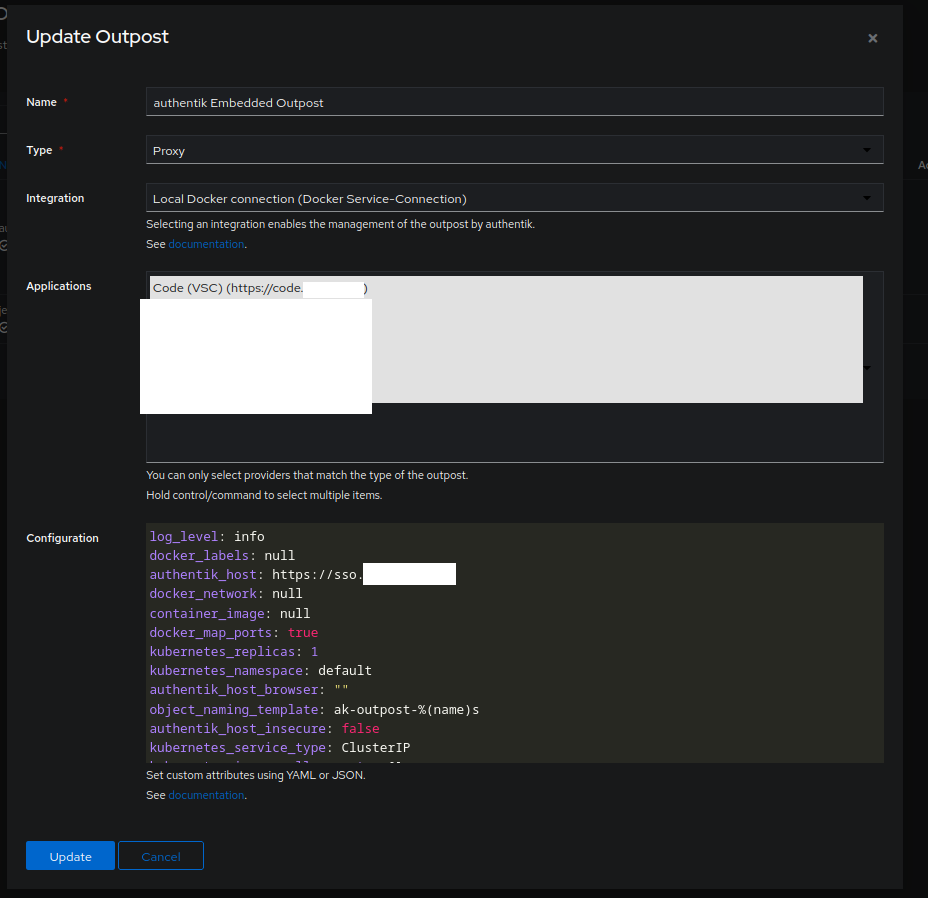
Authentik obviously also has a configuration. But for that I think it is the easiest to send screenshots :thinking:
Application Overview:

Application code.domain.tld
Provider Overview:

Provider code.domain.tld
Outpost Overview:

Outpost (embedded outpost, can be used for multiple proxies)
Thank you for the information! I used it to get everything set up but the redirect worked correctly for me so I think your configuration must be good.
Could you try in a private/incognito tab? If that works then you could try unregistering the service worker to fix it in non-incognito windows (Application > Service Workers in Chrome).
Right now my best guess is the service worker is in some odd state where it is not authenticated so it goes through the auth flow on its own.
I did try out what you said with unregistering in both Chrome and Firefox, but the issue happens again the next time I log back in :thinking:
But you also said that it immediately worked for you and that you were unable to reproduce the issue. Hmm. (Oh btw thank you very much for taking the time and setting up everything just to try it out. That probably was not a small amout of work!)
I currently honestly have no idea what I could try to debug. If you think that there are any logs I could try to make and give them to you, then tell me what I can do :D Otherwise I think I will try to ask the Authentik people maybe then. Maybe they have an idea.
Ah unfortunate the services worker unregistration did not work. Do you see anything interesting by testing in a private/incognito window?
If you run code-server with debug logging there might be something helpful :stuck_out_tongue: code-server --log debug or LOG_LEVEL=debug code-server would do it. The output can be found at ~/.local/share/code-server/coder-logs/code-server-stdout.log.
Other than that, maybe Authentik has some debug logs we can look at but I am not sure where they are or if they need to be enabled.
@jsaltzman per Asher's comment above yours, can you provide logs to help us look into this?
New behaviour for a few days now: Now I end up on https://code.domain.tld/update/check I am not aware of any changes I made to either to my Authentik server nor to my code-server instance. I did update my code-server recently, but that new behaviour definitely occurred before the update to the latest version. But it also still exists (I just did not have the time in the last few days, or weeks, to reply here, sorry!)
There are no changes to the environments, in which code-server and authentik run, still same OS. But I did update both servers since my original post, so now the versions are: Code-Server: 4.7.0 7f108c61ab670ccaae4cfde5de2909c003db1ce8 with Code 1.71.0 Authentik: 2022.8.1
I also finally had time to enable the debugging. Here an output of the moment I reloaded my code-server-Tab (after I woke up my PC from sleep mode and had to re-authentik with Authenik. Therefore on the Tab-Reload I first got redirected to the Authentik-Login-Page, and then after logging in I was on https://code.domain.tld/update/check)
[2022-09-16T21:19:11.543Z] debug 2 active connections
[2022-09-16T21:20:11.543Z] debug 2 active connections
[2022-09-16T21:21:11.543Z] debug 2 active connections
[2022-09-16T21:22:11.543Z] debug 2 active connections
[22:22:27] [LOCALNGINXIP][f393e7d4][ManagementConnection] The client has disconnected, will wait for reconnection 3h before disposing...
[01:22:22] [LOCALNGINXIP][369f9bef][ExtensionHostConnection] <28862> Extension Host Process exited with code: 0, signal: null.
[01:22:32] [LOCALNGINXIP][f393e7d4][ManagementConnection] The reconnection grace time of 3h has expired, so the connection will be disposed.
[2022-09-17T14:50:32.987Z] debug Making request {"uri":"https://api.github.com/repos/coder/code-server/releases/latest"}
[2022-09-17T14:50:33.366Z] debug got latest version {"latest":"4.7.0"}
[2022-09-17T14:50:33.368Z] debug comparing versions {"current":"4.7.0","latest":"4.7.0"}
Those are the last 10 lines in ~/.local/share/code-server/coder-logs/code-server-stdout.log
Not were helpful I guess? I can see some debug logs from the previous day, I can also see me getting disconnected yesterday. And it did an update check. I did replace the IP of my Ngin Reverse Proxy server in lines 5-7 with LOCALNGINXIP.
Hmm...I'm not sure what else we can do to help you unfortunately. I don't have time to dig into Authenik but here's what I would do to troubleshoot the issue:
- try accessing code-server directly, or using
ngrokorlocaltunnel - add Nginx, make sure you can access
- add Authentik, make sure you can access
I think this is most likely an environment issue rather than something specific to code-server but I could be wrong.
@marissa999 I tried the combination of authentik (forward auth) and code-server (both of them are in docker with nginx for reverse proxy) however, once I add the authentik's forward auth nginx setup, the code-server URL goes to 500 internal Server Error. I wonder if you have met this situation before :)

Hmm I do not think I had that issue :thinking: Without knowing much more I would just blame your nginx setup and recommend you to check the nginx logs :thinking: In my experience nginx throws a 500 most of the time bc it couldnt reach the destination that it should proxy.
Hmm I do not think I had that issue thinking Without knowing much more I would just blame your nginx setup and recommend you to check the nginx logs thinking In my experience nginx throws a 500 most of the time bc it couldnt reach the destination that it should proxy.
ok, let me check the nginx logs and see whether is my configuration's fault.
I hope I'm not digging up something too old. Since it's still open I hope I can contribute.
I have the same issue. In my case I get the authentik page on b.domain.tld and get redirected to a.domain.tld. I think this happens because I am already on a.domain.tld and authenticated. It is updating data. Every request fires a new auth request. This updates the redirect url. So when I am authed on b.domain.tld I get redirected to a.domain.tld because it made the latest request. I think the same is happening with code. Since the serviceworker was installed and runs in the background it requests another URL and the redirect URL is updated. Why do I call /outpost.goauthentik.io/start?rd=b.domain.tld if that parameter is disregarded in the further request chain? That could solve the problem.
