
vscode-ibmi
 vscode-ibmi copied to clipboard
 codefori
SQL query runner needs to take chosen ASP into account when not set at a user profile level
# LIAMTEST is in IASP1
echo "SELECT OBJNAME, OBJLONGSCHEMA, OBJTYPE, IASP_NAME FROM TABLE (QSYS2.OBJECT_STATISTICS('LIAMTEST', '*ALL', '*ALLSIMPLE') )" | system "call QSYS/QZDFMDB2 PARM('-d' '-i' '-t' '-r' 'IASP1')"

# COMMON1 is in *SYSBAS
echo "SELECT OBJNAME, OBJLONGSCHEMA, OBJTYPE, IASP_NAME FROM TABLE (QSYS2.OBJECT_STATISTICS('COMMON1', '*ALL', '*ALLSIMPLE') )" | system "call QSYS/QZDFMDB2 PARM('-d' '-i' '-t' '-r' 'IASP1')"

# ILEDITOR is in *SYSBAS
echo "SELECT OBJNAME, OBJLONGSCHEMA, OBJTYPE, IASP_NAME FROM TABLE (QSYS2.OBJECT_STATISTICS('ILEDITOR', '*ALL', '*ALLSIMPLE') )" | system "call QSYS/QZDFMDB2 PARM('-d' '-i' '-t' '-r' 'IASP1')"


@chrjorgensen Just spent my morning figuring this out. I had to ask if we had any systems with ASPs setup.
I just learned that ASPs basically stack. Let's say I have this:
ILEDITOR *SYSBAS
COMMON1  *SYSBAS
LIAMTEST IASP1
By default, I am always *SYSBAS. This means:
WRKLIB ILEDITORwill work as it's in 8SYSBASWRKLIB LIAMTESTwill not work as it's in another ASP
But if I change my ASP group to IASP1 with SETASPGRP IASP1, this means:
WRKLIB ILEDITORwill showWRKLIB LIAMTESTwill show because of your ASP group setting
So it's almost like setting the ASP group really just gives it higher priority when searching for libraries.
@worksofliam I have personally only been on a system with user ASP once in my career, so not much experience with this - so some training is definitely needed. But I administer some Power servers with SAN storage, so I can easily create a user ASP on the system I use for Code for IBM i testing.
So you're welcome to assign this issue to me...
This is about as much as I know about IASPs:
When an ASP exists, such as IASP1, then in the root of the IFS is /IASP1 and inside is /QSYS.LIB, which is where the objects inside of that ASP exist. Objects have an ASP number associated with them, and to get the name of the ASP from the ASP number you can use QSYS2.ASP_INFO. An ASP number of 0 always means *SYSBAS
LIAMTEST/QRPGLESRChas an ASP number of144- I can use
QSYS2.ASP_INFOto lookup that ASP number to get the name.
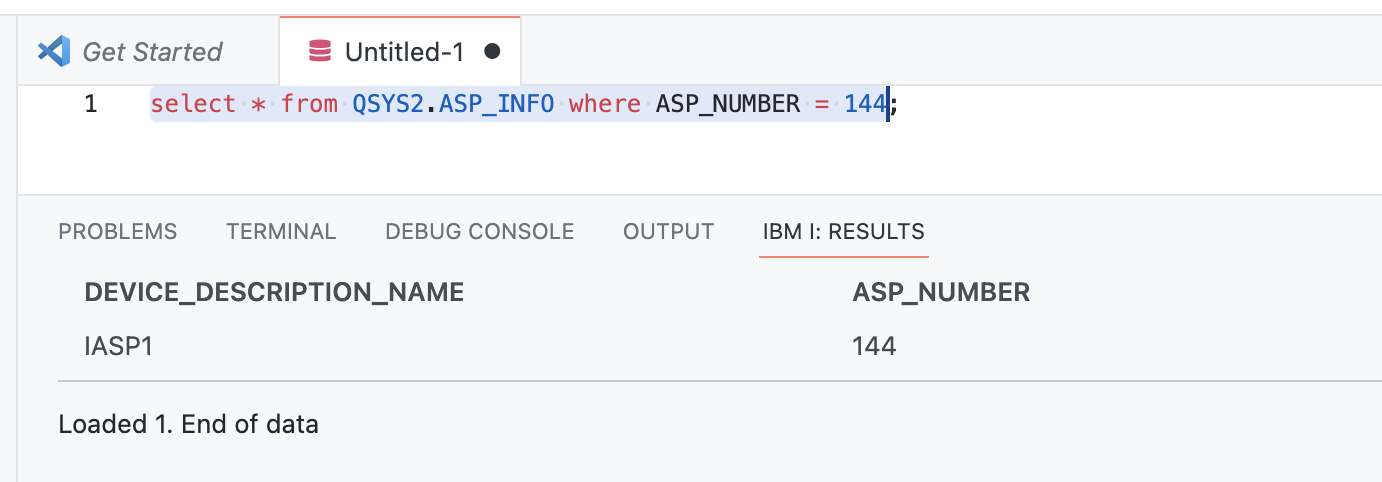
- Then I can see that a directory exists in the the IFS root for it:
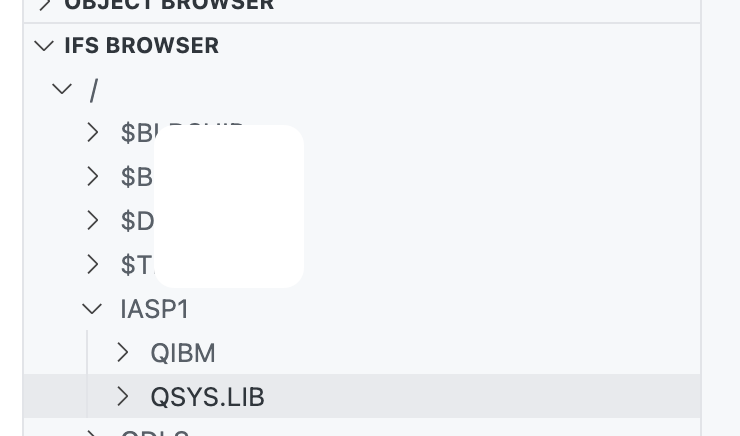
This works great when not using SQL. We need to add support for this method to selecting the ASP when running SQL statements.
system "call QSYS/QZDFMDB2 PARM('-d' '-i' '-t' '-r' 'IASP1')"
Here is a current bug. My filter for the LIAMTEST library does not work because it's not in *SYSBAS and exists in IASP1.
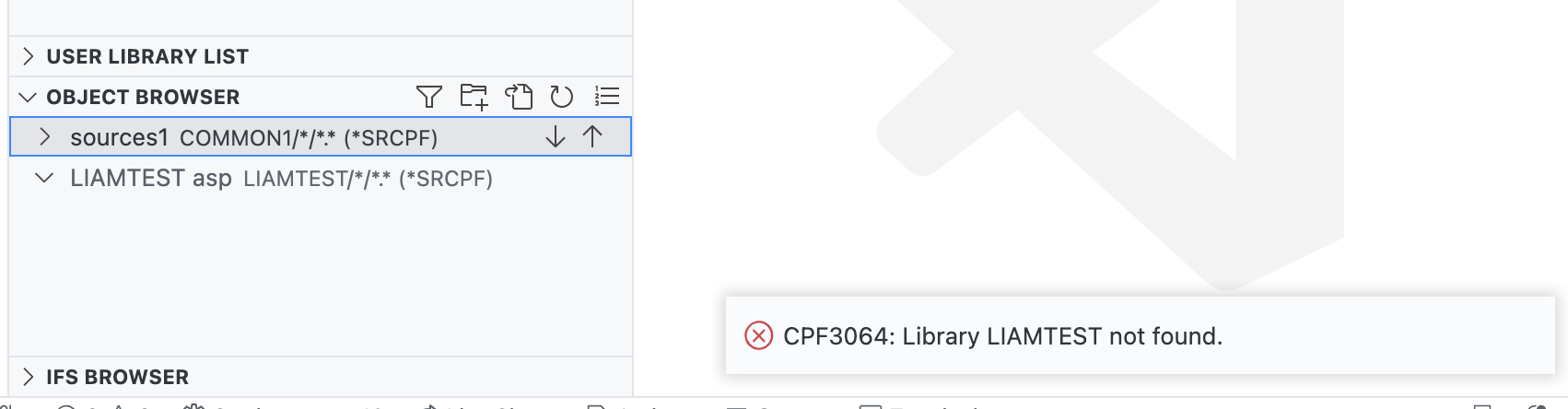
We can't change our existing use of DSPFD (or any system commands!) to look in a specific ASP because they require the use of SETASPGRP, which of course won't work for us because each command runs in a new job (this won't be changing).
But, to fully support ASPs, we need to ensure the user has SQL enabled (which is true most of the time since we are now using system programs to run SQL) so we can make use of QSYS2.OBJECT_STATISTICS in an statement where we can define the ASP to use. This requires a change to getObjectList to support the use of SQL.
# LIAMTEST is in IASP1
echo "SELECT OBJNAME, OBJLONGSCHEMA, OBJTYPE, IASP_NAME FROM TABLE (QSYS2.OBJECT_STATISTICS('LIAMTEST', '*ALL', '*ALLSIMPLE') )" | system "call QSYS/QZDFMDB2 PARM('-d' '-i' '-t' '-r' 'IASP1')"
For now, we can use the user provided ASP name in the settings.
I was right about the 'stacking'. Even with an ASP group/name set, we are still able to access *SYSBAS objects.
Once the specified ASP group has been set for the current thread, all libraries in the independent ASPs in the ASP group are accessible and objects in those libraries can be referenced using regular library-qualified object name syntax. The libraries in the independent ASPs in the specified ASP group plus the libraries in the system ASP (ASP number 1) and basic user ASPs (ASP numbers 2-32) form the library name space for the thread.
The real heavy lifting here is adding the ability to specify an ASP name on IBMiContent#runSQL and then refactoring the calls to it. When this happens, the interface to code-for-ibmi.runQuery cannot be broken due to compatibility to other extensions.
@worksofliam @Wright4i
Alright, I did some testing...
- First I added two volumes to my server. One was added to (user) ASP 2 (in SST) and another to independent ASP 33 (with
CFGDEVASP) - Second I added one library to ASP 2 and another to ASP 33
In this setup I could see the library in ASP 2, but not the one in ASP 33.
- I then did duplicated QDFTJOBD to my own job description and changed this to include independent ASP 33:
CHGJOBD xxx INLASPGRP(yyy) - I changed my userprofile to use the new job description and forced a reconnection to the system
Now the library in ASP 33 was available and I could see the files and members in the object browser.
It all worked as if the objects was in the *SYSBAS, no problem at all. I could even see the objects after changing my userprofile to the default job description, which did not have ASP 33 as initial ASP group - as long as I kept the connection to the system in VS Code. After a reconnect, the objects were no longer available.
The IFS browser does work differently - since the ASP device is linked to a folder in root as soon as it is varied on, the folder is available together with the ASP device. When the device is varied off, the IFS folder is no longer available.
My testing brings the question: Should it be the job description on the server that controls what Code for IBM i can see on the server, or should Code for IBM i try to attach to an independent ASP using the SETASPGRP command?
IMO it should be the setup on the server, that controls what's available for Code for IBM i - so the user must have a job description that includes the independent ASP to be able to use this ASP. Which means we don't have to code anything special for iASP's in this extension.
My testing brings the question: Should it be the job description on the server that controls what Code for IBM i can see on the server, orr should Code for IBM i try to attach to an independent ASP using the
SETASPGRPcommand?
@chrjorgensen I agree with you it should be on the JOBD to describe the job. SETASPGRP isn't even a viable option with the way the new jobs are spawned for each command. If we go this route I think it'd be completely fair to just document how to setup a Job Description using an ASP and leave it up to the end-user to setup when configuring Code for IBM i.

@Wright4i I have yet to find a situation where accessing an independent ASP is a problem - but there is a lot of coding for ASP support in the current version, so maybe I haven't understood the problem? I haven't been through all of Code for IBM i, just using the object and IFS browsers and opened files for editing.
@worksofliam Can you elaborate on this - what is the current ASP support for?
Okay, now I see what the ASP is used for: opening (downloadMemberContent) and saving (uploadMemberContent) the source in the member, which is done by CPYTOSTMFand CPYFRMSTMF commands.
I also found an issue - when creating a new member, the member was added but wouldn't open because the ASP was not used in the path for the source member. I'll do some more testing...
EDIT: The issue could not be recreated in the latest master branch from GitHub - so no alarm anyway... 😄
Further testing:
- I added an additional volume to my server as independent ASP 34 (with CFGDEVASP)
- Then I added a library to ASP 34
Now I can switch between the iASP's with SETASPGRP - but a job can only be connected to one iASP at a time (at least to my knowledge), so I can only see of my two libraries on the iASP's one at a time (however in the IFS I can see them both, since each iASP has its own directory in root and the libraries appear in a /QSYS.LIB subdirectory in the iASP directories).
I can also have filters in the object browser for each library - but as above, I can only open one of the at a time (the one in my job description when the connection is started). The library in the iASP not connected to cannot be found.
Idea: If we really want the user to be able to switch iASP, we can probably make a function setCurrentIASP and present the current and available iASP's in a list (like the changeCurrentLibrary function) for the user to choose... WDYT?
@chrjorgensen @Wright4i First off, I thank you deeply for looking into this problem. I am very sorry because I am so worked right now and I am neglecting how much time I'm putting into it. I hope this can change in the next two weeks after I have some work travel out the way.
Next, to your question:
we can probably make a function setCurrentIASP
This is a very good idea, and we should make use of the existing ASP property in the configuration
present the current and available iASP's in a list
Also a great idea. I am envisioning a simple quick pick list for this. We actually go and fetch the ASP information and store it in the connection class so we already have that idea.
I think we need to combine those efforts, with the change I recommended above:
But, to fully support ASPs, we need to ensure the user has SQL enabled (which is true most of the time since we are now using system programs to run SQL) so we can make use of
QSYS2.OBJECT_STATISTICSin an statement where we can define the ASP to use. This requires a change togetObjectListto support the use of SQL.
The real heavy lifting here is adding the ability to specify an ASP name on IBMiContent#runSQL and then refactoring the calls to it. When this happens, the interface to code-for-ibmi.runQuery cannot be broken due to compatibility to other extensions.
I think if there is only one ASP (as in just *SYSBAS), then we likely don't need to add anything to the UI to make sure the UX is not affected.
To @Wright4i's point:
SETASPGRP isn't even a viable option with the way the new jobs are spawned for each command.
Code for IBM i is stateless, so we've had to build our entire extension like this - the way ASPs would work is exactly how the library lists work.. we have to send it in on every command - luckily we can easily do that with the system SQL program we use:
system "call QSYS/QZDFMDB2 PARM('-d' '-i' '-t' '-r' 'IASP1')"
@worksofliam Don't worry - be happy! 🌞 Take care not over-working yourself and becoming stressed - I've been there and it's not funny!
This is what I get from your suggestion:
- We add a quick pick list where the user can set the wanted iASP (thus overriding the limit of the job description setting)
- We add support for SQL and the
OBJECT_STATISTICSfunction ingetObjectList - We add the current iASP to the
IBMiContect#runSQLfunction (as a parameter?) to be used as new parameter in the call toQZDFMDB2
Confirm or correct me... 😆
Issues that spring to mind:
- Switching iASP: This could make the library list invalid. We should probably call the
validateLibraryListto have any libraries not available removed from the library list, right? - The profiles: Is the iASP part of this - or should it be added if not already? I have not checked the code yet.
- The source ASP configuration value: Should it be set to the selected iASP? Or what is the purpose of this?
Any other thought? @Wright4i
@chrjorgensen I believe you're correct on the action items from @worksofliam.
On your issues:
- Agreed, we should call
validateLibraryList - Yes? If we're treating ASPs like the library list works and library lists part of the profiles then iASP should be too.
- No idea I'll leave this one to @worksofliam
No additional thoughts here! I'm also a bit over worked these days so Fridays aren't a good day for new ideas 😆 but everything listed here so far sounds good to me. Happy to help out (testing, etc.)!
@chrjorgensen Your to-do list is spot on. Regarding your issues:
- Calling the validate method is a good idea when the ASP changes.
- ASP should be part of the profile.
- The existing ASP config is what we should use to store the user chosen ASP.
Thanks, Liam
@worksofliam @Wright4i Sorry for not having done anything about this yet - except for creating a to-do list... 😄 I have been quite busy the last month both on work and in private, but I hope to start looking at this soon - if not anyone else has begun working on this issue...
Looking back on this again. I am still thinking we need a button/API on the User Library List view to switch ASP group, which would really create a unique JOBD for that user (that we manage) so we can set/change the ASP group.