

 code-charity
Firefox ......... EDIT: Firefox Version Uploaded!! 🌞🌞
Try the firefox version! :) thanks 💕 to @victor-savinov!
Please rate it so people notice
https://addons.mozilla.org/en-US/firefox/addon/youtube-addon

(EDIT above by ImprovedTube)
first I want to say that the developers moved me. and I am sorry for everything I said in #420
second, you can install the extension easily on firefox but it is temporarily
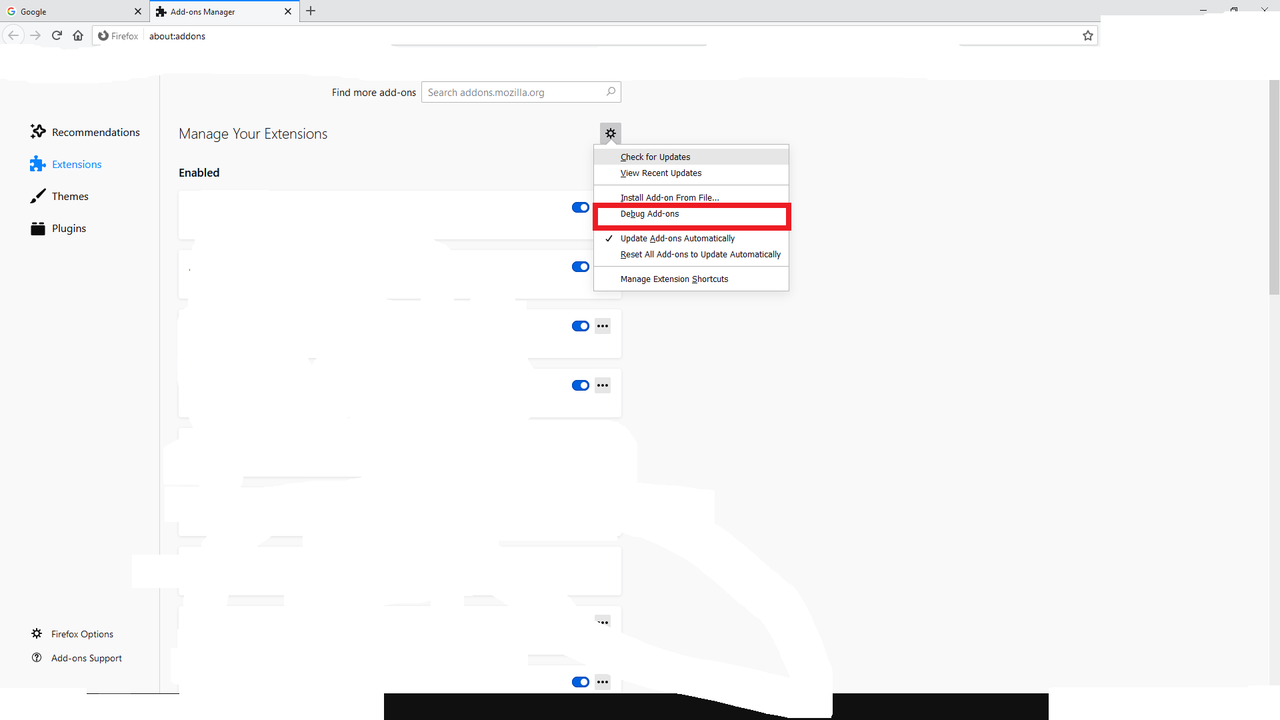
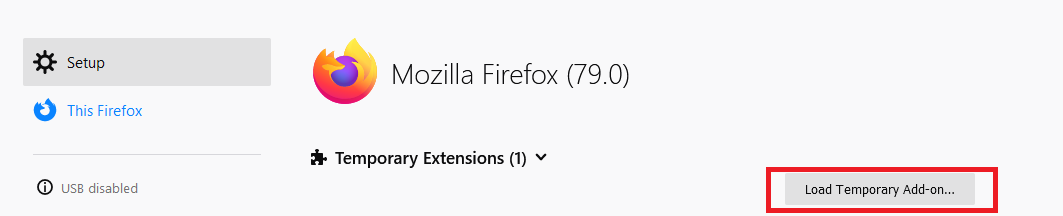
voilà
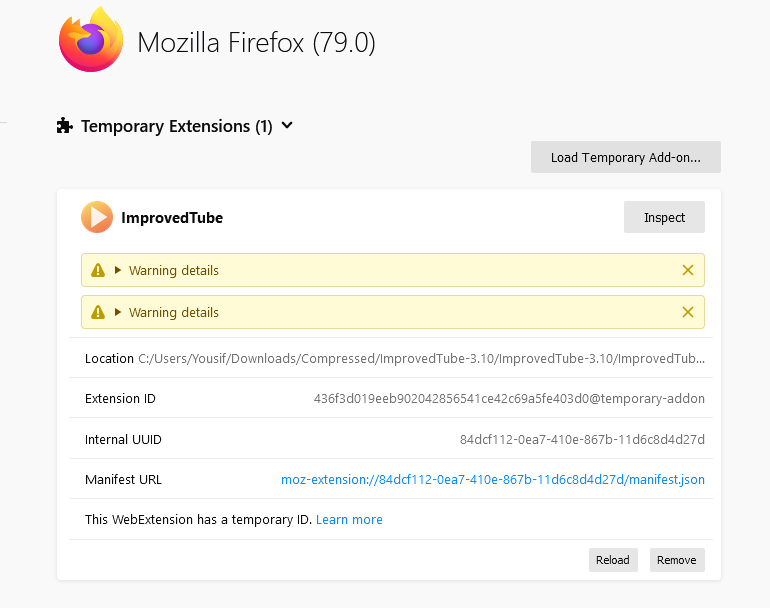
link to the zip file https://www.dropbox.com/s/31ef6160c5mdl1n/ImprovedTube-3.10.zip?dl=0 and there is another error
shortcuts https://www.youtube.com/watch?v=LXb3EKWsInQ:2397
    (Async: EventListener.handleEvent)
    shortcuts https://www.youtube.com/watch?v=LXb3EKWsInQ:2394
    init https://www.youtube.com/watch?v=LXb3EKWsInQ:129
    <anonymous> https://www.youtube.com/watch?v=LXb3EKWsInQ:2834
    injectScript moz-extension://84dcf112-0ea7-410e-867b-11d6c8d4d27d/content-scripts.js:3242
    <anonymous> moz-extension://84dcf112-0ea7-410e-867b-11d6c8d4d27d/content-scripts.js:3390
    apply self-hosted:2159
    applySafeWithoutClone resource://gre/modules/ExtensionCommon.jsm:614
    applySafe resource://gre/modules/ExtensionCommon.jsm:597
    applySafe self-hosted:935
    wrapPromise resource://gre/modules/ExtensionCommon.jsm:827
    (Async: promise callback)
    wrapPromise resource://gre/modules/ExtensionCommon.jsm:813
    callAsyncFunction resource://gre/modules/ExtensionCommon.jsm:1091
    callAsyncFunction resource://gre/modules/ExtensionChild.jsm:701
    callAndLog resource://gre/modules/ExtensionChild.jsm:677
    callAsyncFunction resource://gre/modules/ExtensionChild.jsm:700
    stub resource://gre/modules/Schemas.jsm:2679
    <anonymous> moz-extension://84dcf112-0ea7-410e-867b-11d6c8d4d27d/content-scripts.js:3345
    inject resource://gre/modules/ExtensionContent.jsm:567
    AsyncFunctionNext self-hosted:684
and it will continue throwing this error abut 1000 time and the cpu usige will spike
84dcf112-0ea7-410e-867b-11d6c8d4d27d is the id of ImprovedTube
and the player will not play and it will be like this
 but one time I was able to make it play but that was by sheer luck. it happened that i hardcoded the setting for video quality and it worked. so at least the extension can control some aspects of youtube. so the developers don't need to worry about the video quality thingy

@cpuuntery thank you :heart:
If you test ImprovedTube on Firefox and post new issues, then I will make fixes every few days. When it's stable, we will publish it in Firefox Add-ons.

I can confirm that the version from cpuunterys dropbox can be loaded temporarily. But for me (FF 78.0.2 on Linux), no settings that i change are saved in the addon-dialogue once i click out of it. Once i re-open the dialogue i am again asked for the language and all settings are reset. Also, i can't export the settings before clicking out of it (nothing happens). Clicking "Import Settings" opens the Filechooser.
Let me know if there is any kind of log/debug-output i can share to help :)
Very cute uninstall-page btw ^^

@Termuellinator storage bug has been fixed. Try this https://github.com/ImprovedTube/ImprovedTube/archive/master.zip (tested on Firefox 68.10, Linux)
@victor-savinov with that i get the same error ( " File /home/termy/Downloads/ImprovedTube/ImprovedTube-master_1.zip does not contain a valid manifest " ) as with the .zip from the release-page, even if i manually replace the manifest.json with the one from cpuuntery's zip. Edit: just checked, both manifests are identical
@Termuellinator https://github.com/ImprovedTube/ImprovedTube#firefox--waterfox--gnuzilla-and-icecat-and-other
You are right, selecting the manifest.json instead of the .zip works and the settings are kept :+1: I still can't export settings though. Another thing i noticed that the settings "show channel video count" and "how long ago was the video uploaded" under "Appearance -> Details" doesn't work - but from a short test that doesn't work on chrome either, right?
Edit: The Rotate and Popup Buttons under "Player" are offset down and don't disappear if you deactivate the option again (luckily, they disappear on reload of the page :) ) https://i.imgur.com/Cw7XHFM.png Edit2: The option "only one player instance playing" doesn't stop an already playing tab if i open another video in another tab. If i try the same in Chromium, the "older" tab is stopped, so i assume i understand the intention of the option correctly?
@Termuellinator thanks 👍 summing up:
- chrome bug: "show channel video count" + "how long ago was the video uploaded"
firefox bugs:
- "only one player instance playing"
- Rotate + Popup Buttons offset down https://i.imgur.com/Cw7XHFM.png & won't disappear when deactivating until reloading page.
- can't export settings

That's at least all i found during my testing/fiddling around, other than that it seems to work really well :+1: The german translation is missing a good bit, i'll clean that up when i find time to do so.
Edit: oh, and firefox bug: can't export the settings Edit2: i just checked - while you can select a file to import settings (i exported them from chromium), the import doesn't change any settings. So for now (due to the temporary addon workaround) you have to set all settings again after every browser restart
@ImprovedTube
just to remind you the bug I first mention still exist
firefox console is filled to the brim with errors
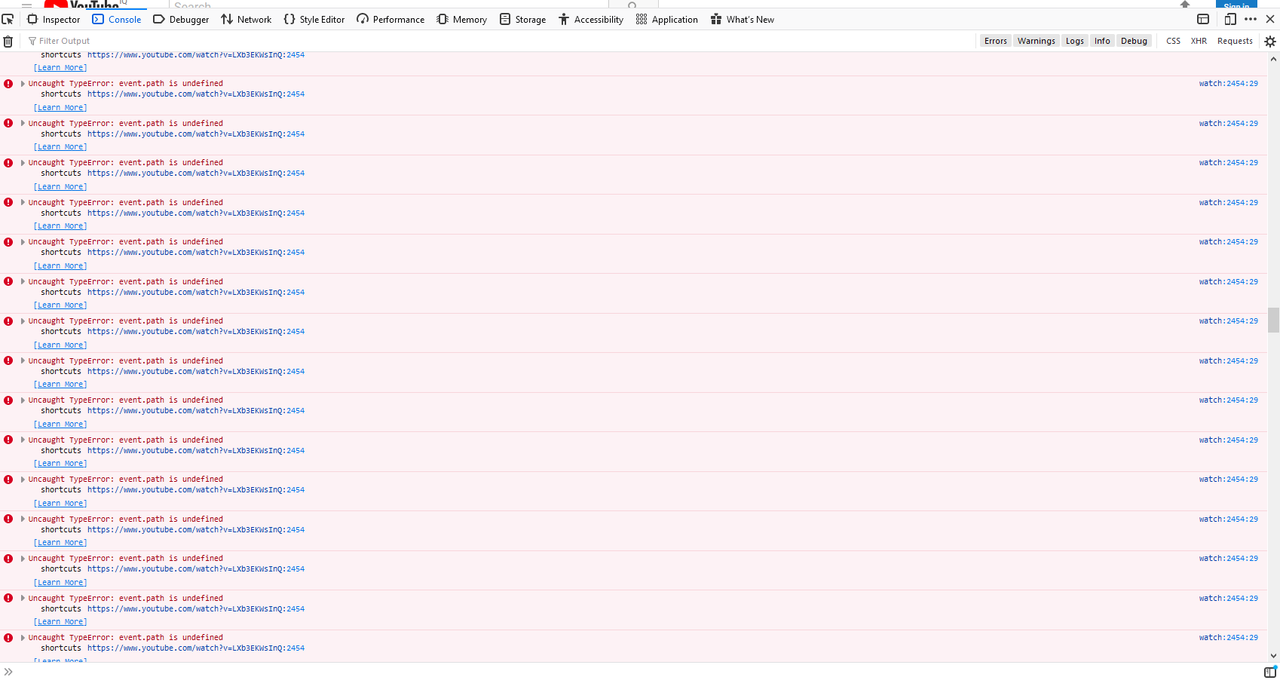 and that causes the CPU usage to be high high
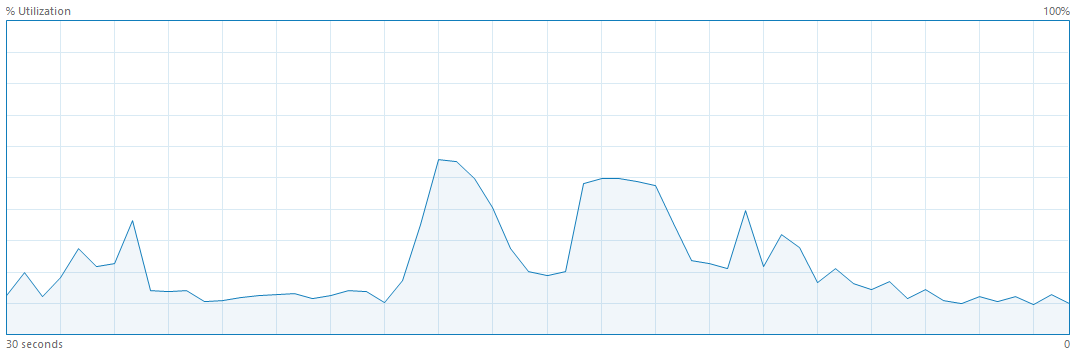
@victor-savinov I managed to track the source of the bug it is in content-scripts.js line 2968 and in shortcuts.js line 314 error
event.path is undefined
looking at the console i can confirm the error-spam, no increased CPU usage though
Testing the master branch from yesterday evening i can report that the Rotate + Popup Buttons are no longer offset down, but still don't disappear when deactivated but rather switch places. The other issues ("only one player instance playing" and import/export of settings) are still present. And i've noticed another bug: The "Mixer" is always saying "No open video tabs", regardless if youtube tabs are open, videos are playing or not.
Hi, I have tested the extension on firefox. Bugs:
- Is it impossible to use the wheel in shortcuts options.
- Buttons on the player aren't in there place but work.

- Refresh youtube page stop the video like this.

- "Show channel videos count" and "How long ago video was uploaded" don't work.
- Use settings Json file don't import the settings, "export settings" don't work.
- Mixer says "No open video tabs".
Improvedtube 3.78 and Firefox 79.0.
The others options I have tested work perfectly, thank you for the extension is the best ! And sorry for my bad english.

Is there any plan on putting the extension on AMO? Or at the very least releasing an .xpi file. I've been using it and it's fine for the most part, would need to use it more to find any major recurring problems, so an .xpi would be nice for that (I don't know how to package an .xpi from the temp add-on files).

yeah, i agree - biggest issue i have at the moment is going through all the settings every time i start the browser ^^
I have tested the last version of Improvedtube and the shortcuts for screenshot, repeat... are working perfectly.
Refresh youtube page stop the video like this.
For this I have activate the Firefox autoplay option and refresh the page don't stop the video.
thank you @cpuuntery ! Will report back if i find any new issues (and it seems i already found some new options that i have to add the german translation to ^^) Edit: the "do you enjoy improvedtube" popup links to the chrome-store, that'll have to be changed once it'll hit AMO :)
Thank you @cpuuntery . As a note I believe it is possible to make the add-ons update pull from Github instead of AMO as I believe that's what Bypass Paywalls did. So that is an option if you do not or cannot release it on AMO yet. And if in the next release you upload the .xpi as well on the release assets, then I'd like to remind you to update the Readme as it would be much easier than the current process.
Thanks.

firefox console on a youtube video https://pastebin.com/rqDTYmLm
also firefox and new edge doesn't stop the video from buffering when the autoplay is disabled

@cpuuntery Thank you for the XPI-file! It looks like it's self-signed. Can you perhaps teach us how you self-signed it? I did a little bit of research and the process looks a bit complicated. I may be able to figure it out with a bit of time-investment, but maybe you can help me out? I can't write you directly, so I'm replying here. Recently switched to Firefox and don't wanna miss this awesome extension.

Hello everybody, I just am exploring my path to switching to Firefox and would love to see this extension supported fully. Would it be possible for the developers to publish an official XIP extension to Github in the releases?
I tried sideloading the extension temporarily but that's not really a solution and downloading an XIP from someone's DropBox and self-signing and stuff… I would prefer not to do that.
A few things I noticed:
- installed via Temporary Addon
- tried loading JSON settings from my Chrome extension
- settings were not activated based on the import
- tried setting a handful of my settings manually, so far those look good and work mostly.
I'm happy to test more and help getting this ready — even if just as an official XIP download for the website / github releases.
Looking forward to getting this out there.

@chrisspiegl You can fully install the latest version of ImprovedTube on Firefox Developer Edition:
You need to first allow unsigned XPIs. Go to about:config and set xpinstall.signatures.required to false.
Then download the latest ImprovedTube ZIP from GitHub, extract manifest.json and open it in a Text editor:
Add this:
    "browser_specific_settings": {
      "gecko": {
        "id": "improvedtube@tomxyz1"
      }
    },
This is how it should look like: https://imgur.com/a/FdKO6nx (It doesn't need to be "tomxyz1")
Put the modified manifest.json back into the ZIP and replace the original.
Drag the ZIP onto Firefox with about:addons open.
That's it.
So basically, you only need Firefox Dev with disabled Signature-Verification, and the extension as a ZIP/XPI with a modified manifest.json
By the way, Firefox Developer Edition is just Firefox Beta with added developer tools, it doesn't take up more space than the other versions, so it's a completely stable and usable version of Firefox.
@tomxyz1 not everyone use want or need Firefox developer edition but thanks i going to try this
@ahmed-abdelrazek I know, I know, but this is the only way you can install an unsigned extension like ImprovedTube.
Regardless, Firefox Dev isn't unstable. I'm sure you'll be fine using the Developer Edition. I use it for some months now after transitioning from Chrome, and it's nice. It really isn't much different from the normal version.
@tomxyz1
Very sorry for the late reply. You need to go to this link and sign up with email. And then you will receive an activation link on your email. And after that follow the pictures
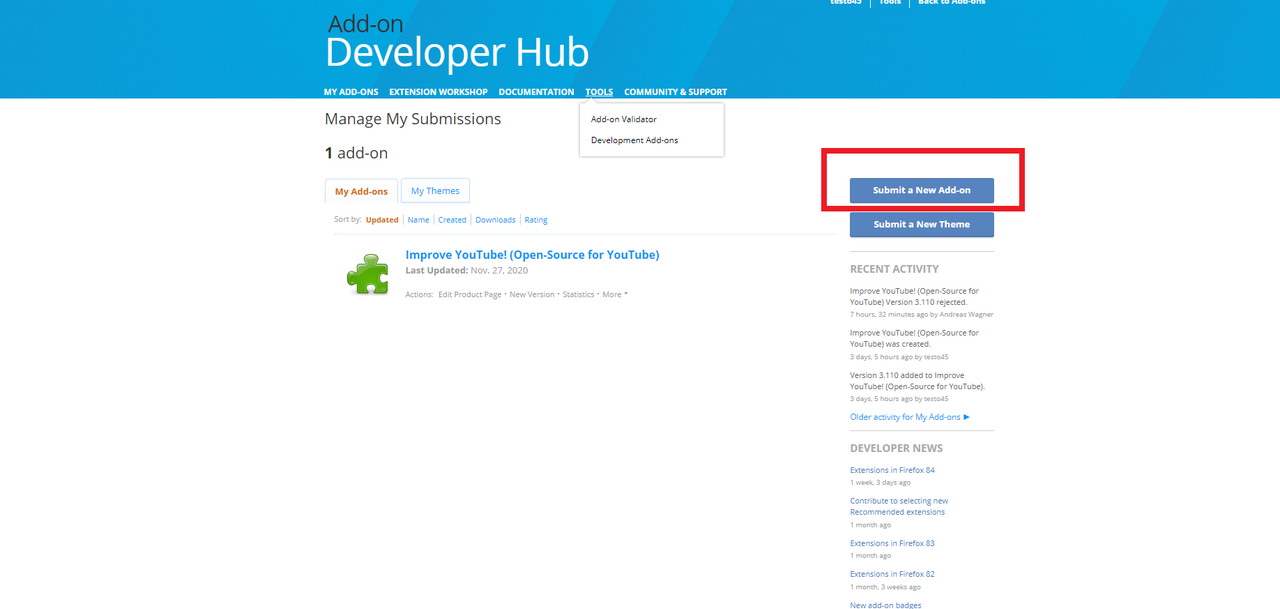 after that
 after that
 after that
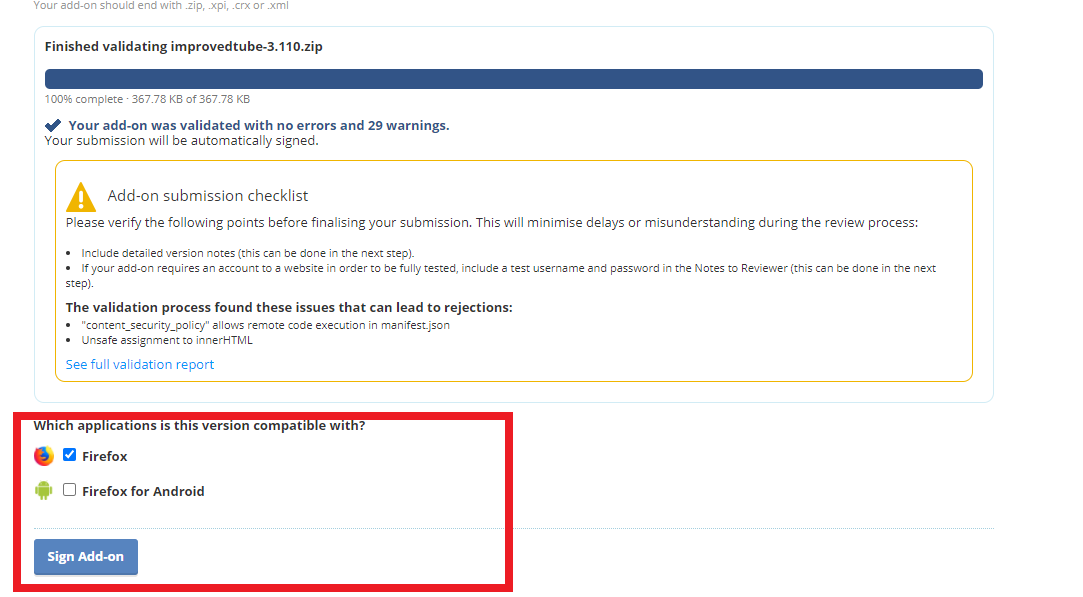 after that
 after that
 after that
 after that
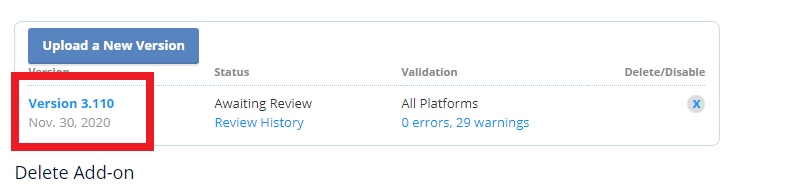 Usually it takes about 10 minutes to sign the extension. The status will change from awaiting approval to approved. Only after that. you will click on a link in the last picture And you will also get an email from Mozilla that notify you that the extension has been signed and a link to download it. the link is the same link from the last picture

@cpuuntery Don't worry. Thank you very much for the step by step instructions, that looks really easy!
@tomxyz1 thanks and one last thing You can also follow these instructions to disable signature checking on Firefox stable stackoverflow instructions! OR superuser instructions!