
cockpit
 cockpit copied to clipboard
 cockpit-project
Package version is cut off in update overview.
Explain what happens
- Open update page
- Have a 'smaller' screen
- Can't see full version numbers.
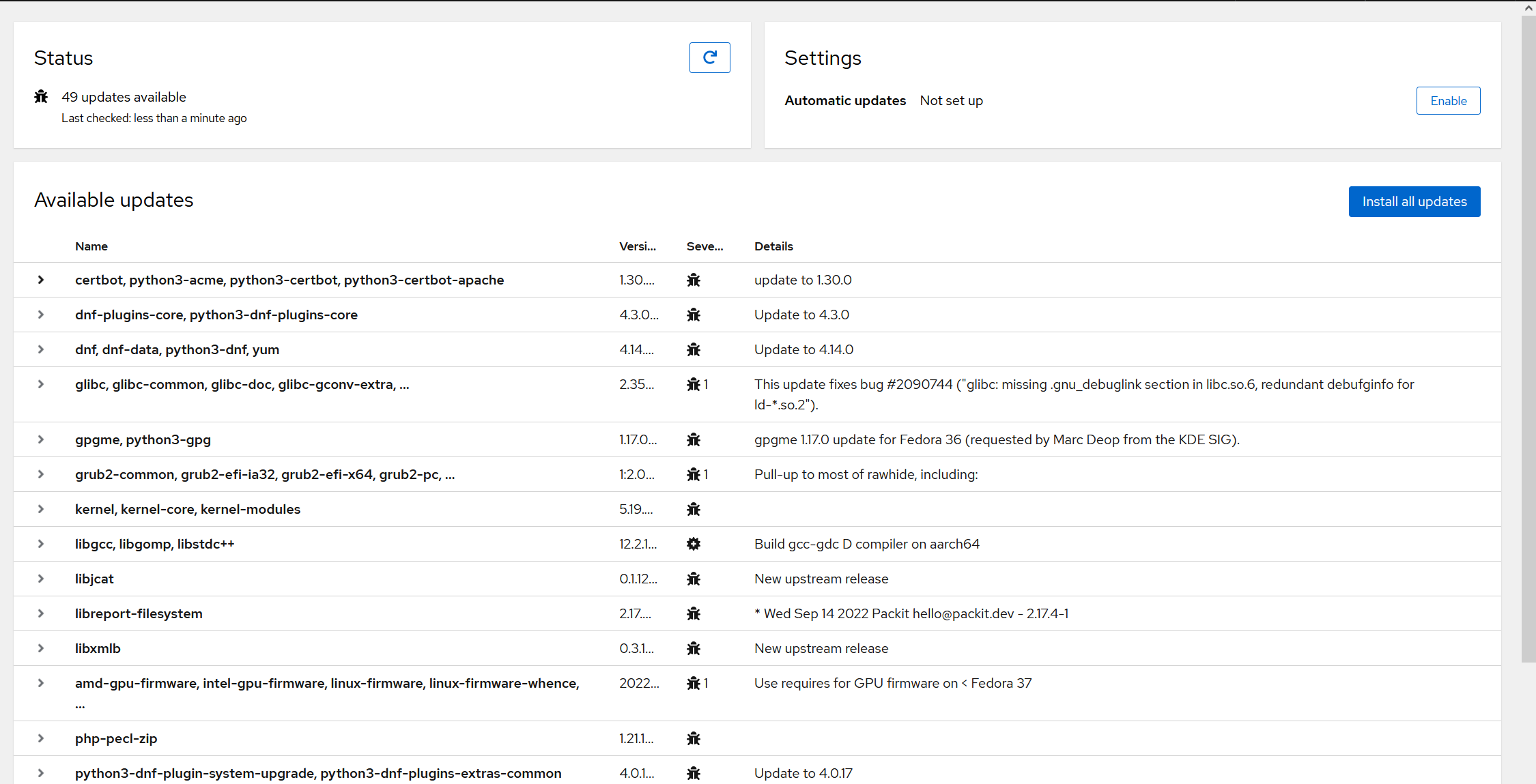
Version of Cockpit
latest
Where is the problem in Cockpit?
No response
Server operating system
No response
Server operating system version
No response
What browsers are you using?
No response
System log
No response

Wow, that's a problem.
We can't just force it to not truncate the versions, as some versions are really long. But the table should definitely give more room for versions than what's in your screenshot.

How long are we talking, I've seen some huge NEVRAs as well but it seems like the epoch is already (conditionally) skipped and so is the arch.
I'd say the version is probably the second most important column there (aside from the name of the package). Some possibilities:
- ungroup the names: makes the list much longer but to me makes the list more explicit, right now some package names are also being truncated from the grouped fields.
- remove details: they often only mention something that's already given in the table (update to upstream version), they could be shown on fold-out/detail?
Thanks :)
This was actually meant to be solved by the cellWidth properties in https://github.com/cockpit-project/cockpit/blob/main/pkg/packagekit/updates.jsx#L416 -- but apparently our https://github.com/cockpit-project/cockpit/blob/main/pkg/lib/cockpit-components-table.jsx has forgotten to take these into account, and I think that property is just ignored now. We need to fix that -- there must be a way to set column properties.
column transforms got introduced in commit b34580abca46b70f6a9304a23, and broken in the PF4 port in commit 5108999badee3834fcc8e572. I suppose we should now use relative Th cell widths to control that? These can be passed through ListingTable (I'm just not entirely sure how, need to look more closely)

Fixing relative widths is definitely a good idea.
We'd still want to manually adjust the version string using something other than percentages, however, to make the version string a "reasonable" width at various desktop sizes. (This part shouldn't scale dramatically based on browser width.)
(Browsers are good at mixing and matching table widths, so this is fine. It's also what we did a long time ago, before the component was rewritten... and PF was upgraded several times since. So things have changed.)
So I think we probably want four things:
- Fixing the
cellWidthproperty incockpit-components-table.jsx. - Adding stable CSS names per column (for heading and data), for precise targeting of items, when needed, in
cockpit-components-table.jsx. - Adding back a special width override for the versions column using the CSS name, local to the Software Updates page's CSS.
- Middle truncation (new in PF) so you can see the start and end when something needs to be truncated, added in the page's JSX.
Meanwhile, versions are hoverable to get the full version. However, you shouldn't have to do that for most version strings. (Some are surprisingly exceedingly long.)
Additionally, turning on tabular numbers for the versions would be nice to have. We need to start using the improved font. (It's more critical in other places, but it would still be nice here too.)
So, just to regain some understanding here. It seems the transforms are not applied at all in cockpit-components-table.jsx?
My unfamiliarity with patternfly is showing here but where are they supposed to go? I see transforms: ["fitcontent"] or ["cellWidth(40)"], I think the former is supposed to go into a modifier attribute such as: <Th modifier="fitContent"> and the latter I don't know, the Truncate object seems to need to go into the <Td />, so not as a modifier.
I think this is a bit more of a architecture decision than I initially thought :)