
cockpit-podman
 cockpit-podman copied to clipboard
 cockpit-project
I wish to manage service account pods
Hi,
RFE for user story "as a user I want to manage my pods that are run by service account without login".
I want to see and control the state of pods under user systemd session, and see logs.
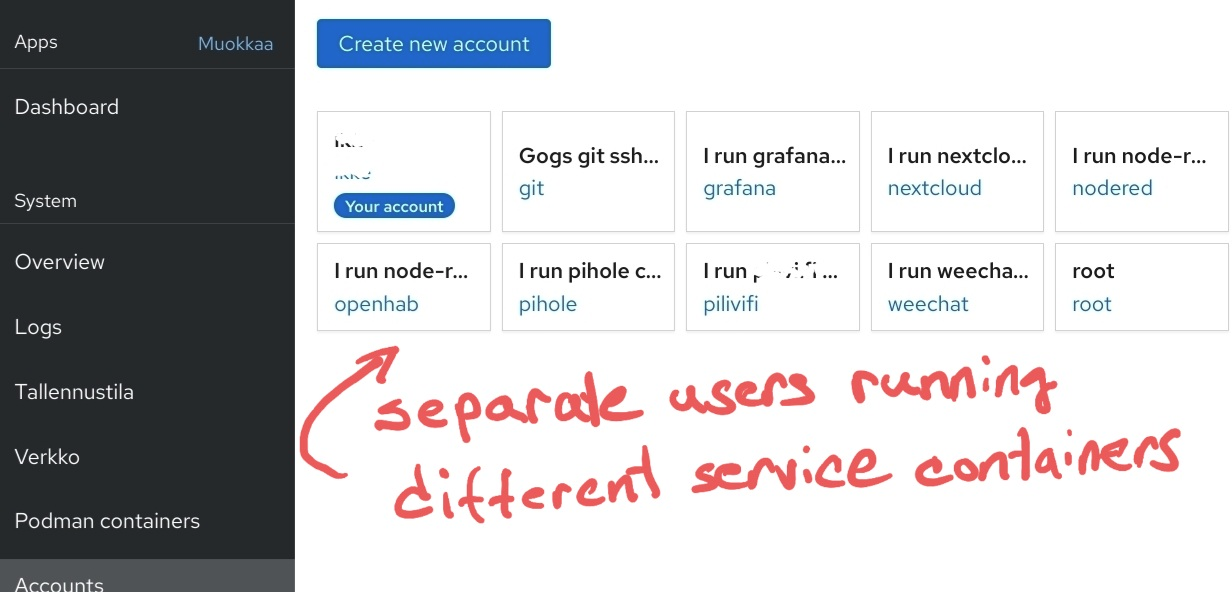
I run my services in podman as I run any other service in linux: Using service accounts. Pods are run under user account which has no login. This is traditional security. Now I can't manage or see such pods in cockpit, nor see their journalctl logs from --user context.
Here's screenshot how I run my pods:
Currently the only way to see what's going on with them is to drop to command line and do:
1. # su - root
2. $ su - grafana
3. # export XDG_RUNTIME_DIR=/run/user/$UID
4. # podman ps
5. # journalctl --user eu ...
6. # systemctl --user status
Cockpit doesn't show anything for such pods ATM. I know this is tricky as one needs to login there. Sudo is not enough due it shows origin uid to systemd, and it won't work with it properly with podman. Anyhow, it won't prevent me from wishing :) Perhaps some discussion with podman team what could be done about it?
Here's blog how I run such containers, I use ansible to set them up: https://developers.redhat.com/blog/2021/02/03/deliver-your-applications-to-edge-and-iot-devices-in-rootless-containers/
And here's how to set such up for e.g. pihole: https://github.com/ikke-t/ansible-podman-examples/blob/master/run-container-pihole-podman.yml

So to be more precise, would be nice to see and control all pods from such service users all in one view. Could cockpit get access to users dbus session e.g. by some socket user would grant access to cockpit or smth?
This is exactly what I wish for!
Having a central place to monitor and manage all different containers running under various users is very useful.

Cockpit Podman already has a pods view, which would be a much better fit than the user accounts page, which is unrelated to podman containers.
I think what you're saying is that you want to run containers (and/or pods of containers) isolated as a specific user for that container... correct?
I have this kind of functionality in the mockup of the create dialog, part of the redesign that we're currently in the process of implementing.
@jelly knows more about the implementation, and we've had to adjust some minor things in the mockup since (although it's generally the same).

We could also consider adding support for showing related services and containers in the accounts page, but it should link to the appropriate pages when applicable, if so, and they should be opened as separate issues.
(Meaning: The accounts page could show containers in use and link to Cockpit Podman for management. Even if it's shown elsewhere, the proper place to do all container management is in the podman containers page, of course.)
The accounts page was there just to show how I use a service account per pod. Not to say that I needed containers listed there.
Great that you are doing re-design!
When I look at your mockup, I would assume the user drop down there would refer to uid within the pod. Not the host uid (as referred huser in in podman teams blogs). It's important to be able to set that too.
The way you describe listing running pods for an account in account view would be ok. And the idea of getting into podman view of that user while clicking it is good. It would be good if one doesn't need to authenticate there in between, as typically such service accounts would not have password.
When I look at your mockup, I would assume the user drop down there would refer to uid within the pod. Not the host uid (as referred huser in in podman teams blogs). It's important to be able to set that too.
Yeah, @jelly and I need to work on making it clearer. I don't think we have it implemented yet.
Right now, we have the toggle between system and the current user. We talked about moving that into the details area (possibly) and in a video call (or somewhere else?), I mentioned a possibility to assign it to a user with a combo dropdown button widget, which I think you'd want.
However, I think we would also need systemd running support before then, else it's kind of pointless to run a container as a user and not actually have it run.
(We're working toward the goals of being able to do stuff like this.)
It would be good if one doesn't need to authenticate there in between, as typically such service accounts would not have password.
That would definitely need admin access... but most of Cockpit needs that for one reason or another (as most of Linux administration needs it really).
But it would be super useful to be able to do this.
I think we'd have to query podman across multiple user sessions for that to happen.
I'm going to take a stab to have something in sooner to see if I can find where in the source this could be added for having the Podman Cockpit UI check all accounts for their running Podman containers. This would be a really good feature to have as I'm struggling with this myself.

After looking into this some more, and having very little to no experience with ReactJS or JS in general, this would require a refactor to allow either user-set UIDs (hacky/ugly) or automatic fetching of UIDs via accounts Cockpit can see, or via just some sort of find /run -name podman.sock (smartest).
The relevant line is here: https://github.com/cockpit-project/cockpit-podman/blob/460d7e4a2a5b94d6aec18e66ae1b03319bd75e8c/src/client.js#L3
My workaround for now, though not 100% ideal, is just using a single generic rootless "podman" user and manually sudo make install from git checkout tags/46 after changing line 3 in client.js to /run/user/$UID (pick the hard-coded UID of the generic rootless user you want). If you want further details on this @ikke-t let me know, though it does mean you are limited to a single rootless podman user and don't expect to run any podman containers with the root user since it replaces that.
I don't have the time or knowledge to look at refactoring this if @garrett is already planning on this as a possibility for their overhaul work regarding this.