

 clangd
About code completion of function call
Suppose I define a function like following:
int add(int a, int b);
and when I type add and press enter, the plugin would complete my code like this:
add(int a, int b);
with two vscode placeholders of int a and int b.
When the real parameter of a is a complicated expression and I need to use code completion, I have to press Esc and exit the placeholder mode. Afterwards I have to move my cursor across , and delete subsequent placeholders manually. It troubles me a lot.
I wonder if you can make the code completion work in the placeholder mode just like redhat.java extension or simply remove the completion of formal parameter list.

When the real parameter of
ais a complicated expression and I need to use code completion, I have to pressEscand exit the placeholder mode. Afterwards I have to move my cursor across,and delete subsequent placeholders manually. It troubles me a lot.
Nested placeholders seem to work fine for me. I took a screen recording to illustrate what I see:
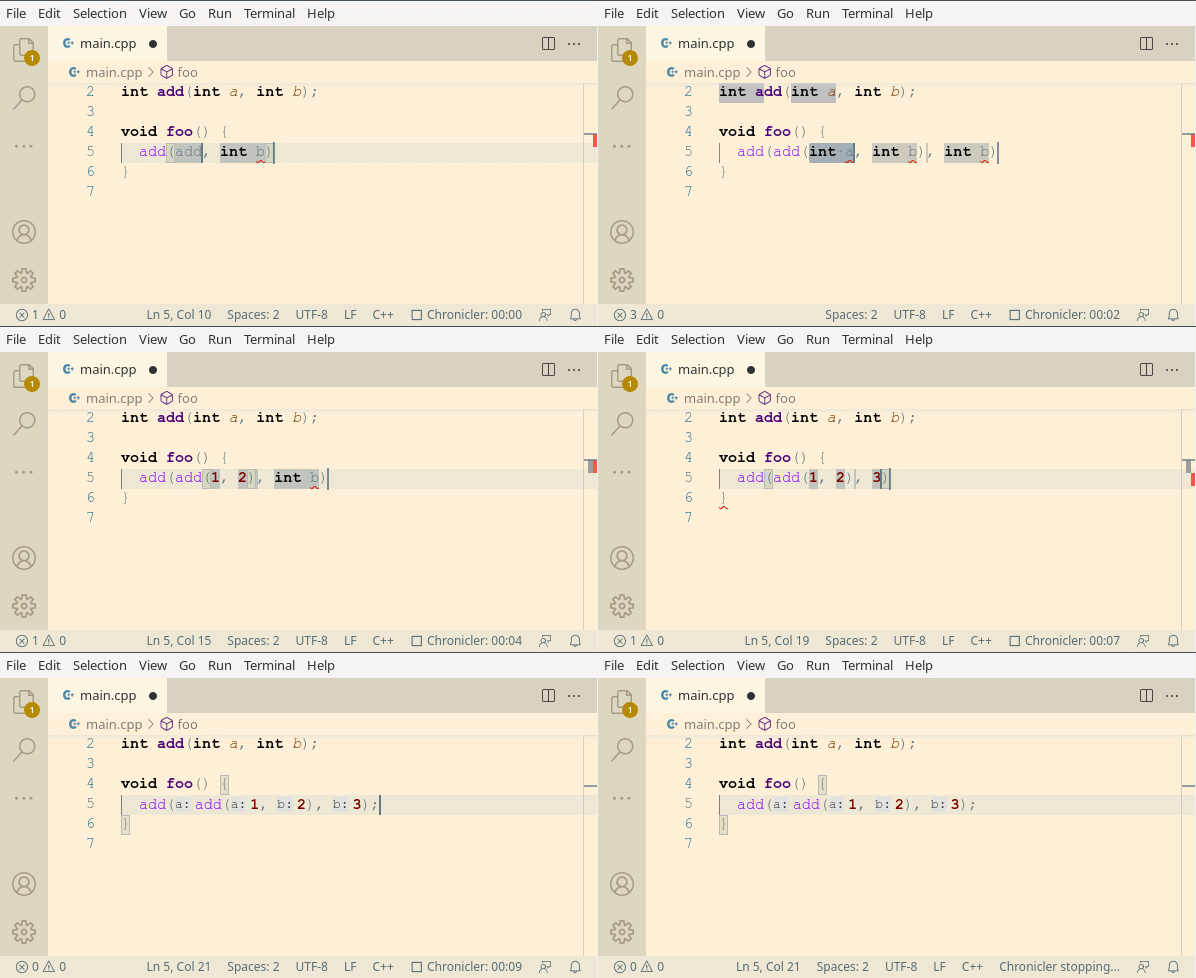
[...] or simply remove the completion of formal parameter list.
It can be disabled by adding --function-arg-placeholders=false to "clangd.arguments".

@HighCommander4 I found it is the editor setting of my vscode that makes a diffrence. Configure settings as follows and the plugin can work like yours.
"editor.suggest.snippetsPreventQuickSuggestions": false
Thank you so much!
@HighCommander4 I found it is the editor setting of my vscode that makes a diffrence. Configure settings as follows and the plugin can work like yours.
"editor.suggest.snippetsPreventQuickSuggestions": falseThank you so much!
This comment seems to confirm that this is the intended solution on the vscode side, so I think we can close this.