
g64 icon indicating copy to clipboard operation
g64 copied to clipboard

Errors when i load in

Open SuperMiniDaws opened this issue 3 years ago • 22 comments

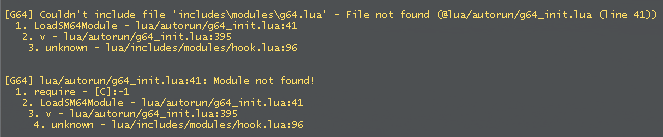
I did all the steps correctly and this appears in the console when i load in image_2022-05-30_184119359
and attempting to browse for the rom gives me this error message image_2022-05-30_184222616

SuperMiniDaws avatar May 30 '22 17:05 SuperMiniDaws

Double check that gmcl_g64_win64.dll is in GarrysMod/garrysmod/lua/bin, that you are playing on the 64-bit version of Garry's mod and that you're on Windows.

ckosmic avatar May 30 '22 17:05 ckosmic

It is in the correct place, I'm on the 64-bit version of Gmod and I can confirm I am on Windows

SuperMiniDaws avatar May 30 '22 17:05 SuperMiniDaws

I am having the same problems as well. I did check the files of the addon and noticed that there is no g64.lua in includes/modules like it is trying to find in the first error

somario360 avatar May 30 '22 17:05 somario360

This should be fixed with the latest release v0.0.2. Please install the new version, replacing the old gmcl_g64_win64.dll and sm64.dll with the new ones

ckosmic avatar May 30 '22 20:05 ckosmic

Yep, works for me now.

somario360 avatar May 30 '22 21:05 somario360

i did what somario did but it just says "[G64] Couldn't locate the libsm64-gmod binary module! Please place it in garrysmod/lua/bin and reconnect".

UnknownRobloxian avatar May 30 '22 21:05 UnknownRobloxian

i did what somario did but it just says "[G64] Couldn't locate the libsm64-gmod binary module! Please place it in garrysmod/lua/bin and reconnect".

same here

Kenz321 avatar May 30 '22 21:05 Kenz321

Did you delete the dlls before you replaced them? That is what I did.

somario360 avatar May 30 '22 21:05 somario360

yes

UnknownRobloxian avatar May 30 '22 21:05 UnknownRobloxian

downloaded the new one and.... image

SuperMiniDaws avatar May 30 '22 21:05 SuperMiniDaws

theres another bin folder outside the garrysmod folder where sm64.dll goes

PooFlinger92 avatar May 30 '22 21:05 PooFlinger92

thats where i put it

SuperMiniDaws avatar May 30 '22 21:05 SuperMiniDaws

i put sm64.dll in \common\GarrysMod\bin\win64

SuperMiniDaws avatar May 30 '22 21:05 SuperMiniDaws

what path is gmcl_g64_win64.dll in?

PooFlinger92 avatar May 30 '22 21:05 PooFlinger92

\common\GarrysMod\garrysmod\lua\bin

SuperMiniDaws avatar May 30 '22 21:05 SuperMiniDaws

those are the paths mine are in and it works

PooFlinger92 avatar May 30 '22 21:05 PooFlinger92

after a lot of fucking around, i got it to work

SuperMiniDaws avatar May 30 '22 21:05 SuperMiniDaws

it says that im using an outdated module for g64, i updated to 0.0.2 of the module

UnknownRobloxian avatar May 30 '22 21:05 UnknownRobloxian

I'm also getting the "Couldn't load module" and "[G64] Couldn't locate the libsm64-gmod binary module! Please place it in garrysmod/lua/bin and reconnect" errors. I'm on version 0.0.2 and made sure both of the dlls are in the right places

RigatoniSupreme avatar May 31 '22 12:05 RigatoniSupreme

after a lot of fucking around, i got it to work

what did you do

Tannermanner2008 avatar May 31 '22 20:05 Tannermanner2008

@SuperMiniDaws ?

Tannermanner2008 avatar Jun 02 '22 21:06 Tannermanner2008

WHEN WILL IT BE FIX!!!!!

MMACOPANE avatar Jun 26 '22 01:06 MMACOPANE
