

 ckeditor
Image in table: The percentage size of the image doesn't work.
📝 Provide detailed reproduction steps (if any)
- Open the manual test for the all-features editor: http://localhost:8125/ckeditor5/tests/manual/all-features.html.
- Insert a column in the first table.
- Insert a relatively small image into one of the new column cells.
- Set the image size to 50%.
✔️ Expected result
The image should occupy half of the cell width. Considering that the minimal size of the block image is 50%, the cell should be at least 100px wide.
❌ Actual result
On the master branch:
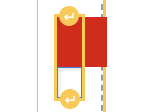
On the i/2052-inline-images branch:
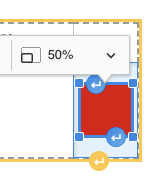
It should be addressed in the i/2052-inline-images branch in order to avoid conflicts in the image styling.
If you'd like to see this fixed sooner, add a 👍 reaction to this post.

There has been no activity on this issue for the past two years. We've marked it as stale and will close it in 30 days. We understand it may be relevant, so if you're interested in the solution, leave a comment or reaction under this issue.

There has been no activity on this issue for the past year. We've marked it as stale and will close it in 30 days. We understand it may still be relevant, so if you're interested in the solution, leave a comment or reaction under this issue.
We've closed your issue due to inactivity. We understand that the issue may still be relevant. If so, feel free to open a new one (and link this issue to it).