

 ckeditor
Show whitespace characters
Is this a bug report or feature request? (choose one)
🆕 Feature request
✅ Expected result
Recently, we got asked about a feature that would show whitespace characters, such as spaces or tabs, in the editor. Since we also have been thinking about this problem a long time ago (and concluded that it might be difficult) we tried to make a PoC to check how it is in the reality.
The idea was to overwrite the default text converter by a more complicated one, which would replace spaces with <span>s that could be styled appropriately.
Here is the code for the proof of concept.
class ConvertSpaces extends Plugin {
	init() {
		this.editor.conversion.for( 'editingDowncast' ).add( dispatcher => {
			dispatcher.on( 'insert:$text', ( evt, data, conversionApi ) => {
				// Here should be an `if` that would check whether the feature's command is enabled.
				// If the command is not enabled, the converter should return.

				if ( !conversionApi.consumable.consume( data.item, 'insert' ) ) {
					return;
				}

				const dataChunks =  data.item.data.split( ' ' );
				const viewWriter = conversionApi.writer;

				let modelPosition = data.range.start;
				let viewPosition = conversionApi.mapper.toViewPosition( modelPosition );

				for ( let i = 0; i < dataChunks.length; i++ ) {
					const chunk = dataChunks[ i ];

					// Chunks may be empty (consider `'foo '.split( ' ' )`).
					// Thankfully, `'foo  bar'.split( ' ' )` returns `[ 'foo', '', 'bar' ]` which is perfect for this algorithm.
					if ( chunk != '' ) {
						viewWriter.insert( viewPosition, viewWriter.createText( chunk ) );

						// Need to recalculate `viewPosition` after every inserted item.
						modelPosition = modelPosition.getShiftedBy( chunk.length );
						viewPosition = conversionApi.mapper.toViewPosition( modelPosition );
					}

					// Do not insert `<span>.</span>` after the last chunk.
					if ( i == dataChunks.length - 1 ) {
						break;
					}

					// Insert dot instead of a space.
					// We will wrap in in a span in following lines.
					viewWriter.insert( viewPosition, viewWriter.createText( '•' ) );

					// I admit this is a little clunky :(.
					const viewSpaceSpan = viewWriter.createAttributeElement( 'span', { style: 'color:#707070;' } );
					const modelWrapRange = this.editor.model.createRange( modelPosition, modelPosition.getShiftedBy( 1 ) );
					const viewWrapRange = conversionApi.mapper.toViewRange( modelWrapRange );

					viewWriter.wrap( viewWrapRange, viewSpaceSpan );

					// Need to recalculate `viewPosition` after every inserted item.
					modelPosition = modelPosition.getShiftedBy( 1 );
					viewPosition = conversionApi.mapper.toViewPosition( modelPosition );
				}
			}, { priority: 'high' } );
		} );
	}
}
This is just a converter, the full feature would need creating a feature class, a command class and the UI. If anyone from the community would like to pick it up, this is a solid base to start from. Below, a gif showing how it looks like.
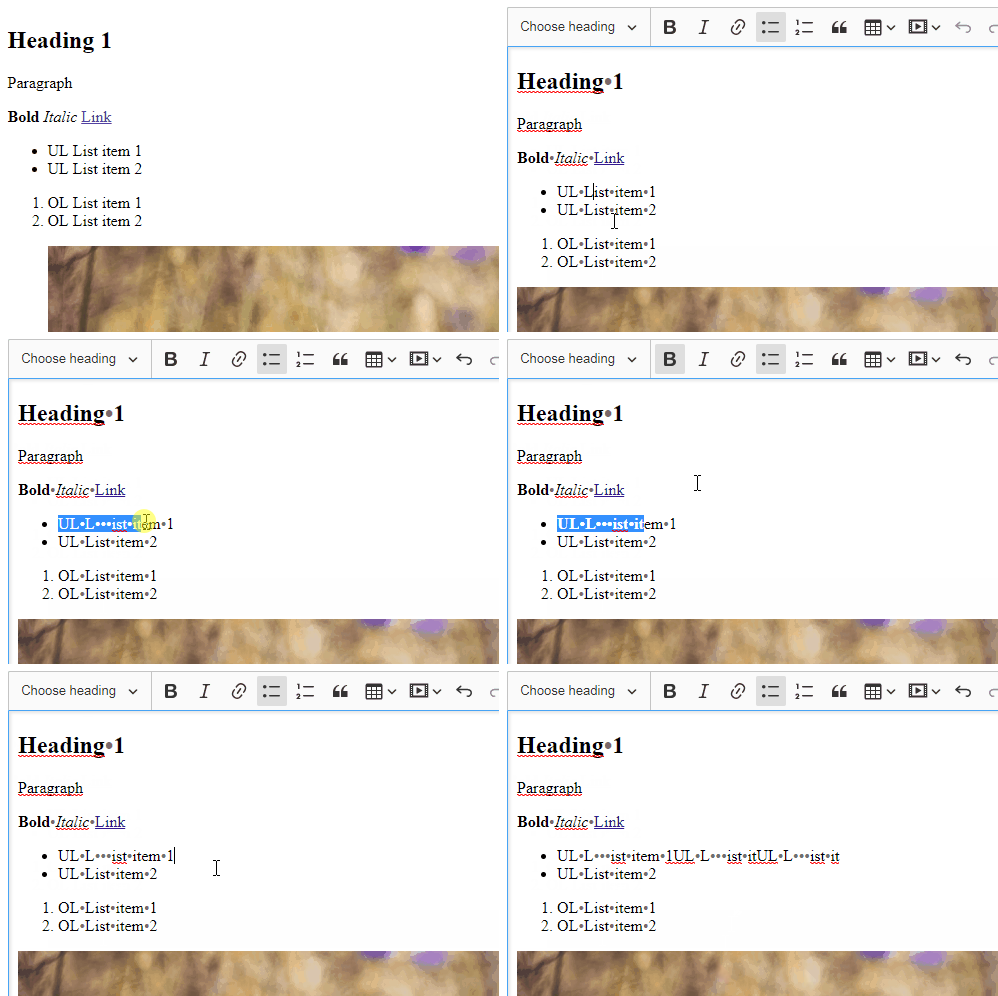
Since this is only an editingDowncast converter editor.getData() and copy-paste still receive spaces in their output. Also, I used a Unicode character for a dot as the normal dot would make spellchecker underline whole sentences.

Thanks very much for this example!
I implemented a variant of this for Neos CMS to insert soft hyphens. Had to adapt the code slightly to work with our current version of CKEditor 5.11 as createRange was not available in the model class.
You can find the code here https://github.com/Sebobo/Shel.Neos.Hyphens/blob/master/Resources/Private/Scripts/HyphensEditor/src/plugins/hyphens.js
@Reinmar you wanted me to ping when I found the solution ;)


I also would love to see this feature in CKEditor core (or native plugin). Is there a target date for this feature?

I made mine for CKEditor3 by editing the font used and creating a second copy where the space was replaced with a centered dot. Then the plugin just swapped fonts and applied a class to the editor using css to display paragraphs with dashed borders.

@habermanm that's an intriguing approach! Thank you for sharing! However, in my case, I am dependent on typekit fonts that need to support a range of non-latin languages, such as Chinese, Japanese, alongside English, so I'm not sure if that will be practical ...
@scofalik Thanks very much, The plugin is very interesting. I would like to make a small modification to adapt to my project:
- if I add two consecutive spaces, I would like to have:
<span style="color:#707070;">•</span><span style="color:#707070;">•</span> - if i add many consecutive spaces, i would like to have:
<span style="color:#707070;">•</span><span style="color:#707070;">•</span>...<span style="color:#707070;">•</span>
Can you suggest me a modification of the plugin to have this result

For my previous question, I found a solution by adding an optional uniqueId and this forces the insertion of a new span:
const viewSpaceSpan = viewWriter.createAttributeElement( 'span', { style: 'color:#707070;' }, {id: uniqueId} );