

 ckeditor
Tooltip for grouped toolbar items blocks access on smartphones
📝 Provide detailed reproduction steps (if any)
- Navigate to https://ckeditor.com/ckeditor-5/demo/editor-types/ on a smartphone.
- Open the grouped toolbar for the overflowing items.
- The focus is set on the first button, causing the tooltip to appear.
- The button on the second row is now inaccessible because the tooltip is rendered right on top of it.
✔️ Expected result
Unclear, but possibly no tooltip at all?
❌ Actual result
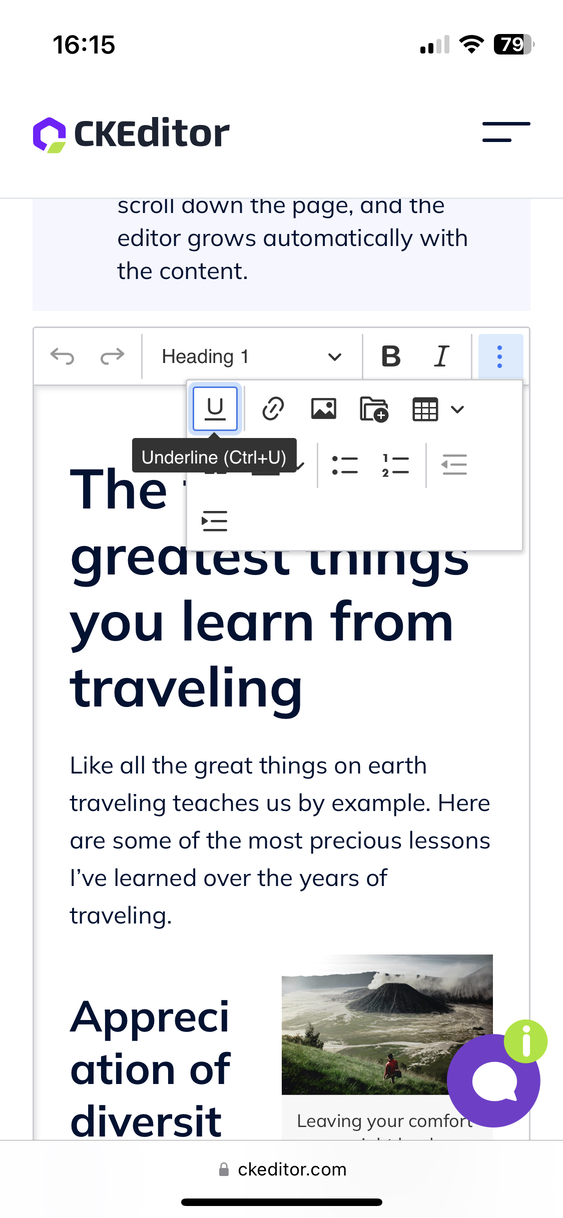
❓ Possible solution
Displaying tooltips on mobile is generally not advisable because the lack of “hover” will cause them to be always in the way of the user. Changing its alignment to any other direction will just block a different part of the UI.
📃 Other details
- Browser: Safari Mobile
- OS: iOS 16.4.1
- First affected CKEditor version: n/a
- Installed CKEditor plugins: n/a
If you'd like to see this fixed sooner, add a 👍 reaction to this post.


It works the same in all envs/browsers. In this particular case, the grouped items drop-drown hosts a two-line (wrapped) toolbar and that's why the tooltip belonging to the first line covers items in the second line.
I don't see any easy solution for that except maybe not displaying tooltips on touch devices. I'm not sure if this is a good idea, though (a11y, discoverability).

I don't see any easy solution for that except maybe not displaying tooltips on touch devices. I'm not sure if this is a good idea, though (a11y, discoverability).
Accessibility can be – at least for screen readers – preserved through aria attributes. Tooltips themselves don’t work great on touch devices, because users cannot open them reliably. For example, it is not possible to open the tooltip for the link button because any attempt to touch it (or swipe/smear over it) will immediately open the inline widget for links.
On second thought, the height of the tooltips are known at runtime. If you really want to keep them around you could increase the row gap when wrapping the buttons so that the tooltip only partially overlaps the adjacent row. It’s a stopgap solution but at least the buttons will be accessible again.
Tooltips themselves don’t work great on touch devices, because users cannot open them reliably.
My thoughts exactly. I cannot think of a mobile UI that would show tooltips. Maybe I don't pay attention and they are there, but I'd be surprised. If someone could confirm that they are indeed not commonly used or even an anti-pattern, the easiest solution then would be to hide them there.
EDIT: I did a quick scan of a couple of "mobile tooltips accessibility" articles and they mention only kind of a popup tooltips with additional information like guides and hints. Often pre-opened by the system when you first visit a certain form/view or a new feature is released. Different use cases than our tooltips for buttons.

There has been no activity on this issue for the past year. We've marked it as stale and will close it in 30 days. We understand it may still be relevant, so if you're interested in the solution, leave a comment or reaction under this issue.
