

 ckeditor
Table contextual toolbar is not showing
📝 Provide detailed reproduction steps (if any)
I used online builder to build decoupled editor. Everything works fine but the Table contextual toolbar is not showing.. If I check the index.html in my online build file, it works fine so it means I added the plugin.
✔️ Expected result
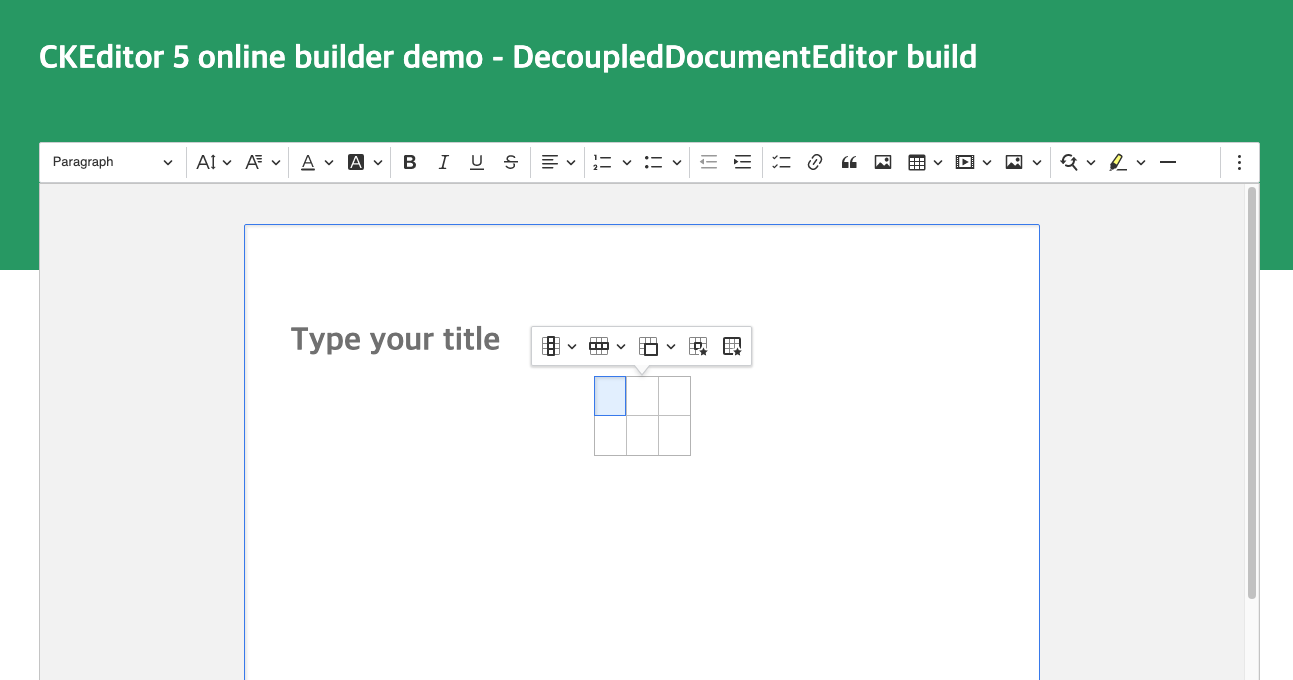
❌ Actual result

this is my editor code
import { Editor as ClassicEditor } from 'ckeditor5-custom-build/build/ckeditor'
import { CKEditor as Editor } from '@ckeditor/ckeditor5-react'
const editorConfiguration = { table: { contentToolbar: ['tableColumn', 'tableRow', 'mergeTableCells'], }, }
const toolBarRef = createRef<HTMLDivElement>()
`<div className="document-editor">
        <Editor
          editor={ClassicEditor}
          config={editorConfiguration}
          data=""
          onReady={(editor) => {
            if (toolBarRef.current) {
              toolBarRef.current.appendChild(editor.ui.view.toolbar.element)
            }
          }}
          onChange={(event, editor) => {
            const data = editor.getData()
            console.log({ event, editor, data })
          }}
          onBlur={(event, editor) => {
            console.log('Blur.', editor)
          }}
          onFocus={(event, editor) => {
            console.log('Focus.', editor)
          }}
        />
      </div>
    </div>
`

We are seeing the same issue and it seems that changing the screen height (triggering a re-calculation of the toolbar position) will cause the toolbar to suddenly show up - so it seems to be a positioning issue for a certain table position and available viewport combination. Would like to get an update on this....

I cannot reproduce it when using the OB as well, so it might point to some react problems with the decoupled editor.
@lschlesinger or @Esther-Choi, could you provide some code repo / codepen?

Have you solved the issue ? @Esther-Choi @Witoso it works if i use it on page but doesnt work on modal.

I am also experiencing this bug when using the table and table toolbar in React. It seems to break when within a modal.


There has been no activity on this issue for the past year. We've marked it as stale and will close it in 30 days. We understand it may still be relevant, so if you're interested in the solution, leave a comment or reaction under this issue.

We've closed your issue due to inactivity. We understand that the issue may still be relevant. If so, feel free to open a new one (and link this issue to it).