

 ckeditor
Improve error handling in CKBox plugin
📝 Provide a description of the improvement
The CKBox plugin currently displays error messages in a very generic way when a file upload fails, without providing any specific information about the reason for the failure. There could be multiple reasons why a file upload might fail, and error responses often contain useful information about the specific cause, such as exceeding file size or bandwidth limits, or having insufficient storage space under the current plan.
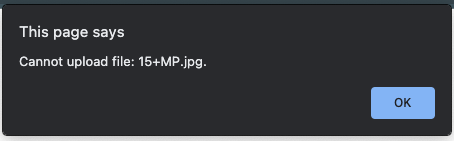
I think we could also think of displaying this kind of information in a more convenient way than using a simple alert.
Scenarios to cover:
- Uploading new files to CKBox without storage space left
- Uploading a file with a size that exceeds current plan limits.
- Uploading an image with a resolution that exceeds current plan limits.
- Choosing/embedding an image in CKEditor when the user exceeded the bandwidth limit and files are no longer served.
📃 Other details
- Browser: chrome
- OS: mac
- CKEditor version: …
- Installed CKEditor plugins: …
If you'd like to see this improvement implemented, add a 👍 reaction to this post.

Thank you for reporting this. Indeed, we need to make it more user-friendly. I would split it into two activities on our side.
Handle upload issues
As you mentioned, we have four scenarios in which we could be more specific
- Uploading new files to CKBox without storage space left
- Uploading a file with a size that exceeds current plan limits.
- Uploading n image with a resolution that exceeds current plan limits.
- Choosing/embedding an image in CKEditor when the user exceeded the bandwidth limit and files are no longer served.
@zaak do I understand correctly those are scenarios when the assets are uploaded, therefore this API endpoint? Asking as I see there 400 and 404 errors, and I'm not sure if those cover all scenarios you mentioned.
One thing to have in mind from the user perspective is that most likely the error will be shown to a person that cannot fix it (content creator), and we need to make sure that the follow-up step is clear for them (e.g. please get in touch with your administrator to resolve the issue) or a link_._
Prepare better error display
Here we could focus on a better display of the errors. Unfortunately, I lack the knowledge if we have some reusable component we could use for displaying them, like a flash message or a modal. Maybe @Reinmar or @oleq could help here.

Here we could focus on a better display of the errors. Unfortunately, I lack the knowledge if we have some reusable component we could use for displaying them, like a flash message or a modal. Maybe @Reinmar or @oleq could help here.
Here's the entry point to the whole notification system problem #8934.

@zaak do I understand correctly those are scenarios when the assets are uploaded, therefore this API endpoint? Asking as I see there
400and404errors, and I'm not sure if those cover all scenarios you mentioned.
@Witoso: Yes, that's correct. These are all 400 with details of the error inside data object, e.g.:
{
    "message": "Maximum image size for your subscription plan exceeded. The maximum size is 15 megapixels.",
    "traceId": "08a0ea4f-a2ce-4438-8822-fa9c9b4f578d",
    "statusCode": 400,
    "data": { "megapixelsLimit": 15 },
    "action": "Purchase higher subscription plan or contact sales."
}
For better UX some of these cases can be validated on the client side before the HTTP request is sent to the server (we can immediately check things like image resolution or file size). All the limits can be obtained from the /limits endpoint.
Additional information and follow-ups:
- Error messaging is already handled on the CKBox UI but is not available when the instance of the CKBox is not present, e.g. drag and drop images, pasting, and image upload.
- Translations: the error messages need to be translated. Fortunately, we may access the
CKBOX_TRANSLATIONSobject with already prepared messages. Thanks to that there will not be a need for duplication between the plugin and CKBox. To be checked by @zaak if it's present in all builds, as well as numerals support. - As was mentioned above, ideally we validate before
POST. That may require hitting/limitbefore, and adding a logic layer for recognizing problems. We cannot reuse the one from CKBox as it may not be available (see 1.). To refine, ideally, it would be great if we could not duplicate logic, or need to enhance it when new limits appear or change. - To help us prioritize, it would be great if @zaak could provide us internally how often we serve 400s, to better understand the scale of the issue.
- The website's demo is right now safe from the issue as it uses a different config (but errors in some cases may still appear).
- As mentioned by @oleq, the notification UI is a long topic, and needs prioritization. In this issue, we will focus on messaging without tweaking the alert's interface.
@zaak one request from my side, could you map the error data message to the scenarios? Or point to the docs that describes them?
- Uploading new files to CKBox without storage space left
- Uploading a file with a size that exceeds current plan limits.
- Uploading an image with a resolution that exceeds current plan limits.
- this one we have I think:
{ "megapixelsLimit": 15 }
- this one we have I think:
- Choosing/embedding an image in CKEditor when the user exceeded the bandwidth limit and files are no longer served.
@Witoso: Here are the examples of data for all these error responses:
- Uploading a file with a size that exceeds current plan limits.
"data": { "sizeLimit": 52428800 }(in bytes) - Uploading an image with a resolution that exceeds current plan limits.
"data": { "megapixelsLimit": 15 }(in megapixels) - Uploading new files to CKBox without storage space left.
"data": { "limit": "storage" } - Choosing/embedding an image in CKEditor when the user exceeded the bandwidth limit and files are no longer served.
"data": { "limit": "bandwidth" }
Additionally, we will include info about exceeded limits in /limits endpoint, so you will immediately know if upload or file embedding is possible at all.
The potential scope of v1 of improvements:
- cover the 4 scenarios for
POSTto serve a better error message (in English).
Post v1:
- Translate the messages using
CKBOX_TRANSLATIONS(waiting for cksource/ckbox#1597 - internal). - Use
/limitbefore POSTing, and add a logic layer for recognizing problems before uploading.
To discuss with the team.
The potential scope of v1 of improvements:
- cover the 4 scenarios for
POSTto serve a better error message (in English).
Post v1:
- Translate the messages using
CKBOX_TRANSLATIONS(waiting for cksource/ckbox#1597 - internal). - Use
/limitbefore POSTing, and add a logic layer for recognizing problems before uploading.
To discuss with the team.
@zaak, could you let us know when all limits will be available on the /limit endpoint? What's the plan here?
@zaak in docs I still see two scenarios only: https://api.ckbox.io/api/docs#tag/Limits/operation/getLimit
@Witoso: That's correct, the docs of this endpoint wait for the update, but the change is already on prod.
{
    "maxImageInMegapixelsLimit": 50,
    "maxFileSizeInBytesLimit": 5369000000,
    "pricingPlanName": "personal",
    "isMaxBandwidthExceeded": false,
    "isMaxStorageSizeExceeded": false
}
Scope v1:
- Before sending the image, check the
/limitendpoint and use it to check if the image can be uploaded. We will do that to fail early. If the file is large, it could take some time for a user to see an error.
- check image megapixels and compare to
maxImageInMegapixelsLimit, if larger: error (message below) - check the file size and compare to
maxFileSizeInBytesLimit, if larger: error. - check isMaxBandwidthExceeded, if true: error,
- check isMaxStorageSizeExceeded, if true: error.
- Show a proper message after uploading files:
-
"data": { "sizeLimit": 52428800 }: Upload failed: maximum file size allowed is %s. Decrease the size or upgrade your CKBox plan. -
"data": { "megapixelsLimit": 15 }: Upload failed: maximum image resolution allowed is %s. Decrease the size or upgrade your CKBox plan. -
"data": { "limit": "storage" }: Upload failed: storage quota exceeded. Upgrade your CKBox plan. -
"data": { "limit": "bandwidth" }Upload failed: bandwidth quota exceeded. Upgrade your CKBox plan.
In future iterations, we will focus on translations.
@Witoso: How about the following?
-
"data": { "sizeLimit": 52428800 }: Upload failed: maximum file size allowed is %s. Decrease the size of the uploaded file or upgrade your CKBox plan. -
"data": { "megapixelsLimit": 15 }: Upload failed: maximum image resolution allowed is %s. Decrease the image resolution or upgrade your CKBox plan. -
"data": { "limit": "storage" }: Upload failed: storage quota exceeded. Upgrade your CKBox plan. -
"data": { "limit": "bandwidth" }: Upload failed: bandwidth quota exceeded. Upgrade your CKBox plan.
Otherwise, it might not be obvious that these errors are about CKBox plans.
There has been no activity on this issue for the past year. We've marked it as stale and will close it in 30 days. We understand it may still be relevant, so if you're interested in the solution, leave a comment or reaction under this issue.

We've closed your issue due to inactivity. We understand that the issue may still be relevant. If so, feel free to open a new one (and link this issue to it).