

 ckeditor
Show full editor features in multiple lines?
Hi,
I have a CKEditor and I am getting a feature list in a single line and it is showing a menu icon, and then showing other options which are fine but when a table is getting selected it's causing the issue as the end user can't see the table.
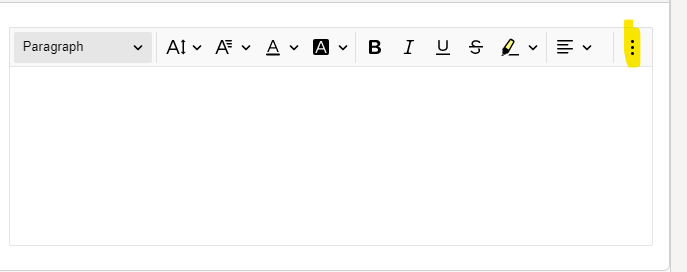
I want to achieve the same as the one in your documentation below
https://ckeditor.com/docs/ckeditor5/latest/examples/builds-custom/bottom-toolbar-editor.html
How can I achieve the same full editor? Do I need to change any setting using javascript?

you gave link to bottom-toolbar but mention "full editor" so i guess you mean the full feature editor which not group the toolbar
to do this you need add to the toolbar config shouldNotGroupWhenFull: true
you can read about it here
https://ckeditor.com/docs/ckeditor5/latest/features/toolbar/toolbar.html
but if iwrong and you talk about the bottom toolbar so there is configure in the link just click on the options under "Editor example configuration"

Thanks @kuku711
I was able to achieve the request of multi-line using this parameter.
I have another question, is it possible to add a hyperlink to an image in CKEditor5? In my editor, the link icon get's disabled as soon as I add an image.
@kinju4374 yep, there is LinkImage https://ckeditor.com/docs/ckeditor5/latest/features/images/images-linking.html
@kuku711
I tried below but it didn't work.
toolbar:['imageStyle:alignLeft', 'imageStyle:alignCenter', 'imageStyle:alignRight', '|', 'imageResize', '|', 'imageTextAlternative', '|', 'linkImage']
Let me know what I am doing wrong.
Hi @kinju4374,
Linking images is most likely not working for you because you didn't include the LinkImage plugin to the list of plugins which will be included in the build.
The plugin should be imported and added, as shown below:
import LinkImage from '@ckeditor/ckeditor5-link/src/linkimage';
ClassicEditor //or any other editor you use
  .create( document.querySelector( '#editor' ), {
    plugins: [
      // ...,
      LinkImage
    ],
    // ...
You can read more about installing plugins here.

There has been no activity on this issue for the past year. We've marked it as stale and will close it in 30 days. We understand it may be relevant, so if you're interested in the solution, leave a comment or reaction under this issue.

We've closed your issue due to inactivity over the last year. We understand that the issue may still be relevant. If so, feel free to open a new one (and link this issue to it).