

 citation-style-language
New style: Römisch Germanische Kommission (German) issues "indent" and juristification
Hi, I tried to put together a style for the Römisch Germanische Kommission. I used this as a template http://www.zotero.org/styles/deutsches-archaologisches-institut
There are still some issues concerning the bibliography. When finished it should look almost like this: https://journals.ub.uni-heidelberg.de/index.php/germania/article/viewFile/49475/43002 (except I don't want the 2 columns).
At the moment it looks like this: Möller-Wiering 2012 S. Möller-Wiering, Germany: Bronze and Pre-Roman Iron Ages. In: M. Gleba / U. Mannering (Hrsg.), Textiles and textile production in Europe from prehistory to AD 400 (Oxford u.a. 2012) 122–138.
-
problem is that I don't get the 2nd part of the entry (S. Möller...122-138) to indent... using display="indent" on the 2nd part, just the first line indents. using hanging-indent="true" the whole entry will indent.
-
problem is the juristification. When I juristify the bibliography in libreOffice the first part of the entry will stretch from margin to margin...looks terrible...Only the 2nd part should be in juristification.
Is it possible to change the csl in a way to solve this problems?
Here the link to the: https://gist.github.com/mariakohle/0806782bb095e611ac2c4afac4a65e9d
I hope I did everything right with this thread.
Thanks for the help Maria

Thanks for clearly explaining your problems and giving the link to your style.
Does https://gist.githubusercontent.com/rmzelle/7db4884b2c2dd3b3f2cdaa9053524d11/raw/519510b6aace73db07eb27d1ebc1713c5a8c6d77/romisch-germanische-kommission.csl solve issue 1? (see https://gist.github.com/rmzelle/7db4884b2c2dd3b3f2cdaa9053524d11/revisions for the changes I made; mainly removing the hanging-indent)
It now looks like this for me in Zotero's style editor:

Is that what you want? I'm not sure if issue 2 can be easily solved, other than switching from justified text to left-aligned text for the entire bibliography.

Thanks for your answer!
In libreOffice the bibliography looks like this with your changes:
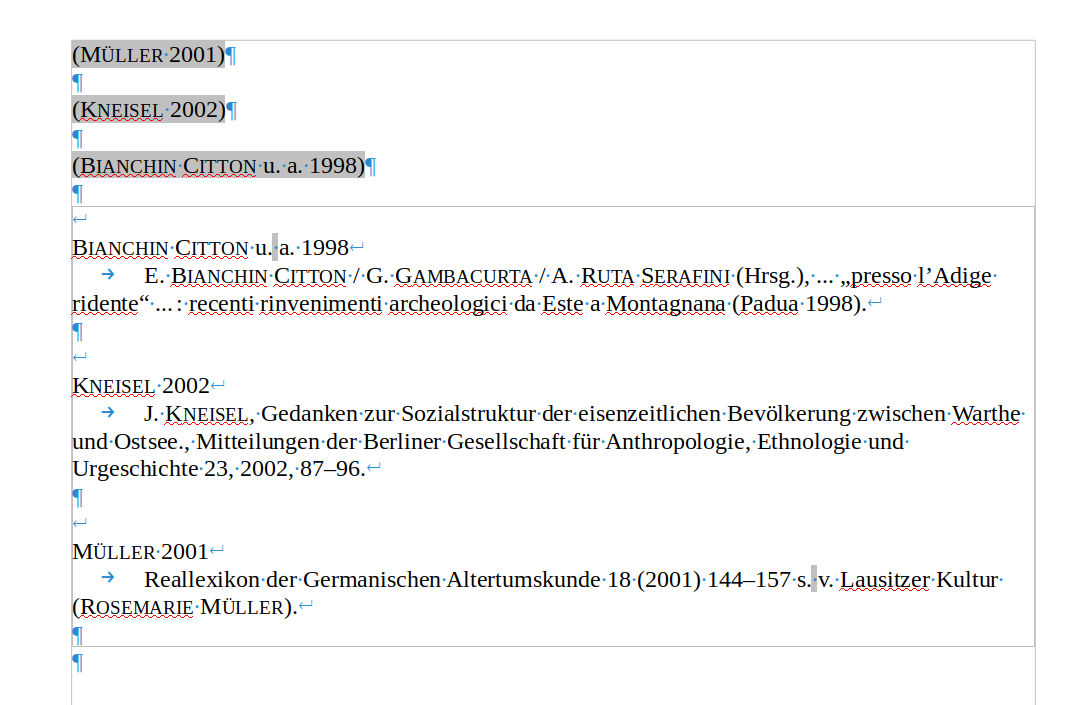
So it is still the problem that only the first line of the 2nd block will indent...could it be a libreOffice problem?
But yes, I want It to look like in the Zotero style editor you show. It looks the same in my Zotero style editor...
This issue hasn't seen any activity in the past 30 days. It will be automatically closed if no further activity occurs in the next two weeks.
![stale[bot] avatar](https://avatars.githubusercontent.com/in/1724?v=4 "Published by a pub.dev verified publisher")
So I think this is an issue with citeproc-js. The HTML looks exactly right, the RTF doesn't. I can reproduce the behavior @mariakohle 's sees here. @fbennett is that something that's fixable? I know getting display to work across formats is tricky.

This issue hasn't seen any activity in the past 30 days. It will be automatically closed if no further activity occurs in the next two weeks.
I'll try to look at it this week. Nudge if I don't. Can't promise a good fix - the two have very different ways of structuring Marin positioning IIRC. We're spoiled by HTML.

Hi @fbennett Currently working on a similar style and also ran into this problem (3rd line should also be indented). Have you had time to look into this? (I'm on Word though)

The problems persists with MS Word (and Libre Office?). To fix it for Word, you have to add a second display attribute to the full citation (i.e. <group display="indent" display="block".>) - which is then rendered with indent in Word.
It also works with HTML (i.e. RStudio/Quarto), but in Zotero Preview the full citation is not displayed with indent.
