
cirosantilli.github.io
 cirosantilli.github.io copied to clipboard
 cirosantilli
How to define Absolute section in routine
Hi
I tried to use the "objcopy" utility copies the contents of a picture to an object file as follow :
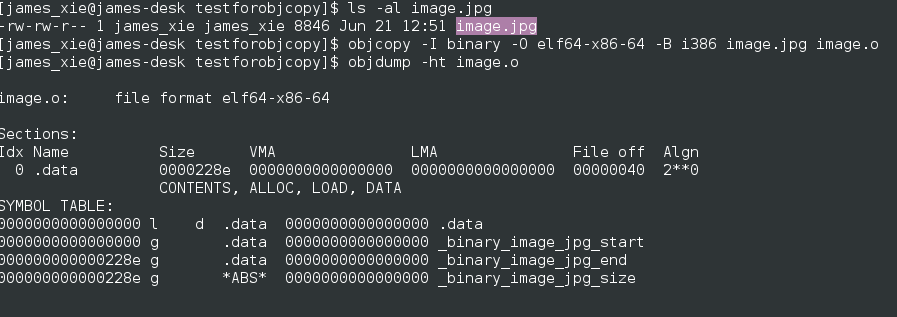
From the picture , we could see the "_binary_image_jpg_size" symbol is Absolute . And My question is that : How to define Absolute section in our routine . I searched on Google, but I found no useful information .

Hi James,
For questions that are not specific to my repositories like this, please ask on stack overflow.
objdump and objcopy only work on executable files like ELF, not on PNG images! :-)
Maybe you are confusing PNG images with disk images, which can be booted from?
I recommend the following:
- start with easier tasks than OS programming
- study English without stop ;-)

This is the description for the "objcopy" command's option "--binary-architecture=bfdarch " : --binary-architecture=bfdarch Useful when transforming a raw binary input file into an object file. In this case the output architecture can be set to bfdarch. This option will be ignored if the input file has a known bfdarch. You can access this binary data inside a program by referencing the special symbols that are created by the conversion process. These symbols are called _binary_objfile_start, _binary_objfile_end and _binary_objfile_size. e.g. you can transform a picture file into an object file and then access it in your code using these symbols.

who tell you the objdump and objcopy could only work on the executable files ?????
Please read the help documents of the commands seriously before answerd the question .
BTW , I have been a programmer about 10 years . Of course I know what a PNG file is !!!!!!
This is the description for the "objcopy" command's option "--binary-architecture=bfdarch " : --binary-architecture=bfdarch Useful when transforming a raw binary input file into an object file. In this case the output architecture can be set to bfdarch. This option will be ignored if the input file has a known bfdarch. You can access this binary data inside a program by referencing the special symbols that are created by the conversion process. These symbols are called _binary_objfile_start, _binary_objfile_end and _binary_objfile_size. e.g. you can transform a picture file into an object file and then access it in your code using these symbols.
[image: screenshot from 2017-06-29 09-01-41] https://user-images.githubusercontent.com/15681200/27666964-054aa3fe-5caa-11e7-8f50-b62b8ca75b61.png
who tell you the objdump and objcopy could only work on the executable files ?????
Please read the help documents of the commands seriously before answerd the question .
BTW , I have been a programmer about 10 years . Of course I know what a PNG file is !!!!!!
2017-06-29 1:49 GMT+08:00 cirosantilli [email protected]:
Hi James,
For questions that are not specific to my repositories like this, please ask on stack overflow.
objdump and objcopy only work on executable files like ELF, not on PNG images! :-)
Maybe you are confusing PNG images with disk images, which can be booted from?
I recommend the following:
- start with easier tasks than OS programming
- study English without stop ;-)
— You are receiving this because you authored the thread. Reply to this email directly, view it on GitHub https://github.com/cirosantilli/chat/issues/28#issuecomment-311736324, or mute the thread https://github.com/notifications/unsubscribe-auth/AO9GsINDBrJ7-ZcSFKXgN8ILsdZfGChOks5sIpITgaJpZM4OHcI3 .
Hi James, sorry for the misunderstanding. Take it easy.
Ask on stackoverflow.
Give more context: what do you want o accomplish? Why a png?