

 chromaui
Storybook tests fail only in chromatic
When I run my storybook locally, all of my interaction tests pass. When I run chromatic, the storybook builds, but on the "test your stories" step it fails with Error code 2, and I can see the failing test in the chromatic logs.
Here is my story, with some relevant helper functions. The next-to-last assertion, await expectRowCount(2) is the one that is failing in Chromatic (both when I run chromatic locally, and when it's run as part of my Bitbucket pipeline); and FWIW the actual last assertion also fails if I comment that above-mentioned one.
The expectRowCount helper is used all over the stories file with no other problems. And, again, the tests pass when I run storybook locally.
export const getRows = (container = screen as TestContainer): HTMLElement[] =>
  container.getAllByRole('row').slice(1);

export const getButton = (name: string | RegExp, container = screen as TestContainer): HTMLButtonElement =>
  container.getByRole('button', { name });

export const expectRowCount = async (len: number) =>
  await waitFor(() => expect(getRows()).toHaveLength(len));

const testSelectingMLB = async ({ rows }: { rows: number }) => {
  // open the dropdown
  fireEvent.mouseDown(getButton('All Sports'));

  // click MLB, assert dropdown state
  fireEvent.click(within(screen.getByRole('listbox')).getByText('MLB'));
  expect(getButton('MLB')).toBeInTheDocument();
  expect(screen.queryByRole('button', { name: 'All Sports' })).not.toBeInTheDocument();

  await expectRowCount(rows);
};

const AllOptions = {
  storyName: 'Combining all options',
  ...Default,
  args: {
    ...Default.args,
    searchKey: 'playerName',
    dropdownFilters: [filtersWithoutOptions],
    buttonGroupFilters: [buttonGroupConfig],
  } as Props,
  play: async () => {
    // SearchKeys.play, but without the reset
    const input = screen.getByPlaceholderText(/search/i);
    fireEvent.change(input, { target: { value: 'nday' } });

    // test multi-filter
    getButton('In Progress').click();

    await expectRowCount(2); // <<< this fails, in chromatic only

    // test single filter (select MLB)
    await testSelectingMLB({ rows: 1 });  // if I comment the failing test above, this one also fails (in chromatic only)
  },

Hi @tuzmusic have you tried accessing the hosted version of your SB and checking if the test passes in your browser? If you write into Chromatic support we can take a closer look at your specific SB and see what the issue might be.

Posting in case this helps anyone: I found that Chromatic was running Storybook in a different way from my storybook command - like this: npm run build-storybook && npx http-server ./storybook-static. When I ran it like that, I was seeing stories fail in this version of the Storybook web client as well. After talking with support, it ended up being missing scripts and public files that I needed to supply to the storybook-static folder, by adding this to ./storybook/main.js:
staticDirs: ['../public']
That copies all files from my /public folder at the root of the project to the storybook-static folder that gets generated when you run build-storybook. Doc on staticDirs: https://storybook.js.org/docs/react/configure/images-and-assets

@aldrichdev Thank you for posting this and saved me a lot of time. I am running into the same issue as well. I am using heroicons and I think it is causing the test to fail.

hi @stuthib!
I'd love to help with the heroicons issue.
To make sure it wasn't a fundamental issue, I created a reproduction using webpack, react, and @heroicons/react and chromatic rendered as expected (for me.)
http://localhost:6006/?path=/story/example-button--primary
could you tell me a little more about your environment?

hi @stuthib!
I'd love to help with the
heroiconsissue. To make sure it wasn't a fundamental issue, I created a reproduction usingwebpack,react, and@heroicons/reactand chromatic rendered as expected (for me.)http://localhost:6006/?path=/story/example-button--primary
could you tell me a little more about your environment?
Thank you for the quick response. We are using vite, react, typescript and @heroicons/react. It works well locally, but the interaction test fails on chromatic which is run on our CI.
I am testing a text input which has an icon in it. I am not importing the icons directly in the story file, but it is imported in another component called icons which is under src and the input component is using the icon in it.
Please let me know if I can help provide more information.
@chantastic maybe it is not an issue with having the icons. Because I tried to remove it and run, it still fails. It works okay when I run using localhost, but fails using npm run build-storybook && npx http-server ./storybook-static

This is what I see on my localhost
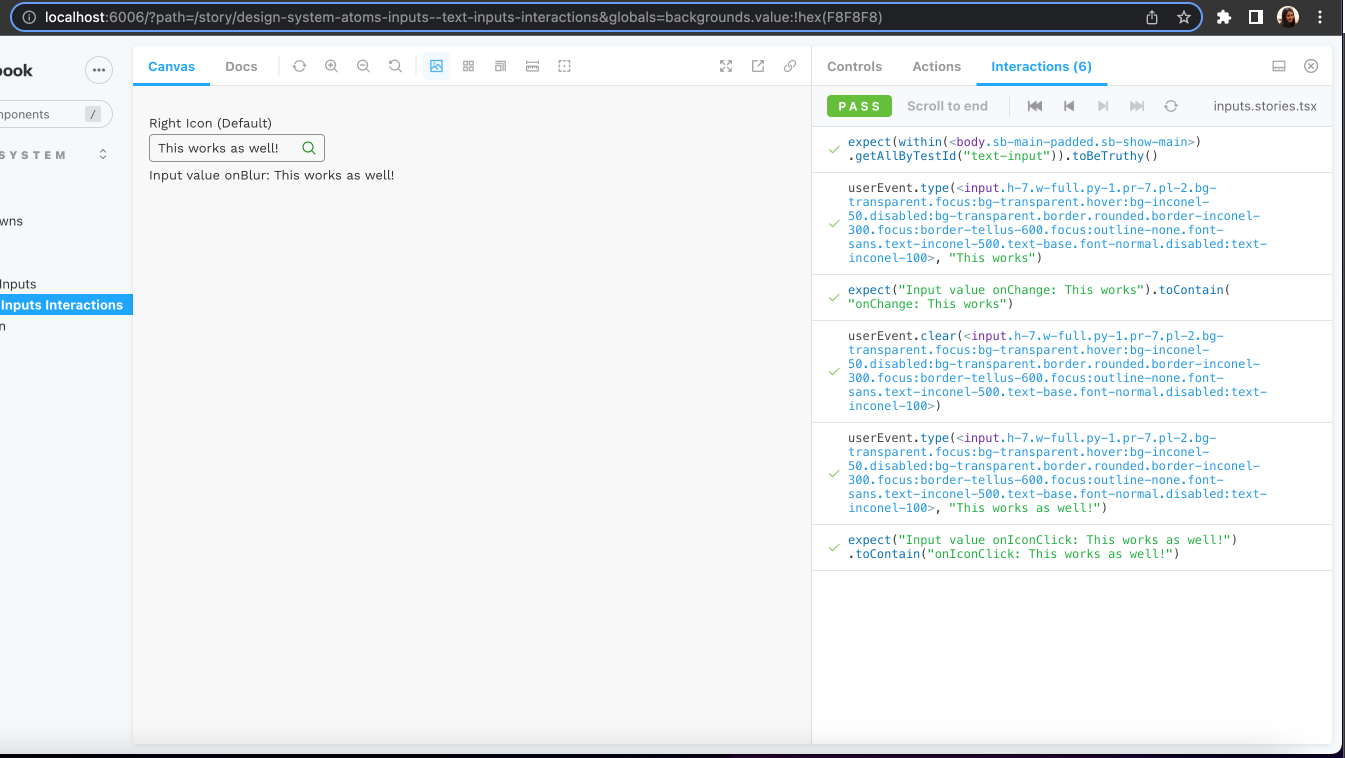
@stuthib thank you for the additional information! would it be possible to see the code for that interaction? I'd like to reproduce it as thoroughly as possible.
Yes for sure. This is the TextInput component and styles use tailwind css.
import { useEffect, useState } from 'react'
import { textInputPadding, textInputBorderClass } from './classMaps'
import Icon from '../Icons'
import { TextInputProps } from './types'

export const TextInput: React.FC<TextInputProps> = ({
  onIconClick,
  onChange,
  onKeyDown,
  onBlur,
  onFocus,
  placeholder = '',
  icon,
  position = 'right',
  autoFocus = false,
  value,
  disabled = false,
  error = false
}) => {
  const [inputValue, setInputValue] = useState(value ?? '')
  const inputPaddingClass = textInputPadding(position, icon)
  const inputBorderClass = textInputBorderClass({ error, disabled })
  const inputBackgroundClass =
    'bg-transparent focus:bg-transparent hover:bg-inconel-50 disabled:bg-transparent'
  const inputTextClass =
    'font-sans text-inconel-500 text-base font-normal disabled:text-inconel-100'

  useEffect(() => {
    if (value !== undefined) {
      setInputValue(value)
    }
  }, [setInputValue, value])

  const onInputChange: (event: React.ChangeEvent<HTMLInputElement>) => void = (
    event
  ) => {
    const target = event.target as HTMLInputElement
    setInputValue(target?.value)
    if (onChange !== undefined) {
      onChange(event, target.value)
    }
  }

  const onClick: (event: React.MouseEvent<HTMLElement>) => void = (event) => {
    if (onIconClick === undefined) return
    onIconClick(event, inputValue)
  }

  return (
    <div className='flex items-center relative w-44'>
      {icon !== undefined && position === 'left' && (
        <div className='absolute inline-block left-0 ml-1.5'>
          <Icon icon={icon} disabled={disabled} onClick={onClick} />
        </div>
      )}
      <input
        disabled={disabled}
        value={inputValue}
        onChange={onInputChange}
        onBlur={onBlur}
        onFocus={onFocus}
        onKeyDown={onKeyDown}
        placeholder={placeholder}
        autoFocus={autoFocus}
        className={`h-7 w-full py-1 ${inputPaddingClass} ${inputBackgroundClass} border rounded ${inputBorderClass} focus:outline-none ${inputTextClass}`}
      />
      {icon !== undefined && position === 'right' && (
        <div className='absolute inline-block right-0 mr-1.5'>
          <Icon icon={icon} disabled={disabled} onClick={onClick} />
        </div>
      )}
    </div>
  )
}
icon is just a string and I pass in heroicon as a string that is exported from my Icons component. Example MagnifyingGlassIcon
In my story, I am using the above component as below -
const InputContainer: React.FC<{
  label?: string
  position?: TEXT_INPUT_ICON_POSITION
  icon?: TEXT_INPUT_ICONS
  error?: boolean
  disabled?: boolean
  placeholder?: string
  autoFocus?: boolean
  defaultValue?: string
}> = ({
  label,
  position,
  icon,
  error,
  disabled,
  placeholder,
  autoFocus,
  defaultValue
}) => {
  const [value, setValue] = useState<string>(defaultValue ?? '')
  const [actionType, setActionType] = useState<string>('')
  return (
    <div className='mt-2' data-testid='text-input'>
      <label className='font-sans text-base'>{label}</label>
      <TextInput
        error={error}
        disabled={disabled}
        position={position}
        icon={icon}
        autoFocus={autoFocus}
        placeholder={placeholder}
        value={value}
        onChange={(_, value: string) => {
          setValue(value)
          setActionType('onChange')
        }}
        onBlur={(event) => {
          setValue(event?.target?.value)
          setActionType('onBlur')
        }}
        onIconClick={(_, value: string) => {
          setValue(value)
          setActionType('onIconClick')
        }}
      />
      {value.length > 0 && (
        <span className='font-sans text-base'>
          Input value {actionType}: {value}
        </span>
      )}
    </div>
  )
}
// Interaction test
const TemplateInput: ComponentStory<typeof TextInputs> = (args) => {
  return (
    <InputContainer label='Right Icon (Default)' icon='MagnifyingGlassIcon' />
  )
}
export const TextInputsInteractions = TemplateInput.bind({})

TextInputsInteractions.play = async ({ canvasElement }) => {
  const canvas = within(canvasElement.parentElement as HTMLElement)
  const inputs = await canvas.getAllByTestId('text-input')
  expect(inputs).toBeTruthy()

  const inputContainer = inputs[0]
  const inputWithIcon = inputContainer.getElementsByTagName('input')[0]

  userEvent.type(inputWithIcon, 'This works')
  // await expect(inputWithIcon.value).toBe('This works')

  const labelOnChange = await inputContainer.getElementsByTagName('span')[0]
  expect(labelOnChange.textContent).toContain('onChange: This works')

  userEvent.clear(inputWithIcon)

  userEvent.type(inputWithIcon, 'This works as well!')

  const icon = inputContainer.getElementsByTagName('svg')[0]
  fireEvent.mouseDown(icon)

  const labelOnIconClick = await inputContainer.getElementsByTagName('span')[0]
  expect(labelOnIconClick.textContent).toContain(
    'onIconClick: This works as well!'
  )
}
I have a similar issue (sb 7.0.4), the tests run correctly on local (i.e. npm run test-storybook) but fail in Chromatic.
The weirdest thing is that if I manually play the failed test on the deployed storybook it works (i.e. I go to the failed case and re-play it). In my case, all the errors are related to elements not being found (e.g. error messages).
I guess the play function is executed before the story is ready or similar.

@ignaciolarranaga chances are there's a timing issue here. Your play function needs to wait for something to appear (using findBy or similar), but it works locally because the rendering is a little bit quicker (or what have you).
Because often components aren't truly "ready" until after SB think they are rendered (this can be for various reasons), it's often a good idea to put a findBy or waitFor at the top of a complex play function.
@chantastic maybe it is not an issue with having the icons. Because I tried to remove it and run, it still fails. It works okay when I run using localhost, but fails using
npm run build-storybook && npx http-server ./storybook-staticThis is what I see on my localhost
I'm having an issue exactly like errors shown in these images. Some notes:
-
I create a new library with nextjs, a simple div component and a story with an interaction test in it.
- WORKS: Serving locally and running the test again the locally served storybook
- WORKS: Building and serving the static build locally
- WORKS: Uploading to chromatic
-
I create a new library with react-vite, setup the same component and a story with interaction test
- WORKS: Serving locally and running the test again the locally served storybook
- FAILS: Building and serving the static build locally
- FAILS: Uploading to chromatic
- WORKS: If I comment out the interaction test in the story and leave everything else the same. Both the statically generated, locally served and chromatic runs both work.
-
There appears to be an issue with the jest/ testing library interaction tests for a react-vite based project when uploading to chromatic?

I've managed to get my react-vite storybook with interactions/ tests working. I'm nx monorepos which only installed "@storybook/jest": "~0.1.0" when initialising the library.
I manually upgraded to "@storybook/jest": "0.2.2" which fixed the issue.
Reference issue that helped me solve this. https://github.com/storybookjs/jest/issues/20
Hope this helps someone else