

 chocolatey
PowerShell - Start-ChocolateyProcessAsAdmin should log to stdout and not stderr
When running with powershell.exe as an external process, it adds all output messages as stderr to the CLIXML stream when those logging streams are not info or output. This behavior seems incorrect.
Related to #901
Details
If you see Exited with '0', it means it is good - those are not actually errors. Bear with me a second - so when you call Start-ChocolateyProcessAsAdmin, it calls that process which runs in a separate PowerShell process to perform that work. PowerShell logs on multiple streams - DEBUG, VERBOSE, INFO (stdout), WARN, and ERROR (stderr) streams. However, when it exits and needs to provide those logs back to an exe (like choco.exe), it needs to combine those streams together as there is only stdout and stderr. You can probably guess what it does with DEBUG, VERBOSE, and WARN - straight to stderr, which makes it appear that there is an error that occurs when it is in fact just capturing the logs. Having it come back in CLIXML is also not helpful to deduce this is not an issue. We need to find a better way to log that.

This explains why AU fails when inserting certificate. I had to find a way to not execute that func within au updater

To note, this may be something in SMA doing this. Still need to find a way to identify why it logs to stderr
This is somewhat handled by #1126 - meaning it will just run the powerShell block when the process is already elevated.
With the partial handling on this, I don't feel comfortable providing a fix for this without more testing time. Bumping to next release.
@ferventcoder Any progress on this? Or any workaround available?
The problem with this is that eg the yarn package always outputs error and we're in the process of rolling out this package company wide, which will lead to people believing that the installation was not successful even though it was.

Would a change in the package chocolateyinstall.ps1 to: Start-ChocolateyProcessAsAdmin -Statements $script -ea SilentlyContinue or Start-ChocolateyProcessAsAdmin -Statements $script | out-null work?

@bcurran3 not really an option - both of those have different implementations - if there is an error we want to know. If we don't output any of the output and there is an issue, it will be invisible to the user. The problem is much of that falls in the verbose/debug/warn streams and outside of PowerShell, it doesn't know how to put that into stdout, so it shoves all of those into stderr. Quite annoying behavior. We need a way to redirect some streams to stdout (and I have tried to use redirection as part of the call to PowerShell, it didn't like it).

Possible workaround.
Let powershell log everything to a file. And choco reading those logs and appending it to choco log instead of reading the stout and stderr, after the process is over. Finally, showing the INFO messages to output.

4 years and the issue is still there. Maybe one day you beat Atlassian with starved backlog :)

Anyone ever, manage to find any workaround for this? All the null redirects I've tried fail to work. Cant redirect to a variable, null, or a file. Tried many different ways of redirection. Don't even care if an error is overlooked at this point as I have checks in place afterwards. Just want some way of suppressing the junk output. I spend hours trying as many tricks as I can think of, never find a way, give up, then another user complains about chocolatey giving errors and I try again.
ping.
When using Start-ChocolateyProcessAsAdmin, even if piping to Out-Null...
(truncated)

Finally came up with a workaround until the Chocolatey bug is fixed:
- Use a background job that runs
Start-ChocolateyProcessAsAdminand wait on it to complete - There are some quirks with this workaround, such as having to set the error action preference and import the Chocolatey installer module since it runs in its own session
Things that don't work
- Tried
$ErrorActionPreference = "SilentlyContinue" - Tried piping to
Out-Null - Tried redirecting output to file
- Tried
2>&1 | Out-Null
Unfortunately none of these suppress the red text.
Workaround example
I recently adopted the Recuva package, and when running the ChocolateyInstall.ps1 script, I was having issues with the #< CLIXML message showing up in red in Windows Terminal. This can confuse users.
Here's the workaround I used: https://github.com/asheroto/ChocolateyPackages/blob/c4bd7d223ffee1c6ce37a09a917a7cb4f564914d/recuva/tools/ChocolateyInstall.ps1#L18-L58
Now the package install is happy:
UPDATE
Well unfortunately although that works locally, it's rejected by automatic validation.
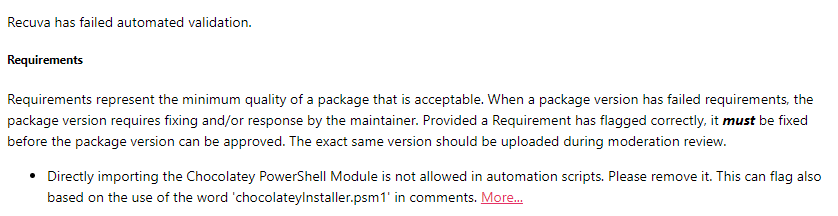
The More link goes here: https://docs.chocolatey.org/en-us/community-repository/moderation/package-validator/rules/cpmr0011
But that doesn't have any info on it yet.
For this particular situation, I decided to just run the script requiring admin permissions since that's what CCleaner does (same developer as Recuva).
https://github.com/asheroto/ChocolateyPackages/blob/0d2d6343b6b77a15f79ff2d66a9adeebf6f870ae/recuva/tools/ChocolateyInstall.ps1