
sd

sd copied to clipboard
 chmln
chmln
How to disable global mode
Hi.
Given the text below:
[package]
name = "foo"
version = "0.1.0"
edition = "2018"

[dependencies]
rocket = { version = "0.5.0-rc.1", default-features = false }
serde = { version = "1.0.126", features = ["derive"] }
serde_json = "1.0.64"
serde_qs = "0.8.3"
reqwest = { version = "0.11.3", features = ["json"] }
thiserror = "1.0.25"
I can match only the first match by emitting /g on my regex:
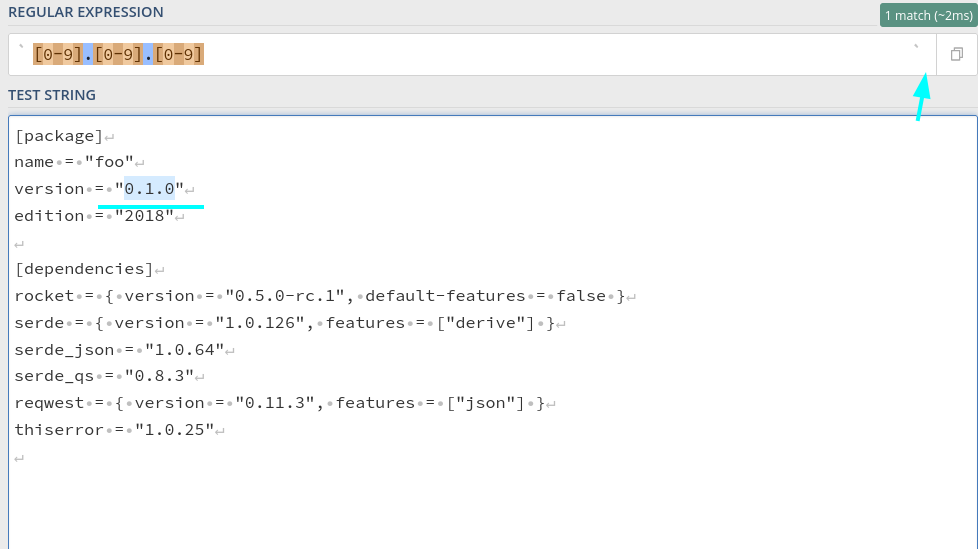
However, I can't do this in sd. I don't find a single line flag:
OPTIONS:
    -f, --flags <flags>
            Regex flags. May be combined (like `-f mc`).

            c - case-sensitive
            e - disable multi-line matching
            i - case-insensitive
            m - multi-line matching
            s - make `.` match newlines
            w - match full words only
It will change all the matches in the text, not once.
❯ sd -p -f e '[0-9]+.[0-9]+.[0-9]+' '1.0.3' Cargo.toml

[package]
name = "foo"
version = "1.0.3"
edition = "2018"

[dependencies]
rocket = { version = "1.0.3-rc.1", default-features = false }
serde = { version = "1.0.3", features = ["derive"] }
serde_json = "1.0.3"
serde_qs = "1.0.3
❯ sd --help
sd 0.7.6
Any suggestion? Thanks in advance.


This should be resolved now that you can use the -n aka --max-replacements flag to limit the number of desired replacements
