

 chkr1011
tree view ?
Is it possible to add TreeView which is loaded dynamically instead of ReceivedApplicationMessages? I think that list of messages in ListBox is a bad idea, it's uncomfortable to work with it
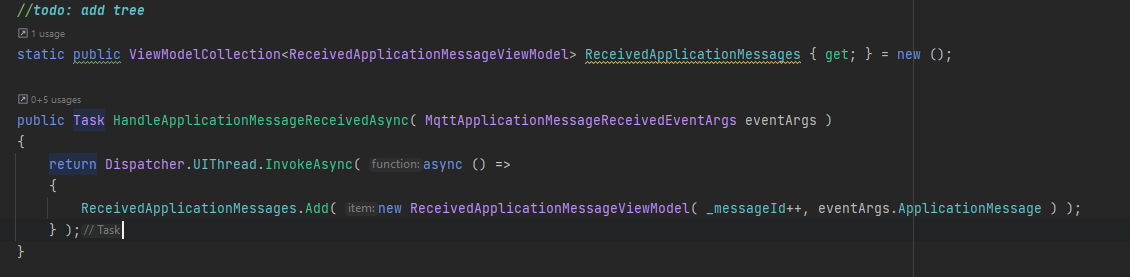 `
`

I wrote algorithm for prefix tree but I can't understand how to display it on ui
`internal static class Program
{
private static readonly ConcurrentQueue<ICollection
    private static async Task Main()
    {
        Task.Run(ProcessFilelists);

        var lines = await File.ReadAllLinesAsync("input-lists.txt"); // add ReceivedMessages.Topic

        Filelists.Enqueue(lines
            .Select(t => t.TrimStart('/'))
            .Where(x => x != string.Empty)
            .ToArray());

        while (true)
        {
            await Task.Delay(100);
        }
    }

    public class Tree
    {
        public readonly Dictionary<string, Tree> Trees = new Dictionary<string, Tree>();
        public readonly List<string> Files = new List<string>();
    }

    private static async Task ProcessFilelists()
    {
        while (true)
        {
            if (!Filelists.TryDequeue(out var list))
            {
                await Task.Delay(100);
                continue;
            }

            DrawTree(MainTree, list);
        }
    }

    private static void DrawTree(Tree rootTree, ICollection<string> list)
    {
        rootTree.Files.AddRange(list.Where(x => !x.Contains('/')));

        var subfolders = list
            .Where(x => x.Contains('/'))
            .Select(filename =>
            {
                var array = filename.Split('/');
                var prefix = array.First();
                var subFile = array.Skip(1).Aggregate((a, b) => a + '/' + b);

                return (prefix, filename: subFile);
            })
            .ToArray();

        subfolders
            .GroupBy(t => t.prefix)
            .ToList()
            .ForEach(t =>
            {
                var folder = t.Key;
                if (!rootTree.Trees.ContainsKey(folder))
                {
                    rootTree.Trees[folder] = new Tree();
                }

                DrawTree(rootTree.Trees[folder], t.Select(t1 => t1.filename).ToArray());
            });
    }
}
`
Please try the current version in main branch. It uses a data grid now which should improve usability and performance a lot.

Please try the current version in main branch. It uses a data grid now which should improve usability and performance a lot.
hm it looks really good but there is a problem
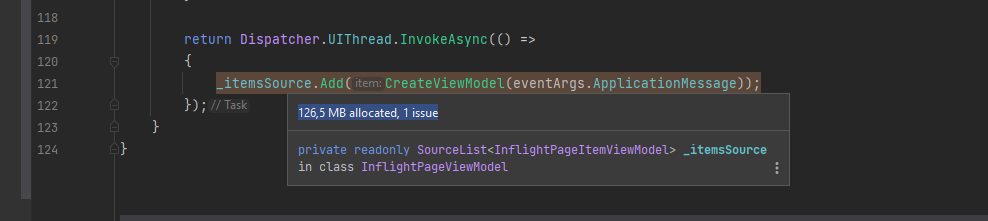
that is why I changed your code a little bit:
static public event EventHandler? NewMessageArrived;
           var timer = new Timer( 1000 ) {AutoReset = false};
           timer.Elapsed += ( sender, args ) => ChunkMessages();
           NewMessageArrived += (sender, args) => { if (!timer.Enabled) timer.Start(); };

private ConcurrentViewModelCollection<ReceivedApplicationMessageViewModel> ReceivedApplicationMessages { get; } = new ();
       private ConcurrentViewModelCollection<ReceivedApplicationMessageViewModel> ReceivedApplicationMessagesChunk { get; } = new();


       public Task HandleApplicationMessageReceivedAsync( MqttApplicationMessageReceivedEventArgs eventArgs )
       {
           return Dispatcher.UIThread.InvokeAsync( () =>
           {

               ReceivedApplicationMessagesChunk.Insert( 0, new ReceivedApplicationMessageViewModel(
                   _messageId++,
                   eventArgs.ApplicationMessage ) );

               NewMessageArrived?.Invoke(null, EventArgs.Empty);
           } );
       }

       private void ChunkMessages()
       {
           if ( !_isRecordingEnabled ) return;
           ReceivedApplicationMessages.InsertRange( 0, ReceivedApplicationMessagesChunk);
           ReceivedApplicationMessagesChunk.Clear();
       }
If !_isRecordingEnabled All received message are not getting lost. You add messages to collection but don't send them on ui
I will add a setting in the future to toggle between "new items on top" or "new items at the bottom". As for now I will stick to the first because otherwise the selected item will visually "flew away" 😄
listbox has AutoScrollToSelectedItem property and I think you can use it
No because it is DataGrid now so this is not available.
private bool flag;

private void HandleSelectionChanged(object sender, SelectionChangedEventArgs e)
{
    if (flag)
    {
        _dataGrid.ScrollIntoView(_dataGrid.SelectedItem, null);
        return;
    }

    flag = true;
}