

 chhoumann
[BUG] - Quick Capture Daily Note adding Space in name
Describe the bug
I have a QuickAdd macro to capture a note to my daily note (formatted as yyyy-mm-dd). When I launch the macro it seems to add a space to the name of the file. Specifically if daily note (2021-08-19.md) has already been created when I launch the macro is creates another file with a leading space ( 2021-08-19.md)
To Reproduce
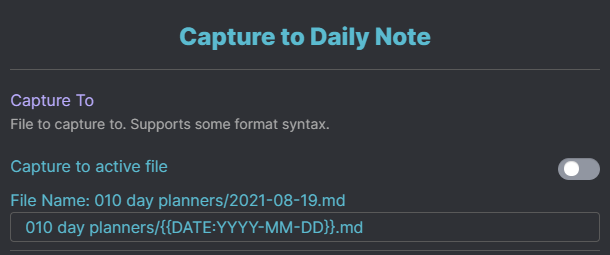
The "Capture To: " value in the plugin:
010 day planners/{{DATE:YYYY-MM-DD}}.md
The other setting turned on are as follows:
Create file if it doesn't exist = Yes
Insert after = ## Misc Notes
Create line if not found = Yes / Top
Expected behavior
The macro should not add the space in the name.. .it should see that the daily note file (2021-08-19.md) is present and jsut append the "capture" to the note... not create a new note let alone one with a space.
Screenshots
Desktop (please complete the following information):
- OS: Windows 10
- Plugin Version: 0.4.0
- Obsidian Version: 0.12.13

I initially thought I had a similar issue. In my case I initially mistyped the path and inserted a leading space. " Inbox/{{DATE:YYYY-MM-DD}}.md". Then I corrected it, but QuickAdd was still adding the leading space. Then I realized that I need to disable the macro and re-enable it again for the settings to take effect. (Probably closing and re-opening Obsidian could also work).
