

 chhoumann
[BUG] Parsing issues with Auto Note Mover plugin set on automatic
Describe the bug
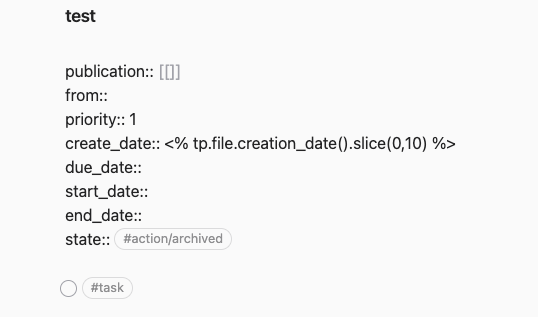
When I create a note based on a template, if I have the Auto Note Mover plugin on AND with the Trigger set on "Automatic", dates such as <% tp.file.creation_date().slice(0,10) %> are not parsed. Obsidian throws a Templater error and the console shows two errors:
app.js:1 Error: ENOENT: no such file or directory, open '/Users/andreatitolo/Obsidian/obsidian-personale/test.md'plugin:templater-obsidian:82 Templater Error: Template parsing error, aborting. ENOENT: no such file or directory, open '/Users/andreatitolo/Obsidian/obsidian-personale/test.md'
Of course, the file is created and the template is applied correctly, except for the date (see screenshot).
Expected behavior Expected for the date to be parsed correctly (e.g. 2022-06-27), as it does when using the Templater plugin.
Screenshots
The note created with QuickAdd template and Auto Note Mover with trigger set to automatic.
Desktop (please complete the following information):
- OS: MacOS Monterey 12.4
- QuickAdd version: 0.5.5
- Templater version: 1.12.0
- Auto Note Mover version: 1.2.0
Additional context Disabling Templater plugin doesn't change anything apart from hiding the Error. The console outputs only shows error 1) listed above. Creating the same note with the same template using Templater works. Creating the same note with Auto Note Mover trigger set to manual works too.
Template used:
publication:: [[]]
from::
priority:: 1
create_date:: <% tp.file.creation_date().slice(0,10) %>
due_date::
start_date::
end_date::
state:: #action/archived

- [ ] #task
