

 chhoumann
[BUG]
Describe the bug
Using the CAPTURE option, the plug-in creates a file with no name but with the correct data inside. Repeated execution finds the no name file and appends, as expected.
To Reproduce Steps to reproduce the behavior:
- Enter CTL-P
- Type "Quick" and see the command I set up in the list.
- ENTER
- If I had text selected, it exits and writes that text to the no name file.
- If I had no text selected, I get the prompt to enter text. If I enter something, it puts that in the no name file.
- Nothing I try will let me write data to any file but the no name file, or to the bottom of the active file if I have that option checked.
Expected behavior I expect it to find the file I specify and append the data to it. However, it ignores the file I specify and creates a no name file.
Screenshots
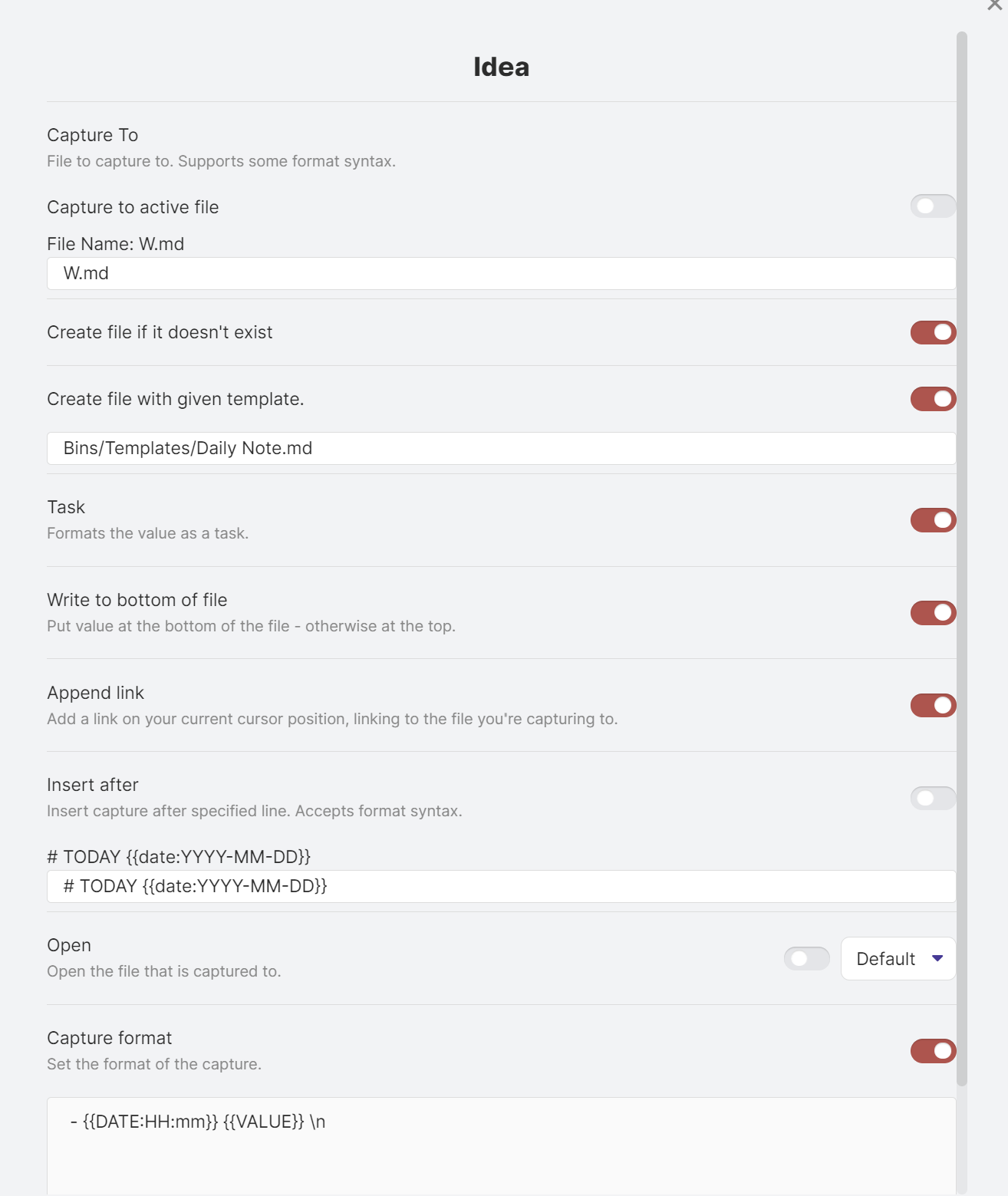
This shows the options and values I have set. NOTE: the problem occurs with other options as well.
Desktop (please complete the following information):
- OS: [e.g. iOS]
-
Windows 11 - Browser [e.g. chrome, safari]
-
Firefox - Version [e.g. 22]
-
98.0.1 (64 bit)
Additional context Add any other context about the problem here.
I followed your YouTube explanation and found that I could not get it to work after the 10 minute mark. I repeated the first 10 minutes over and over, to see if I missed some small thing. I have tried changing things more or less randomly to see if I could get the result you do in the video.
