
quickadd

quickadd copied to clipboard
 chhoumann
[FEATURE REQUEST] Quickadd can't recognize template files with file extensions other than '.md'
Describe the bug
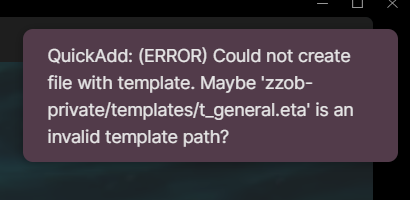
QuickAdd can't recognize template files with file extensions other than .md, I am not sure whether it's a bug or just by design.
To Reproduce Steps to reproduce the behavior:
- Disable core plugin
Templates; - Install
Templaterplugin; - Install
QuickAddplugin; - Create a template file named
t_general.eta; - Create a
QuickAddtemplate choice namedCreate note, set its template path to the path of the template filet_general.eta; - Create a note with the template choice
Create note.
Expected behavior QuickAdd could create notes successfully.
By the way, the Templater plugin could recognize the template file t_general.eta, you could click the templater button on the sidebar to create notes with the very template file flawlessly.
Screenshots


Desktop (please complete the following information):
- OS: Windows 11;
- Obsidian: 0.13.19;
- Quickadd: 0.4.17;
- Templater: 1.9.11.
Additional context
- The
Templaterplugin can recognize the template filet_general.etaand create notes with it successfully ; - Change the template file name to "t_general.md", then
QuickAddworks.
