

 chenqingspring
Adding images
How can I use images with react-lottie? How does the json reference the images?

Same issue! Have you found something? My images are not loaded into my the animation

it would be great if we could somehow just import the images locally into the react component, and react-lottie would somehow resolve the image path translation from webpack. Perhaps a mapping array between the original image source in the json and the webpack translated path?
import image0 from "./animation/Cypher_Main/images/img_0.png";
import image1 from  "./animation/Cypher_Main/images/img_1.png";

const CypherLeft = () => <LottieControl animationData={animationData} imageMap={[{name:'images/img_0.png', path: image0 },{name:'images/img_1.png', path: image1}]}/>;
What do you think?

In my case, I had a seperate JSON for animation and just had to give the appropriate path of the image in the JSON. For ex:
"assets": [
    {
      "id": "image_0",
      "w": 720,
      "h": 720,
      "u": "/img/innovation/",
      "p": "innovation.png",
      "e": 0
    }
  ],
Here: u: is the path and p is the file name of the image that I want to animate. Hope this helps.


You should edit your json file.
For example, you got an animation file, named 'animation.json', there's an object in that file, format that json file if needed.
you will see some props in this object.
if you need import some resource like image_0.png etc., change the file 'animation.json' to 'animation.js' (also for tsx'), assign the object to a variable. in this renamed file we import our resources like 'import <MyImage> from <'your image file'>;' , update props in assets, link p to MyImage.
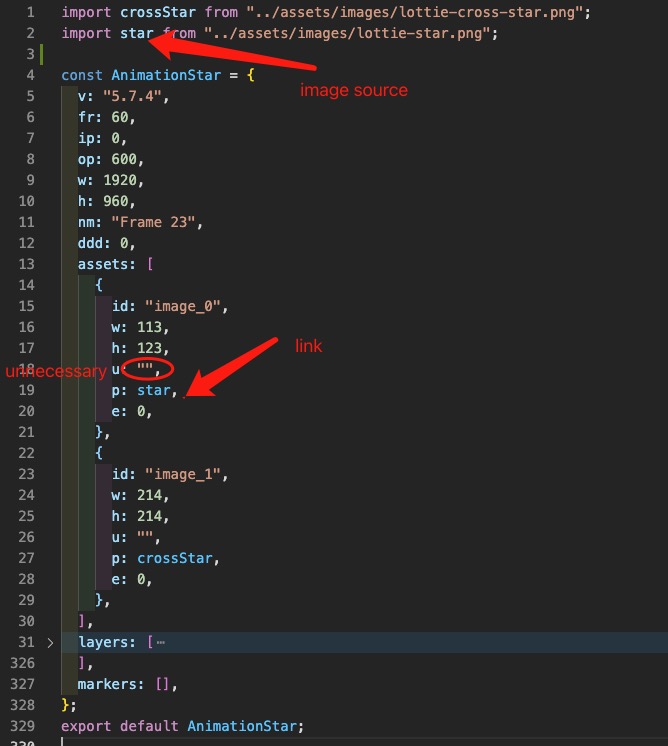
In another file, use it simply like
import Lottie from "react-lottie";
import AnimationStar from "./AnimationStar";

const animationOptions = {
  loop: true,
  autoplay: true,
  // .... other props
  animationData: AnimationStar,
  rendererSettings: {
    clearCanvas: true,
  },
};


const YourComponent = (prop) => {
  return
   <Lottie options={animationOptions}></Lottie>
}
