

 chatmail
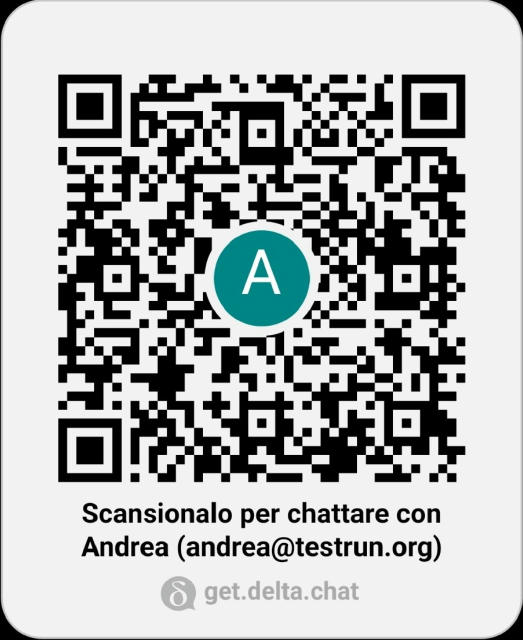
The letter in the qrcode is not centered
- Android version: 10
- Device: Huawei Mate 20
- Delta Chat version: 1.26.2
- Expected behavior: When I have not chosen an avatar and show my QRCode I would like the letter inside to be centered.
- Actual behavior: The letter in the QR Code is not centered.
- Steps to reproduce the problem: Delete your Avatar, so you don't have anyone. Click on the QRCode icon and go to the "QR invite code" tab
- Screenshots:
- Logs: I don't think it's necessary
I forgot to thank Federico and all the Italian community who give me a great help, such as finding this bug

Ping @Simon-Laux; I guess that the letter actually is centered, but because it's an uppercase letter, it goes further to the top than to the bottom (a lowercase g for example would go further to the bottom than to the top).
Maybe the letter can easily be shifted down a bit?

unfortunately, svg implementations do not support "good" ways to center things vertically correctly, this is not really solvable in the core - if we make it nice for android, it will be worse for ios/desktop, see discussions at https://github.com/deltachat/deltachat-core-rust/pull/2815#issuecomment-978067378 (there, android was even worse :)
for android we hacked the position at https://github.com/deltachat/deltachat-android/pull/2138/commits/e5dc8fe3d82e8b72631ae5806e9c4c7eec93a37a , however, we can tweak that there a bit - before, however, we should make sure that always the same font is used on android, iirc, it is currently just sans-serif, which may be very differently. we should force a concrete font, if in doubt, by another hack :)
all in all, this seems to be an android issue, core cannot do much on that.
