

 charmbracelet
encoding issue
Run on powershell
--placeholder='请选择颜色'
$s=@('黑色','白色','红色','蓝色') | gum filter --no-limit --placeholder='请选择颜色' | Where {$_ -notmatch 'failed'}

and filter text can not input unicode chars

If i add --placeholder=' 请选择颜色🤔' with <space> as prefix, it can show correctly.
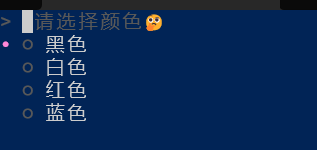
But filter text still can not input unicode chars 🤔
I tried to reproduce this on linux, and the results are the same. Characters are not rendered unless a leading space is added.
This seems to be a problem in bubbles, caused by the multi-codepoint glyphs you're using. I'll try to get a pr to bubbles soon.

As for input, how are you trying to input characters to the prompt? This may be a problem with powershell and not gum, since table-based keyboard layouts (like chinese via pinyin) don't work in all applications.
Copy-pasting chinese characters into the filter bar works perfectly well.
As for chinese pinyin input, fzf works well. so maybe not a problem of powershell.