
vscode-ruff
 vscode-ruff copied to clipboard
 charliermarsh
A Visual Studio Code extension with support for the Ruff linter.
Ruff extension for Visual Studio Code




[!NOTE]
As of Ruff v0.4.5, Ruff ships with a built-in language server written in Rust: ⚡
ruff server⚡To opt in to
ruff serversupport (now available in Beta), enable the "Native Server" extension setting (ruff.nativeServer: true).See: Enabling the Rust-based language server.
A Visual Studio Code extension for Ruff, an extremely fast Python linter and code formatter, written in Rust. Available on the Visual Studio Marketplace.
Ruff can be used to replace Flake8 (plus dozens of plugins), Black, isort, pyupgrade, and more, all while executing tens or hundreds of times faster than any individual tool.
The extension ships with ruff==0.4.2.
(Interested in using Ruff with another editor? Check out
ruff-lsp.)
Highlights
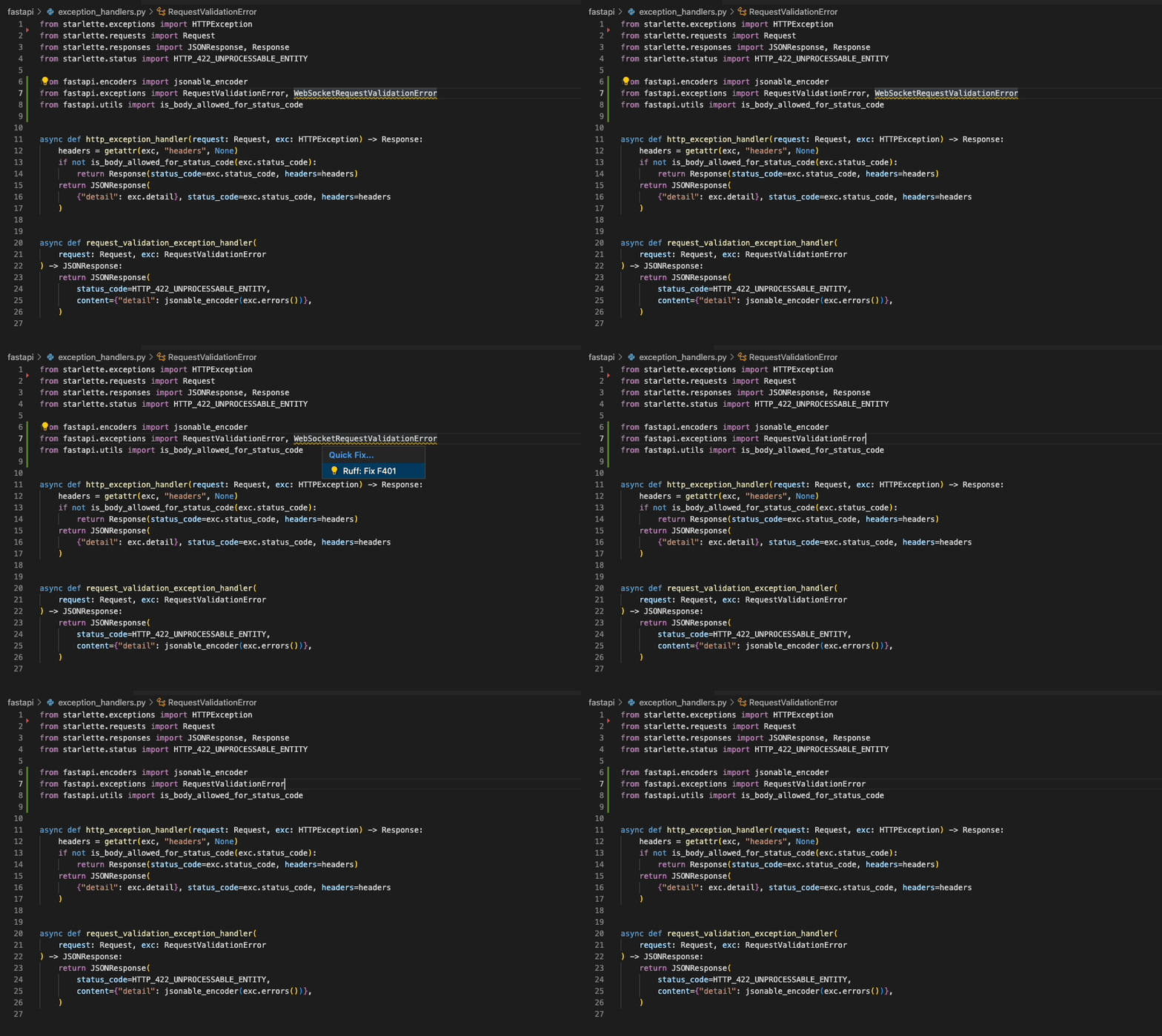
"Quick Fix" actions for auto-fixable violations (like unused imports)
"Fix all": automatically fix all auto-fixable violations
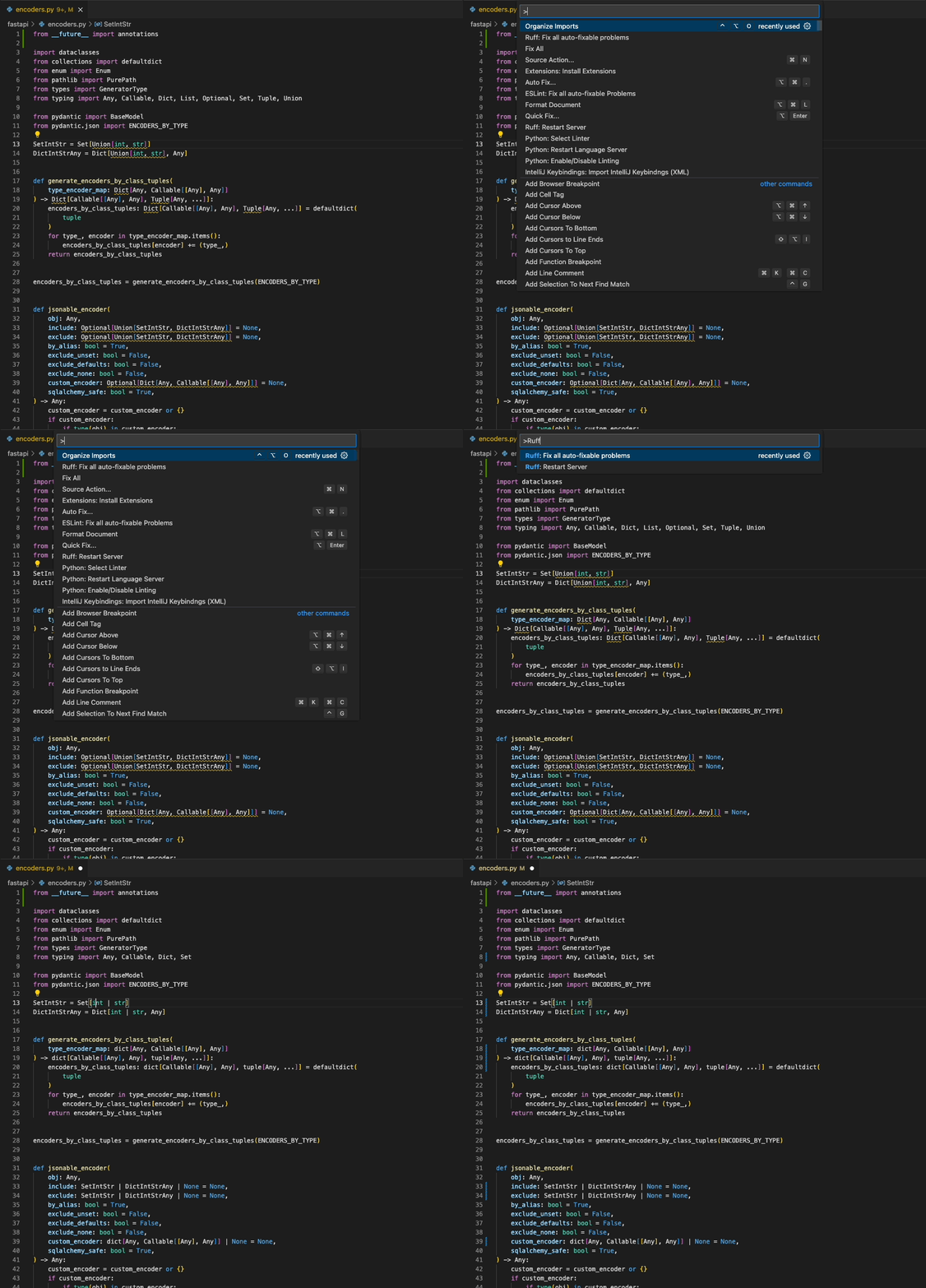
"Format Document": Black-compatible code formatting
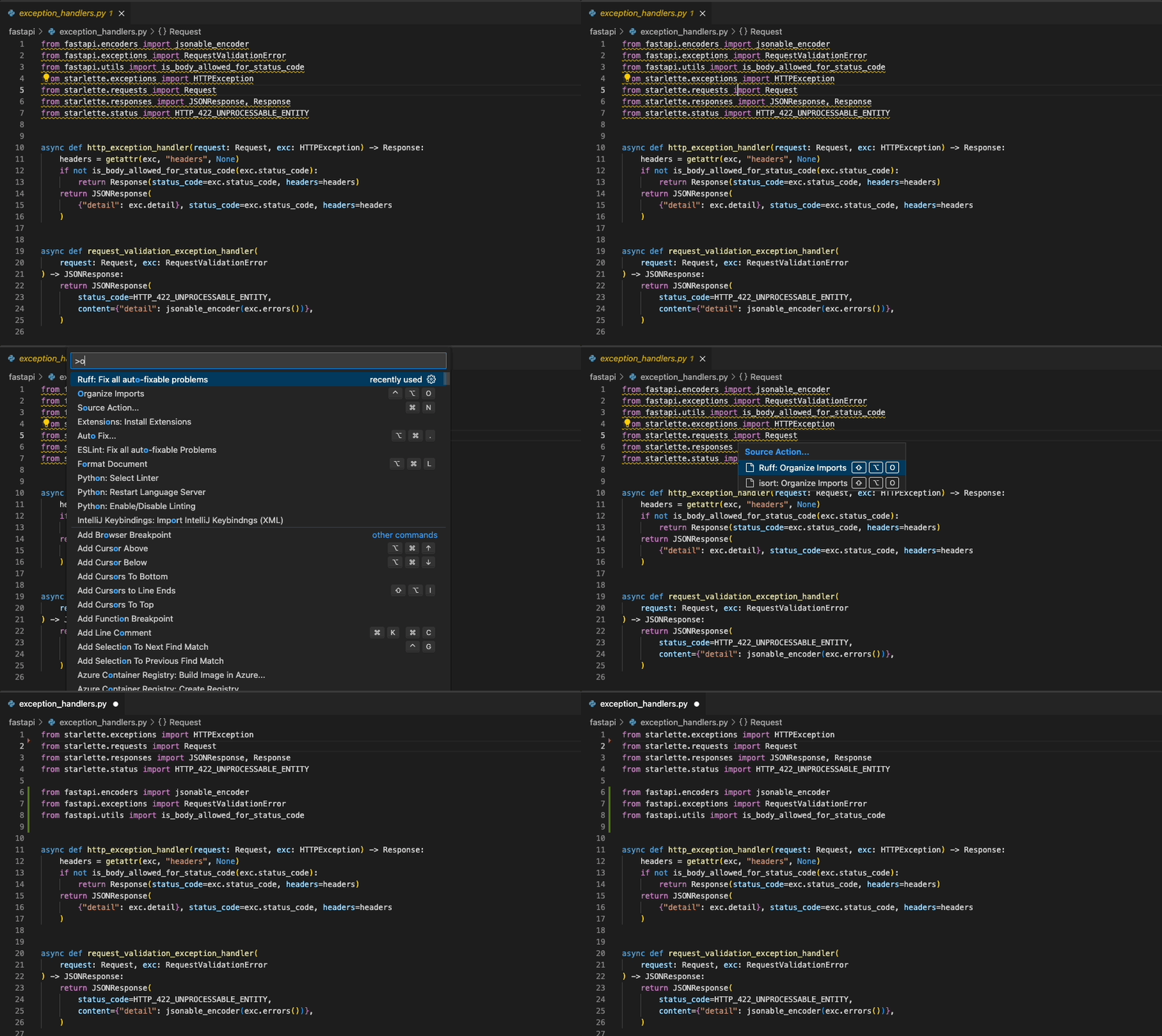
"Organize Imports": isort-compatible import sorting
Usage
Once installed in Visual Studio Code, ruff will automatically execute when you open or edit a
Python or Jupyter Notebook file.
If you want to disable Ruff, you can disable this extension per workspace in Visual Studio Code.
Fix safety
Ruff's automatic fixes are labeled as "safe" and "unsafe". By default, the "Fix all" action will not apply unsafe
fixes. However, unsafe fixes can be applied manually with the "Quick fix" action. Application of unsafe fixes when
using "Fix all" can be enabled by setting unsafe-fixes = true in your Ruff configuration file or adding
--unsafe-fixes flag to the "Lint args" setting.
See the Ruff fix docs for more details on how fix safety works.
Jupyter Notebook Support
The extension has support for Jupyter Notebooks via the Notebook Document Synchronization capabilities of the Language
Server Protocol which were added in 3.17. This has been implemented in ruff-lsp as of version v0.0.43 which provides
full support for all of the existing capabilities available to Python files in Jupyter Notebooks, including diagnostics,
code actions, and formatting.
This requires Ruff version v0.1.3 or later.
Settings
| Settings | Default | Description |
|---|---|---|
codeAction.disableRuleComment.enable |
true |
Whether to display Quick Fix actions to disable rules via noqa suppression comments. |
codeAction.fixViolation.enable |
true |
Whether to display Quick Fix actions to autofix violations. |
enable |
true |
Whether to enable the Ruff extension. Modifying this setting requires restarting VS Code to take effect. |
fixAll |
"explicit" |
Whether to register Ruff as capable of handling source.fixAll actions. |
ignoreStandardLibrary |
true |
Whether to ignore files that are inferred to be part of the Python standard library. |
importStrategy |
fromEnvironment |
Strategy for loading the ruff executable. fromEnvironment finds Ruff in the environment, falling back to the bundled version; useBundled uses the version bundled with the extension. |
interpreter |
[] |
Path to a Python interpreter to use to run the linter server. |
lint.args |
[] |
Additional command-line arguments to pass to ruff check, e.g., "args": ["--config=/path/to/pyproject.toml"]. This setting is not supported under nativeServer: true. |
lint.enable |
true |
Whether to enable linting. Set to false to use Ruff exclusively as a formatter. |
lint.run |
onType |
Run Ruff on every keystroke (onType) or on save (onSave). |
format.args |
[] |
Additional command-line arguments to pass to ruff format. This setting is not supported under nativeServer: true. |
organizeImports |
"explicit" |
Whether to register Ruff as capable of handling source.organizeImports actions. |
path |
[] |
Path to a custom ruff executable, e.g., ["/path/to/ruff"]. |
showNotifications |
off |
Setting to control when a notification is shown: off, onError, onWarning, always. |
nativeServer |
false |
Whether to use the Rust-based language server. |
The following settings are exclusive to the Rust-based language server (nativeServer: true), and
are available in addition to those listed above:
| Settings | Default | Description |
|---|---|---|
configuration |
null |
Path to a ruff.toml or pyproject.toml file to use for configuration. |
configurationPreference |
editorFirst |
The strategy to use when resolving settings across VS Code and the filesystem. By default, editor configuration is prioritized over ruff.toml and pyproject.toml files. |
exclude |
[] |
Glob patterns to exclude files from linting. |
lineLength |
88 |
The line length to use for the linter and formatter. |
lint.preview |
false |
Whether to enable Ruff's preview mode when linting. |
lint.select |
[] |
Rules to enable by default. See the documentation. |
lint.extendSelect |
[] |
Rules to enable in addition to those in lint.select. |
lint.ignore |
[] |
Rules to disable by default. See the documentation. |
lint.extendIgnore |
[] |
Rules to disable in addition to those in lint.ignore. |
format.preview |
false |
Whether to enable Ruff's preview mode when formatting. |
Configuring VS Code
You can configure Ruff to format Python code on-save by enabling the editor.formatOnSave action in
settings.json, and setting Ruff as your default formatter:
{
  "[python]": {
    "editor.formatOnSave": true,
    "editor.defaultFormatter": "charliermarsh.ruff"
  }
}
And, for Jupyter Notebooks:
{
  "notebook.formatOnSave.enabled": true,
  "[python]": {
    "editor.defaultFormatter": "charliermarsh.ruff"
  }
}
You can configure Ruff to fix lint violations on-save by enabling the source.fixAll action in
settings.json:
{
  "[python]": {
    "editor.codeActionsOnSave": {
      "source.fixAll": "explicit"
    }
  }
}
And, for Jupyter Notebooks:
{
  "notebook.codeActionsOnSave": {
    "notebook.source.fixAll": "explicit"
  }
}
Similarly, you can configure Ruff to organize imports on-save by enabling the
source.organizeImports action in settings.json:
{
  "[python]": {
    "editor.codeActionsOnSave": {
      "source.organizeImports": "explicit"
    }
  }
}
And, for Jupyter Notebooks:
{
  "notebook.codeActionsOnSave": {
    "notebook.source.organizeImports": "explicit"
  }
}
Taken together, you can configure Ruff to format, fix, and organize imports on-save via the
following settings.json:
{
  "[python]": {
    "editor.formatOnSave": true,
    "editor.codeActionsOnSave": {
      "source.fixAll": "explicit",
      "source.organizeImports": "explicit"
    },
    "editor.defaultFormatter": "charliermarsh.ruff"
  }
}
And, for Jupyter Notebooks:
{
  "notebook.formatOnSave.enabled": true,
  "notebook.codeActionsOnSave": {
    "notebook.source.fixAll": "explicit",
    "notebook.source.organizeImports": "explicit"
  },
  "[python]": {
    "editor.defaultFormatter": "charliermarsh.ruff"
  }
}
Note: if you're using Ruff to organize imports in VS Code and also expect to run Ruff from the
command line, you'll want to enable Ruff's isort rules by adding "I" to your
extend-select.
Note: The above-mentioned Notebook configurations will run the action for each cell individually.
This is the way VS Code handles Notebook actions and is unrelated to ruff-lsp. If you'd prefer to
run them on the entire notebook at once, prefer to use the Ruff prefixed commands such as
Ruff: Organize Imports and Ruff: Fix all auto-fixable problems.
If you're using the VS Code Python extension,
you can configure VS Code to fix violations on-save using Ruff, then re-format with the Black extension,
via the following settings.json:
{
  "[python]": {
    "editor.formatOnSave": true,
    "editor.codeActionsOnSave": {
      "source.fixAll": "explicit"
    },
    "editor.defaultFormatter": "ms-python.black-formatter"
  }
}
If you'd like to use Ruff as a linter, but continue to sort imports with the isort extension,
you can disable Ruff's import-sorting capabilities via the following settings.json:
{
  "[python]": {
    "editor.codeActionsOnSave": {
      "source.fixAll": "explicit",
      "source.organizeImports": "explicit"
    }
  },
  "ruff.organizeImports": false
}
If you'd like to run Ruff on-save, but avoid allowing other extensions to run on-save, you can
use Ruff's scoped source.fixAll and source.organizeImports actions via the following settings.json:
{
  "[python]": {
    "editor.codeActionsOnSave": {
      "source.fixAll.ruff": "explicit",
      "source.organizeImports.ruff": "explicit"
    }
  }
}
If you'd like to run Ruff, but disable code formatting (by Ruff, or by another formatter), be sure
to unset the editor.defaultFormatter in settings.json:
{
  "[python]": {
    "editor.defaultFormatter": null,
    "editor.codeActionsOnSave": {
      "source.fixAll": "explicit"
    }
  }
}
Enabling the Rust-based language server
To use the new Rust-based language server (ruff server), you'll need to enable the "Native Server"
setting in the extension settings:
{
  "ruff.nativeServer": true
}
The Rust-based language server is built into Ruff directly, and is both faster and more fully-featured than the Python-based language server.
Use of the native server may require changes to your VS Code configuration, as some settings are unsupported; see Configuring Ruff.
Configuring Ruff
The Ruff VS Code extension will respect any Ruff configuration as defined in your project's
pyproject.toml, ruff.toml, or .ruff.toml file (see: Configuring Ruff in the Ruff documentation).
In general, we recommend configuring Ruff via pyproject.toml or ruff.toml so that your
configuration is shared between the VS Code extension and the command-line tool, and between all
contributors to the project.
Python-based language server (Stable)
If you're using the default Python-based language server, you can use the ruff.lint.args and
ruff.format.args settings in settings.json to pass command-line arguments to Ruff.
For example, to enable the pyupgrade rule set in VS Code, add the following to settings.json:
{
  "ruff.lint.args": ["--extend-select=UP"]
}
To override the VS Code extension's Ruff configuration entirely, and override any local
pyproject.toml file or similar, you can pass a custom --config argument to the Ruff CLI, again
using the ruff.lint.args and ruff.format.args options in settings.json:
{
  "ruff.lint.args": ["--config=/path/to/ruff.toml"],
  "ruff.format.args": ["--config=/path/to/ruff.toml"]
}
Finally, to use a common Ruff configuration across all projects, consider creating a user-specific
pyproject.toml or ruff.toml file as described in the FAQ.
Rust-based language server (Beta)
If you're using the Rust-based language server (ruff server), you can configure some common
settings in VS Code directly, like ruff.lineLength (to configure the line length for the linter
and formatter) or ruff.lint.select (to configure the enabled lint rules):
{
  "ruff.lineLength": 88,
  "ruff.lint.select": ["C", "E", "F", "W"]
}
To use a custom configuration file, set the ruff.configuration setting to the path of your
ruff.toml or pyproject.toml file:
{
  "ruff.configuration": "/path/to/ruff.toml"
}
Finally, to use a common Ruff configuration across all projects, consider creating a user-specific
pyproject.toml or ruff.toml file as described in the FAQ.
Commands
| Command | Description |
|---|---|
| Ruff: Fix all auto-fixable problems | Fix all auto-fixable problems. |
| Ruff: Format Imports | Organize imports. |
| Ruff: Format Document | Format the entire document. |
| Ruff: Restart Server | Force restart the linter server. |
Requirements
This extension requires a version of the VSCode Python extension that supports Python 3.7+. Ruff itself is compatible with Python 3.7 to 3.13.
License
MIT

Metadata
Owner
 charliermarsh
Metadata
A Visual Studio Code extension with support for the Ruff linter.