

 cfug
cfug
Image not uploading in DIO 4 and above.
New Issue Checklist
- [ ] I have searched for a similar issue in the project and found none
Issue Info
| Info | Value | |
|---|---|---|
| Platform Name | flutter | |
| Dio Version | 4.0.0 | |
| Android Studio | Arctic Fox | 2020.3.1 Patch 4 |
Issue Description and Steps
Greeting everyone, my image is not uploading to my server when i update to DIO 4.0.0 and above. The same code works for DIO version below 4.0.0 . Below is the upload code. Kindly help me out. Thanks
 Future<dynamic> upload(String url, BuildContext context,
      {List<File> files,
      Map body,
      FileCount count = FileCount.MULTIPLE,
      authorize = true}) async {

    BaseOptions options = await getOptions(validate: authorize);

    dynamic response, serverResponse;

    List<MultipartFile> uploadFiles = [];

    FormData requestData;


    try {
      Dio dio = new Dio(options)..interceptors.add(Logging());

      (dio.httpClientAdapter as DefaultHttpClientAdapter).onHttpClientCreate =
          (client) {
        SecurityContext sc = new SecurityContext();
        HttpClient httpClient = new HttpClient(context: sc);
        //allow all cert
        httpClient.badCertificateCallback =
            (X509Certificate cert, String host, int port) => true;
        return httpClient;
      };

      // add files to uploadFiles array
      if (files.length > 0) {
        for (var index = 0; index < files.length; index++) {
          MultipartFile file = MultipartFile.fromFileSync(files[index].path,
              filename: basename(files[index].path),contentType:MediaType.parse('image/jpg'));
          uploadFiles.add(file);
        }

        print("file the request: $uploadFiles");

        requestData = FormData.fromMap({"file": uploadFiles});
      } else {
        requestData = FormData();
      }

      body.forEach((key, value) {
        MapEntry<String, String> data = new MapEntry(key, '$value');
        requestData.fields.add(data);
      });

      print("sending the request: ${uploadFiles.asMap().values}");


      serverResponse = await dio.post(
        url,
        data: requestData,
        options: new Options(contentType: 'multipart/form-data'),
        onSendProgress: (int sent, int total) {
          print('$sent $total');
        },
      );

      print("Server Replied: $serverResponse}");

      print(serverResponse.data);

      //check for connection errors
      if (serverResponse.statusCode < 200 || serverResponse.statusCode > 400) {
        return _decoder.convert(
            '{"success":false,"message":"${LocalText.of(context).load("error_executing_request")}"}');
      }

      response = _decoder.convert(serverResponse.data);

      print("Response: $response");
    } on DioError catch (e) {
      // The request was made and the server responded with a status code
      // that falls out of the range of 2xx and is also not 304.
      if (e.response != null) {
        print(e.response.data);
        print(e.response.headers);
        // print(e.response.request);
        response = _decoder.convert(
            '{"success":false,"message":"${LocalText.of(context).load("server_error")}"}');
      } else {
        // Something happened in setting up or sending the request that triggered an Error
        print(e.message);
        response =
            _decoder.convert('{"success":false,"message":"' + e.message + '"}');
      }
    } catch (error) {
      return _decoder.convert(
          '{"success":false,"message":"${LocalText.of(context).load("error_executing_request")}"}');
    }
    return response;
  }

Need more information, is there a server response? is the request not starting? some exception?

yes there is a server response @kuhnroyal and the fields are working perfectly except for the image. Below is the screenshot please.
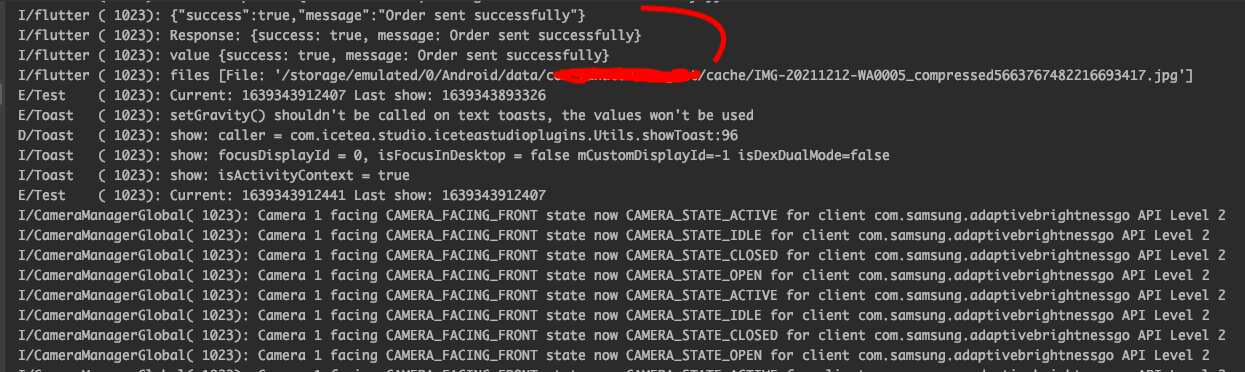
Try to use an http poxy to figure out if the file is actually being sent to the server or if something wrong is being sent, or nothing at all. I don't see anything wrong, but it is hard to tell without a working example.
File is not sent to the server when using DIO 4 and above but the fields works though. Both file and fields are working with DIO 3.0.10 and below.
I, kind of, have the same issue at https://github.com/flutterchina/dio/issues/1444
