

 cfenollosa
Lesson 10's 32bit switch doesn't seem to work for me
I have been trying to make the 32bit system in lessons 8-10, but the program seems to get stuck at some point and won't print the protected mode message or the last letter of the real mode message. I am using a WSL with Ubuntu. Please could someone help

Hey @SaganashDev were you able to make it run? If not where does it get stuck?

The program does run, however only the real mode message loads and the last character of said message is missing. If I loop the system with jmp $, I find that the program prints the whole of the first message if I loop at the start of 'switch_to_pm' and not if I loop after cli.
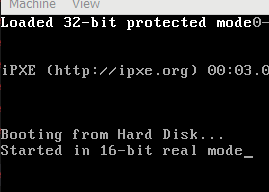

@SaganashDev The message appears on top as @mineas312 says. Since you direct it to do so and you did not clear the screen.
I'm not getting the last 'e' on 'Started in 16-bit real mode' and the message 'Loaded 32-bit protected mode' isn't appearing anywhere.

I'm still here. Are you having exactly the same problem? Missing output letters and all?
I'm facing the same problem. I use wsl1 ubuntu20LTS on windows.
The command is qemu-system-x86_64 --nographic main.bin, this will cause the same problem.
But when I use qemu-system-x86_64 --nographic --curses main.bin, this problem disappear. And I don't know why?
Also I delete --nographic flag, and run it on a real ubuntu machine, not wsl. Everything works well.

This is because after setting the characters in the vga memory, it's displayed on a monitor. The text in tty mode would not be updated anymore.
You will have to remove the --nographic flag, qemu should starts listening to vnc connection. Then use any vnc client to connect to it in order to view the vga output.


mine doesn't work either. Can anyone give me some advice or guidance?
root@vultr:~/go-workspace/code-examples/readnotes/os_dev/origin/os-tutorial/10-32bit-enter# qemu-system-x86_64 --nographic main.bin
WARNING: Image format was not specified for 'main.bin' and probing guessed raw.
         Automatically detecting the format is dangerous for raw images, write operations on block 0 will be restricted.
         Specify the 'raw' format explicitly to remove the restrictions.
SeaBIOS (version 1.15.0-1)


iPXE (https://ipxe.org) 00:03.0 CA00 PCI2.10 PnP PMM+07F8B4A0+07ECB4A0 CA00


Booting from Hard Disk...
Started in 16-bit real mod

I ran into this same issue a while ago, I was using the nographic flag because I was using ssh to access my machine. You need to remove the nographic flag because you are writing to graphics memory which does not work with the flag

I noticed I needed to switch to full screen mode because the first line was hidden by the title bar (this was on macOS)

I noticed I needed to switch to full screen mode because the first line was hidden by the title bar (this was on macOS)
Thanks! This worked for me on OSX Sonoma too.
So, with qemu-system-x86_64 main.bin, you need to go fullscreen (there's an option in the menu bar).
