

 cetic
cetic
6lbr on Rpi 3
Hi there!
I'm trying to access the webpage of the 6lbr [bbbb::100]. Until now, I have installed the 6lbr, my 6lbr.conf file looks like this
MODE=ROUTER RAW_ETH=0 BRIDGE=1 CREATE_BRIDGE=0 DEV_ETH = eth0 DEV_BRIDGE=br0 DEV_TAP=tap0 DEV_RADIO=/dev/ttyUSB0 BAUDRATE=115200
LOG_LEVEL=3 #INFO and above only
and my /etc/network/interfaces is this
auto lo iface lo inet loopback
iface eth0 inet static address 0.0.0.0
car br0
iface br0 inet dhcp
bridge_ports eth0
bridge_stp off
up echo 0 > /sys/devices/virtual/net/br0/bridge/multicast_snooping
post-up ip link set br0 address ip link show eth0 | grep ether | awk '{print $2}'
allow-hotplug wlan0 iface wlan0 inet manual wpa-conf /etc/wpa_supplicant/wpa_supplicant.conf
allow-hotplug wlan1 iface wlan1 inet manual wpa-conf /etc/wpa_supplicant/wpa_supplicant.conf
I've also typed the following lines
sudo sysctl -w net.ipv6.conf.eth0.accept_ra=1 sudo sysctl -w net.ipv6.conf.eth0.accept_ra_rt_info_max_plen=64
but when i try to ping6 bbbb::100 , I get 100% packets lost.
The routing table looks like this
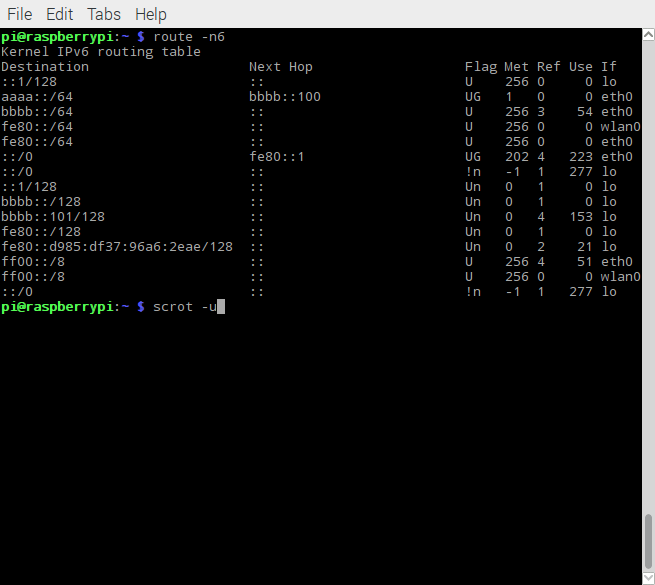
I would like some suggestions about the ways i should configure the routing table. The bbbb::100 address i added using this line:
sudo ip -6 addr add bbbb::101/64 dev eth0
then i added
sudo route -A inet6 add aaaa::/64 gw bbbb::100
but i don't know what is the aaaa::/64. It wasn't even present in the routing table before adding the last line.

