

 cemu-project
Wayland HiDPI renders at double the size of the window
Trying out the native Wayland build (using Sway 1.7 myself), I found that the game would render twice as large, as the screenshot shows: 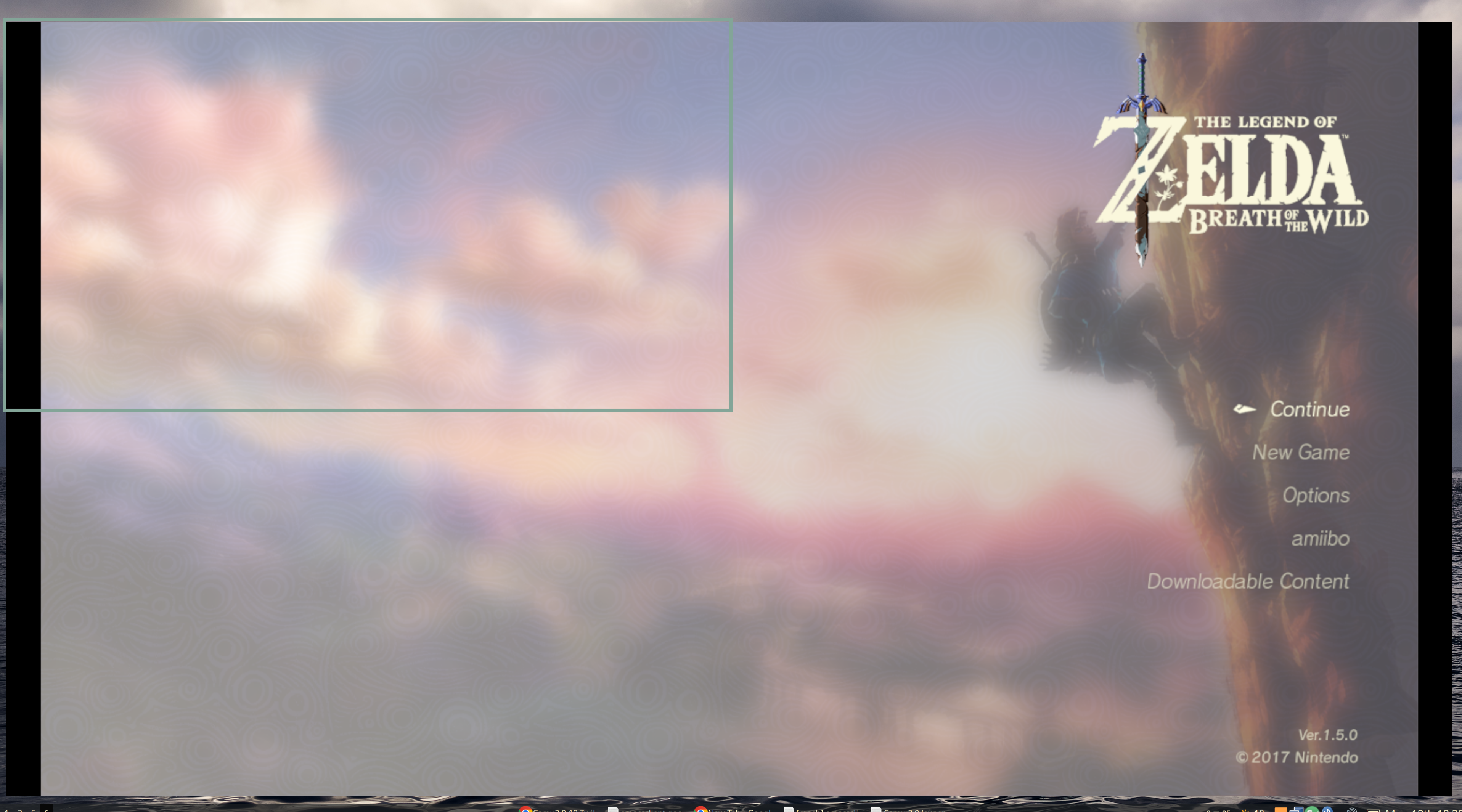
My main monitor is a 4K monitor with 2x scaling in Sway. This is on the latest HEAD build, c78b3da. I've tried setting GDK_SCALE but it seems to be ignored.
Is this happening to anyone else? My current workaround is to run on the previous version's AppImage that runs in Xwayland.


There's a fix at https://github.com/SSimco/Cemu/tree/waylandcanvassize
(edit: some issues for me now, but a start!)
I was testing this on a build from 072c18a and I can confirm this behaviour.
If the game is fullscreened with f11 the issue disappears, and everything is visible (while in fullscreen).
There is some weirdness though, especially in the case of multiple monitor with different scaling: My setup is one monitor with 100% scaling and one with 175%.
If the cemu window is created on the 100% scaling screen it will be correctly scaled, however maximising and then "pulling the window down" from maximised (back to starting size) it will about 66% of the time bug out and scale incorrectly. Redoing this procedure (maximising and then "unmaximising") can fix the issue and return to proper scaling. Maximised always scales correctly on this screen (100% scaling).
The window can be dragged from the 100% to the 175% scaled screen, keeping correct scaling, if it was in that state on the 100% monitor (the game is within the window).
Maximising, toggling f11 twice or creating the cemu window while on the 175% screen will always result in incorrect scaling. Maximising and unmaximising does not fix the scaling.
However the window can be dragged back to the 100% scaled screen and fixed there by repeating the maximising/unmaximising process until it happens to scale correctly again.
This might have been a confusing text, I can maybe record the behaviour later if needed but I am not sure how helpful my observations are. In essence things are a bit quirky on this kind of setup, but the quirks might be the fault of kwin. Getting it to scale correclty on single monitor setups will likely fix all these quirks aswell.

I have the same problem using KDE Plasma in Wayland mode and Cemu 2.0.353 (experimental) and using a scaling factor of 200% on my 4k monitor. As soon as a game is started, the output will be 4 times as big exceeding the window bounds of Cemu overlapping to the right and down. Using the full screen mode with F11 does not help on KDE Plasma. In fullscreen you will only see the upper left fourth of the image. The only workaround I found was to set the scaling factor of the window manager to 100% for the duration of Cemu usage.


Is this still an issue?
I report this has been fixed in niri wm with scaling set to 1.5

On my setup, the problem is resolved. Even with a scaling factor of 200%, the image displays correctly without any cut-off areas. The workaround to set the scaling factor to 100% during Cemu usage is not needed anymore.
Software version: Cemu: 2.6 (2025-02-06)
Operating System: Arch Linux KDE Plasma Version: 6.4.1 KDE Frameworks Version: 6.15.0 Qt Version: 6.9.1 Kernel Version: 6.15.3-arch1-1 (64-bit) Graphics Platform: Wayland
Addition: In my tests it is fixed on the four most relevant Wayland compositors:
Fixed on KDE Plasma (Wayland) with scaling factor of 200%: KDE Plasma version: 6.4.1
Fixed on Gnome (Wayland) with scaling factor of 200%: Gnome version: 48.2
Fixed on Sway (Wayland) with scaling factor of 200%: Sway version: 1.11 Config line: output DP-1 resolution 3840x2160@144Hz scale 2
Fixed on Hyprland (Wayland) with scaling factor of 200%: Hyprland version: 0.49.0 Config line: monitor=DP-1, 3840x2160@144, auto, 2
I my opinion the issue is resolved and could be closed. :)
I have trouble getting master to build, but did you try fractional scaling? Like 131%, 175% etc? Also it might be a good idea to test with two screens at different scaling cause if i remember correctly it sometimes picked up the wrong scaling factor. Did you build Wayland native cemu or run trough xwayland? @aaron-rust
Cemu is running in Wayland mode. Verified by using the Debug Console of KDE Plasma:
qdbus org.kde.KWin /KWin org.kde.KWin.showDebugConsole
If it would be running in an XWayland server, the Cemu entry would show under "X11 Windows".
LGTM in KDE Plasma (all selectable options plus one extra with a non-integer factor): Test: Close Cemu. Change display settings. Reopen Cemu. Start a game and wait until rendering.
Only one monitor (WQHD: 2560 x 1440) connected: 50% OK 75% OK 100% OK 125% OK 150% OK 175% OK 200% OK 225% OK 250% OK 275% OK 300% OK 132,5% OK
Only one monitor (UHD 3840 x 2160) connected: 50% OK 75% OK 100% OK 125% OK 150% OK 175% OK 200% OK 225% OK 250% OK 275% OK 300% OK 117,5% OK
Two monitors (UHD 3840 x 2160 and WQHD 2560 x 1440) connected at the same time: UHD 200%, WQHD 150% OK UHD 175%, WQHD 125% OK UHD 100%, WQHD 100% OK UHD 300%, WQHD 200% OK
Also switched the position of both monitors (which one is to the left) as this may influence where (0,0) is on the coordinate space of the compositor. I think Cemu is pretty solid with it's scaling :)
This should be fixed with an update to the WxWidgets sdk, Ref:https://github.com/wxWidgets/wxWidgets/pull/25994
Doesn't Cemu use it's own wl_subsurface to handle sizing of accelerated surfaces?