

 cdfmlr
Parallel node support
At the moment we can only support one flow out. Is there any plans to include parallel node type or even limited support? I am trying to draw something very simple but found it hard without the parallel node:
At the moment, I can only do something like the below which is not ideal : (
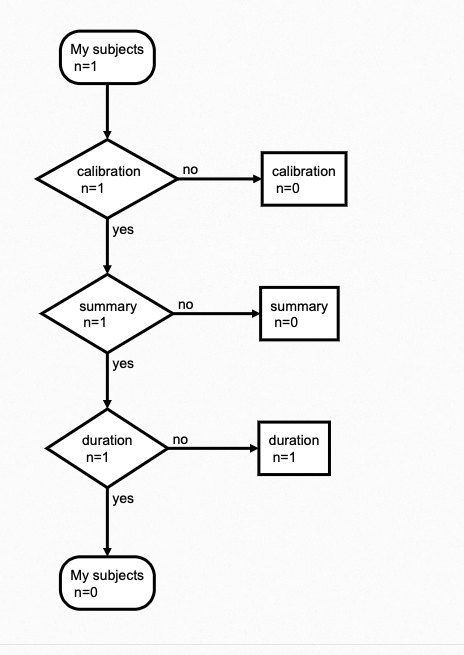

There are parallel nodes in flowchart.js. And I think it will be easy to bind it in pyflowchart. Just add a subclass from Node. You can PR to do this. (maybe you can even inherit Node out of this package)

A basic example:
>>> from pyflowchart import *
>>> class ParallelNode(Node):
...     node_type = 'parallel'
...     def __init__(self, name: str):
...             super().__init__()
...             self.node_name = f'pl{self.id}'
...             self.node_text = f'parallel: {name}'
...
>>> st = StartNode('a_pyflow_test')
>>> op = OperationNode('do something')
>>> cond = ConditionNode('Yes or No?')
>>> io = InputOutputNode(InputOutputNode.OUTPUT, 'something...')
>>> sub = SubroutineNode('A Subroutine')
>>> e = EndNode('a_pyflow_test')
>>> para = ParallelNode('NEW parallel tasks')
>>> st.connect(op)
>>> op.connect(cond)
>>> cond.connect_yes(io)
>>> cond.connect_no(para)
>>> para.connect(sub, "path1, bottom")
>>> para.connect(op, "path2, top")
>>> sub.connect(op, "right")
>>> io.connect(e)
>>> print(Flowchart(st).flowchart())
st0=>start: start a_pyflow_test
op1=>operation: do something
cond2=>condition: Yes or No?
io3=>inputoutput: output: something...
e5=>end: end a_pyflow_test
pl6=>parallel: parallel: NEW parallel tasks
sub4=>subroutine: A Subroutine

st0->op1
op1->cond2
cond2->
cond2->
cond2(yes)->io3
io3->e5
cond2(no)->pl6
pl6(path2, top)->sub4
pl6(path2, top)->op1
sub4(right)->op1
Generated flowchart:

Damn, it's not working. You have to modify the generated pl6(path2, top)->sub4 to pl6(path1, bottom)->sub4 manually:

WTF,,, oh I got the reason. See:
https://github.com/cdfmlr/pyflowchart/blob/94a4150e65298803b2cf7c614fb77d4aa06f6aa9/pyflowchart/node.py#L16-L25
Until this TODO achieved, we can not easily implement a parallel node, like the bugging example above.
As a temporary method. You can do something like CondYN, make some virtual Nodes to implement a parallel node.
Sorry for my rattling on. But I guess I have expressed my meaning. And I will not work on this recently. You can make it by yourself. Please drop me a PR if you achieve it unless you are unwilling.
Sorry for my rattling on. But I guess I have expressed my meaning. And I will not work on this recently. You can make it by yourself. Please drop me a PR if you achieve it unless you are unwilling.
Thanks for the tips. I will try to do a hack around first because my use case is fairly limited. But if it doesn't work, I will see how I can change the class definition for Connection(object) :D .
Will let you know though.