

 cbeust
TestNG : Exception in thread "main" java.lang.NoSuchMethodError:
I recently installed TestNG for Eclipse via the Eclipse Market Place and while running the code i keep getting this error information :
Exception in thread "main" java.lang.NoSuchMethodError: org.testng.internal.Utils.defaultIfStringEmpty(Ljava/lang/String;Ljava/lang/String;)Ljava/lang/String; at org.testng.remote.AbstractRemoteTestNG.setHost(AbstractRemoteTestNG.java:59) at org.testng.remote.RemoteTestNG.initAndRun(RemoteTestNG.java:137) at org.testng.remote.RemoteTestNG.main(RemoteTestNG.java:57)
i searched through threads here and found out that i need to install the latest plugin. Since I downloaded from Market Place i believe the plugin should be the latest one, but stiil I am getting this issue.


hi @krabhishek30
which testng version you used in the project?
could you install the latest beta plugin: http://testng.org/eclipse-beta (see installation detail here ) i suspect you're using an older version (< 6.5.1), the new plugin will give you a more meaningful message.

@krabhishek30
OK, i'm pretty sure you're using a version < 6.5.1, could you update your testng version to be >= 6.5.1 ? thanks
@missedone I used the market place to install the plugin (I believe it installs the latest version) .. I even installed the beta version and everytime it gave me this error info.
@messidone I believe the plugin version was 6.9 something, I can be exactly sure only in the morning(it's 1 am in the morning here)
hi @krabhishek30
i meant to update your testng jar version of your project (not saying the version of the plugin).
@missedone yup that worked. I used the 6.8 version and it worked fine.
Thank you.
I am facing the same error. Tried Mars / Neon with 6.9.11 / 6.9.12 also.
Exception in thread "main" java.lang.NoSuchMethodError: org.testng.internal.Utils.defaultIfStringEmpty(Ljava/lang/String;Ljava/lang/String;)Ljava/lang/String; at org.testng.remote.AbstractRemoteTestNG.setHost(AbstractRemoteTestNG.java:59) at org.testng.remote.RemoteTestNG.initAndRun(RemoteTestNG.java:122) at org.testng.remote.RemoteTestNG.main(RemoteTestNG.java:58)

hi @rajtester what's the version of TestNG Eclipse Plugin you used? could you confirm there is only one testng jar on your classpath?
I tried both TestNG 6.9.11 & 6.9.12 also. I have added some more jars for selenium including testng.
could you confirm that the plugin you used is latest release 6.9.12.201607091356, or even you can try with the latest beta http://testng.org/eclipse-beta
I have added some more jars for selenium including testng.
I know that selenium has a fat jar has testng embedded in it. could you make sure there is only one testng on your classpath, either the fat jar of selenium or the stock testng jar.
Thanks a lot Nick (missedone). It worked. There was a mismatch with TestNG version.
im using TestNG version 6.8.2
java.lang.NoSuchMethodError: org.testng.internal.IConfiguration.getConfigurationListeners()Ljava/util/List;
at org.testng.remote.support.RemoteTestNG6_5$1.newTestRunner(RemoteTestNG6_5.java:34)
at org.testng.remote.support.RemoteTestNG6_5$DelegatingTestRunnerFactory.newTestRunner(RemoteTestNG6_5.java:63)
at org.testng.SuiteRunner$ProxyTestRunnerFactory.newTestRunner(SuiteRunner.java:544)
at org.testng.SuiteRunner.init(SuiteRunner.java:142)
at org.testng.SuiteRunner.

@dassusovan
where do you get this 6.8.2 release?
i don't even see it on Maven central:
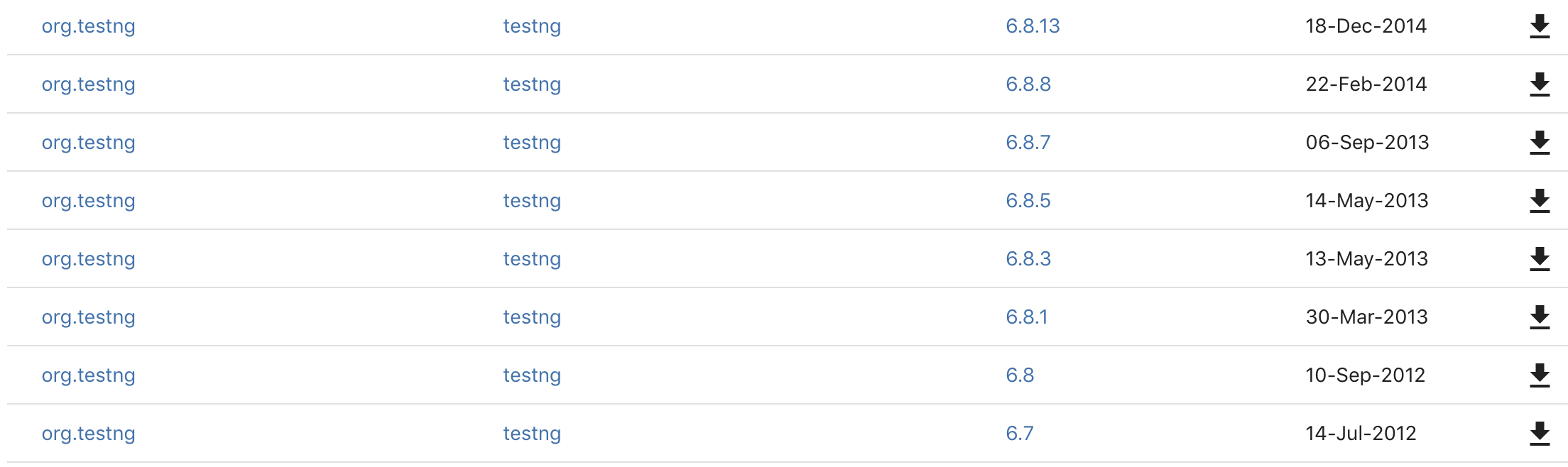 https://search.maven.org/search?q=g:org.testng%20AND%20a:testng&core=gav
if your frame using pom.xml , make sure pom.xml and eclipse market place has the same version of TestNG.
Usually you will get the below error if these jar files are different versions.
e.g:
-pom.xml has
Note: To get resolve your problem update TestNG version in pom.xml , from

java.lang.NoSuchMethodError: org.testng.TestRunner.addListener(Ljava/lang/Object;)V
at org.testng.remote.support.RemoteTestNG6_9_10$1.newTestRunner(RemoteTestNG6_9_10.java:32)
at org.testng.remote.support.RemoteTestNG6_9_10$DelegatingTestRunnerFactory.newTestRunner(RemoteTestNG6_9_10.java:61)
at org.testng.SuiteRunner$ProxyTestRunnerFactory.newTestRunner(SuiteRunner.java:713)
at org.testng.SuiteRunner.init(SuiteRunner.java:260)
at org.testng.SuiteRunner.

yes same issue on 6.14.3 version.
java.lang.NoSuchMethodError: org.testng.TestRunner.addListener(Ljava/lang/Object;)V
In one project, tests successfully run by testng.xml but other it is not.
Using same version(6.14.3) testng version in my pom.xml

I have tried removing the eclipse & java from the system & reinstalling the eclipse,java & testng, issue got resolved. It worked.
Hi All, I have created a maven testng project. I'm able to run and test using Maven by providing the testng.xml file in </suiteXmlFile> tags. But when I try to test the class as a testng test, I end up getting the below error.
[RemoteTestNG] detected TestNG version 7.0.0 java.lang.NoSuchMethodError: org.testng.remote.AbstractRemoteTestNG.addListener(Lorg/testng/ISuiteListener;)V at org.testng.remote.AbstractRemoteTestNG.run(AbstractRemoteTestNG.java:111) at org.testng.remote.RemoteTestNG.initAndRun(RemoteTestNG.java:251) at org.testng.remote.RemoteTestNG.main(RemoteTestNG.java:77)

I was facing the same issue, and then replacing the old testNG jar file (6.14.2) with the latest version (7.0.0) solved my problem.

Hi can someone help me with this, I've tried every solution there is but nothing works
[RemoteTestNG] detected TestNG version 7.0.1
Exception in thread "main" java.lang.BootstrapMethodError: java.lang.NoClassDefFoundError: com/google/inject/Stage
at org.testng.internal.Configuration.

@genesisa96 i think it's different issue as of this ticket. but same as what i reported https://github.com/cbeust/testng/issues/2223
remove jar files from the build path , and install testng from install software in help menu worked for me

Hi can someone help me with this, I've tried every solution there is but nothing works [RemoteTestNG] detected TestNG version 7.0.1 Exception in thread "main" java.lang.BootstrapMethodError: java.lang.NoClassDefFoundError: com/google/inject/Stage at org.testng.internal.Configuration.(Configuration.java:33) at org.testng.TestNG.init(TestNG.java:216) at org.testng.TestNG.(TestNG.java:200) at org.testng.remote.AbstractRemoteTestNG.(AbstractRemoteTestNG.java:17) at org.testng.remote.support.RemoteTestNG6_12.(RemoteTestNG6_12.java:18) at org.testng.remote.support.RemoteTestNGFactory6_12.createRemoteTestNG(RemoteTestNGFactory6_12.java:16) at org.testng.remote.RemoteTestNG.main(RemoteTestNG.java:67) Caused by: java.lang.NoClassDefFoundError: com/google/inject/Stage ... 7 more Caused by: java.lang.ClassNotFoundException: com.google.inject.Stage at java.net.URLClassLoader.findClass(Unknown Source) at java.lang.ClassLoader.loadClass(Unknown Source) at sun.misc.Launcher$AppClassLoader.loadClass(Unknown Source) at java.lang.ClassLoader.loadClass(Unknown Source) ... 7 more
I am also getting the same error. Actually first i have added TestNG jar file in build path but i was not getting option in "Run configuration" , run as TestNG file. So i have install the plugin. Now i am getting option Run as TestNG file but getting the above mentioned error. Can you please help.

@gauravpratap01 if your project dependency is managed with Maven, you can try to add the following guice jar to pom.xml:
<dependency>
  <groupId>com.google.inject</groupId>
  <artifactId>guice</artifactId>
  <version>4.1.0</version>
  <classifier>no_aop</classifier>
</dependency>