

 cb109
cb109
Snippets - uninstall bundled ones and use my own versions
QUESTION
I've installed this via package control and I was wondering if it was possible to uninstall the snippets that are bundled with this.
Or where are they be stored? I cannot find them anywhere inside the ST3 portable folder.
Maybe my only option is to watch for any releases here and install manually?

@stephen147 The snippets are installed wherever the package is installed to. For Windows portable please see the docs here: http://docs.sublimetext.info/en/latest/basic_concepts.html?highlight=portable#the-data-directory
Maybe you can place your snippets in your user folder and they may override those of the package, but you probably already tried that. I think the only way right now to use your own is to manually remove the files or replace them :/

I've looked inside that folder but there's none that I can see only my own but I'm still getting two variations of fn when I type for example.
See attached, in my version you can see I've added a description and in the bundled snippets it only displays the Fn Definition.
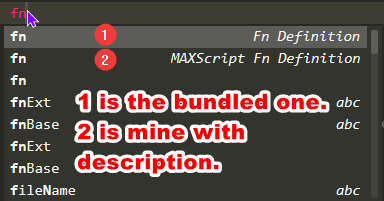
The location of my snippets are: W:\Apps (Portable)\Sublime Text\Data\Packages\User\Snippets