

 cb-linux
No sound on Acer Chromebook Spin 11
Despite the new apl-sof-setup-audio script, my sound card still went undetected.
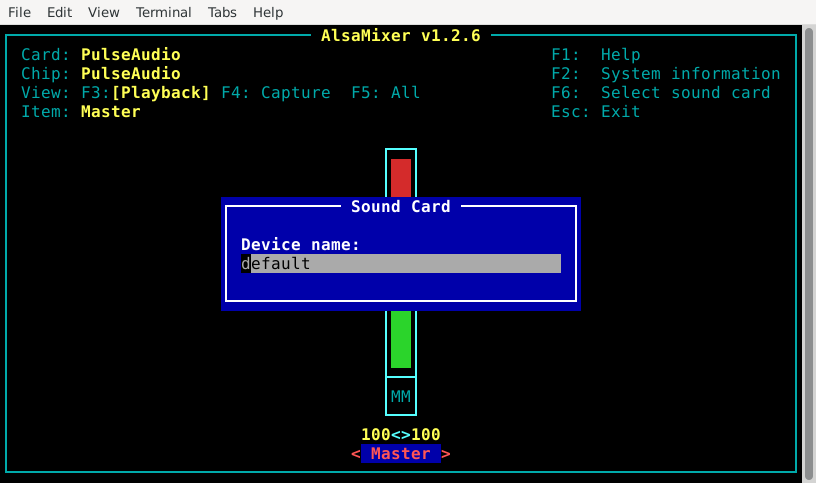
Only "default"(which is Pulseaudio's dummy output) shows up in alsamixer.

Show the output of dmesg and post the link from sudo alsa-info from Breath.

I purged pulseaudio and blacklisted snd-soc-skl and snd-hda-intel(Heard that it makes the sof driver load instead). It still doesn't work.
I don't know if apl-sof-setup-audio ran properly. Your device should be SOF supported. What's in the file /etc/systemd/system/alsa-reload.service?
[Unit] Description="Reload ALSA and set the correct UCM"
[Service] User=root WorkingDirectory=/ ExecStart=/bin/bash -c 'modprobe snd_soc_max98357a snd_soc_da7219 && alsa reload'
[Install] WantedBy=multi-user.target
What about running modprobe bxt_da7219_max98357a && alsa reload? That would be a stopgap solution, though.
Preferably we should use SOF. Blacklisting those modules might not make SOF load. I think you should put options snd-intel-dspcfg dsp_driver=3 in /etc/modprobe.d/test.conf, reboot, and show dmesg.
Nevermind, that's already in the kernel parameters. What's the output of dmesg after modprobe snd-soc-sst-bxt-da7219_max98357a snd-soc-kbl_da7219_max98357a snd-sof-pci-intel-apl && alsa reload
I whitelisted the drivers and ran your command, but my terminal responded with this: bash: alsa: command not found
I know this may seem like a dumb question, but I can't find an answer anywhere. Currently I have alsa-utils installed, do I have to install anything else?
The above happened. I know this may seem like a dumb question, but I can't find an answer anywhere. Currently I have alsa-utils installed, do I have to install anything else?
By the way, the sound still doesn't work "cat /proc/asound/cards" returns with "--- no soundcards ---"
This is our error:
[  128.948429] snd_soc_sst_bxt_da7219_max98357a: unknown parameter 'snd-soc-kbl_da7219_max98357a' ignored
[  128.948440] snd_soc_sst_bxt_da7219_max98357a: unknown parameter 'snd-sof-pci-intel-apl' ignored
I've never encountered anything like this before. What if you just modprobe sudo modprobe snd_soc_max98357a snd_soc_da7219 and reload ALSA?
I think an lsmod from ChromeOS would also be useful - once we get the correct modules loaded, this should be fixed and I'll add it to apl-setup-audio.
The config of this device is super weird. snd_soc_skl or snd_hda_intel doesn't return any errors, and SOF just doesn't load for some reason. I guess we can chalk it up to the wrong modules being loaded.
This is our error:
[  128.948429] snd_soc_sst_bxt_da7219_max98357a: unknown parameter 'snd-soc-kbl_da7219_max98357a' ignored
[  128.948440] snd_soc_sst_bxt_da7219_max98357a: unknown parameter 'snd-sof-pci-intel-apl' ignored
I've never encountered anything like this before. What if you just modprobe
sudo modprobe snd_soc_max98357a snd_soc_da7219and reload ALSA?
I tried your followed your steps. Sadly, it's still "--- no soundcards ---" Is there any other way to verify whether it's working?
modprobe snd_soc_max98357a snd_soc_da7219 snd-sof-pci-intel-apl sof-pci-dev && sudo alsa reload
Post a dmesg
[    5.959231] da7219 i2c-DLGS7219:00: Invalid micbias pulse level
[    6.290841] pci 0000:00:0e.0: attach allowed to drvr snd_hda_intel [internal device]
[    6.330036] iwlwifi 0000:01:00.0 wlp1s0: renamed from wlan0
[    6.838134] pci 0000:00:0e.0: attach allowed to drvr snd_soc_skl [internal device]
and the the thing just... stops for some reason.
Try rerunning the whole script setup.sh again (on the PC you built Breath with of course), but first remove ~/linux-build. I've published a few changes that should allow you to enable dynamic debug (i'll explain this later).
Also, if you would be fine with it, use Ubuntu as your distro for audio testing. Debian is untested by me personally.
I've got the same device, and got this error:
fatal: destination path 'sof-bin' already exists and is not an empty directory.

Sorry, I forgot to delete that comment. I just re-ran the script and the problem disappeard. Sound still isn't working.
Hmmm, what about lsmod? There’s a chance that manually loading the da7219 module will help.
Here's the lsmod:
lsmod.txt
How do you load the da7219 module?
I tried sudo modprobe da7219 and it doesn't find it.