

 castwide
max_files not taken into account
Hello,
I seem to have a little problem with setting max_files in a large project. I have to index around ~12k files and setting max_files to 20000 or 0 will still result in the same error message:

I am using VSCode v1.41.1 on a ruby:2.5.5 Docker container.
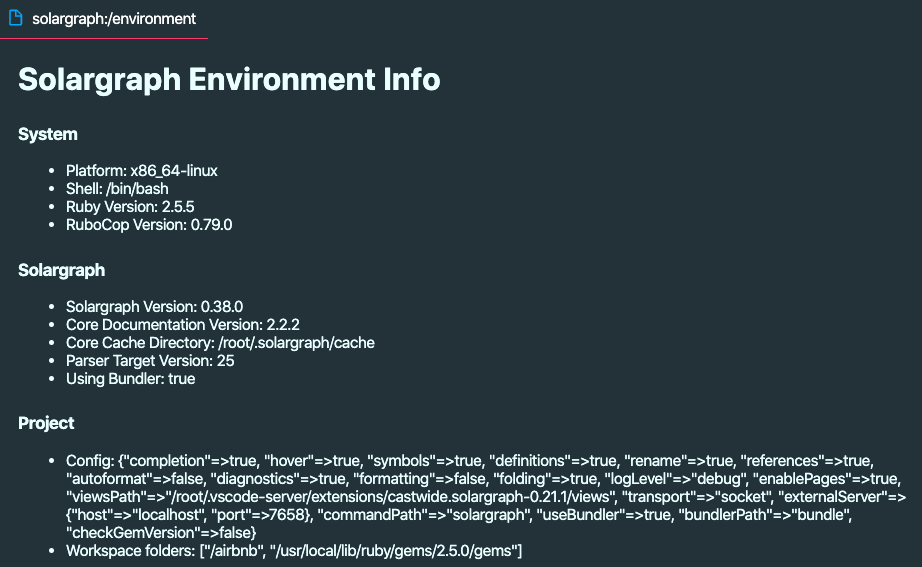
Could you help me track down the real issue, please?


Sure:
---
include:
  - "lib/**/*.rb"
  - "app/**/*.rb"
  - "/usr/local/lib/ruby/gems/2.5.0/gems/**/*.rb"
  - "/usr/local/bundle/gems/**/*.rb"
exclude:
  - spec/**/*
  - test/**/*
  - vendor/**/*
  - ".bundle/**/*"
require: []
domains: []
reporters:
  - rubocop
  - require_not_found
require_paths: []
max_files: 20000
The config looks okay. Is Solargraph running from inside Docker? If so, maybe the .solargraph.yml file isn't being copied to the container?
Yes, I am running the project setup as a VSCode remote container setup with docker-compose and all. Solargraph runs fine and its config is in the project root. When I exclude the last two system folders where bundled gems are installed, then Solargraph still reports the exact same issue. Is there a way to debug Solargraph, what folders/settings is it really working with? Or explicitly telling it where the config file is? Maybe it is not picking it up within a container? I have the following vscode settings in the container:
    "solargraph.checkGemVersion": false,
    "solargraph.useBundler": true,
    "solargraph.completion": true,
    "solargraph.definitions": true,
    "solargraph.diagnostics": true,
    "solargraph.folding": true,
    "solargraph.references": true,
    "solargraph.rename": true,
    "solargraph.symbols": true,
    "solargraph.hover": true,
    "solargraph.logLevel": "debug",
Ok, I am have discovered something. I run my project with VSCode workspace and have multiple folders there. Namely, I want to see those 2 system gem folders. When I reduce my workspace by those 2 folders and have only the project, Solargraph does not say I am over the 5k limit. When I add them in and save the workspace file, the error popup shows almost immediately. Adding those 2 folders in the solargraph config files' exclude list does not help either.
You shouldn't need to include your system gem folders to get intellisense for your gems. Solargraph uses YARD documentation for them. It might be a little less complete depending on how thoroughly documented the gems are, but it's much faster. See "Gem Support" in the README for more information.
If you're using a multi-root workspace, the .solargraph.yml file(s) should be in the folder(s) defined in your code-workspace file. Each folder can have its own configuration.
Ok, I'll switch back to project folder mode, though we should still figure out why max_files is not working as expected.
It should work with a multi-root workspace as long as the config files are in the workspace folders. Does it only work with a single project folder?
It works right in single folder workspace setup, yes. I just wanted to be able to browse into those gem folders easier. I will experiment with having a solargraph config in each system gem folders and exclude their contents.
You might be able to get the gem access you need with Go To Definition. For example, if you're using Benchmark in your code:
require 'benchmark'

Benchmark.measure {}
Running Go To Definition on either the 'benchmark' string or the Benchmark.measure call should open the relevant file. As long as Solargraph recognizes the gem, you shouldn't need to have it open as a workspace folder.
Browsing gem code should not be an issue anymore. If there are still related problems, please feel free to open a new issue.