

 carolinan
Fuzzy shadows?
Your theme generator is great - but somehow when I created an advanced one I get fuzzy shadows behind the post-titles, and cannot figure out why. I saw a text shadow line in theme.json and removed it, but that did not seem to solve it.


Hi! The text shadow in theme.json generates a CSS custom property. Removing the style should make sure that the CSS custom property has no value and the shadow should not be applied anymore. Did you clear cache?
If you look at the light color scheme in the advanced theme version (6.0): https://github.com/carolinan/fullsiteediting/blob/course/Starter%20themes/advanced-60/styles/light.json#L34 You can see how I updated the shadow to look better on light background.
The generator is not smart enough to know if you selected a light or dark background, so it can't adapt the text shadow, you would need to update the values yourself.
The text shadow is a custom block style, so you can also select the post title -and any of the other blocks that have this option: and deselect the shadow:
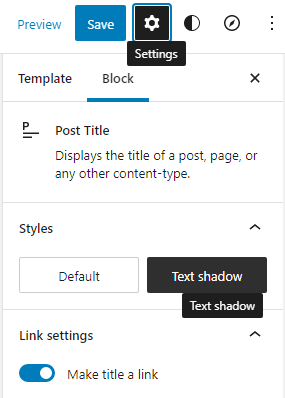
If you want to remove the optional custom block style from the theme, delete it from inc\register-block-styles.php. Remember to also update the stylesheets and generate new minified versions of the styles.

Thanks! Will do!
On Tue, Jun 7, 2022 at 11:24 AM Carolina Nymark @.***> wrote:
Hi! The text shadow in theme.json generates a CSS custom property. Removing the style should make sure that the CSS custom property has no value and the shadow should not be applied anymore. Did you clear cache?
If you look at the light color scheme in the advanced theme version (6.0):
https://github.com/carolinan/fullsiteediting/blob/course/Starter%20themes/advanced-60/styles/light.json#L34 You can see how I updated the shadow to look better on light background.
The generator is not smart enough to know if you selected a light or dark background, so it can't adapt the text shadow, you would need to update the values yourself.
The text shadow is a custom block style, so you can also select the post title -and any of the other blocks that have this option: and deselect the shadow:
[image: image] https://user-images.githubusercontent.com/7422055/172418724-202115b5-e6ed-40b8-8e02-14672db2a1cc.png
If you want to remove the optional custom block style from the theme, delete it from inc\register-block-styles.php. Remember to also update the stylesheets and generate new minified versions of the styles.
— Reply to this email directly, view it on GitHub https://github.com/carolinan/fullsiteediting/issues/26#issuecomment-1148822039, or unsubscribe https://github.com/notifications/unsubscribe-auth/AM6ZKXXHRXT75TYEI2SQTMLVN5SS7ANCNFSM5XZEHZZA . You are receiving this because you authored the thread.Message ID: @.***>