
QuickUI
 QuickUI copied to clipboard
 cardwizard
Quickly create a UI for any python file with a CLI
Quick UI
CLI to UI in 1 click

QuickUI is a tool to instantly create a usable UI from any python file which has a CLI created using the Argument Parser.

Usage
Step 1: Clone the Repo
git clone https://github.com/cardwizard/QuickUI
Step 2: Install the requirements
pip install -r requirements.txt
Step 3: Run quickUI. Pass path to your python file
python -m quickui my-awesome-python-file.py
Voila! Access the UI
Hit http://localhost:8765 to access the QuickUI dashboard
Simple, Easy, Quick!
With it, you know exactly what parameters need to be passed to the program while running it.
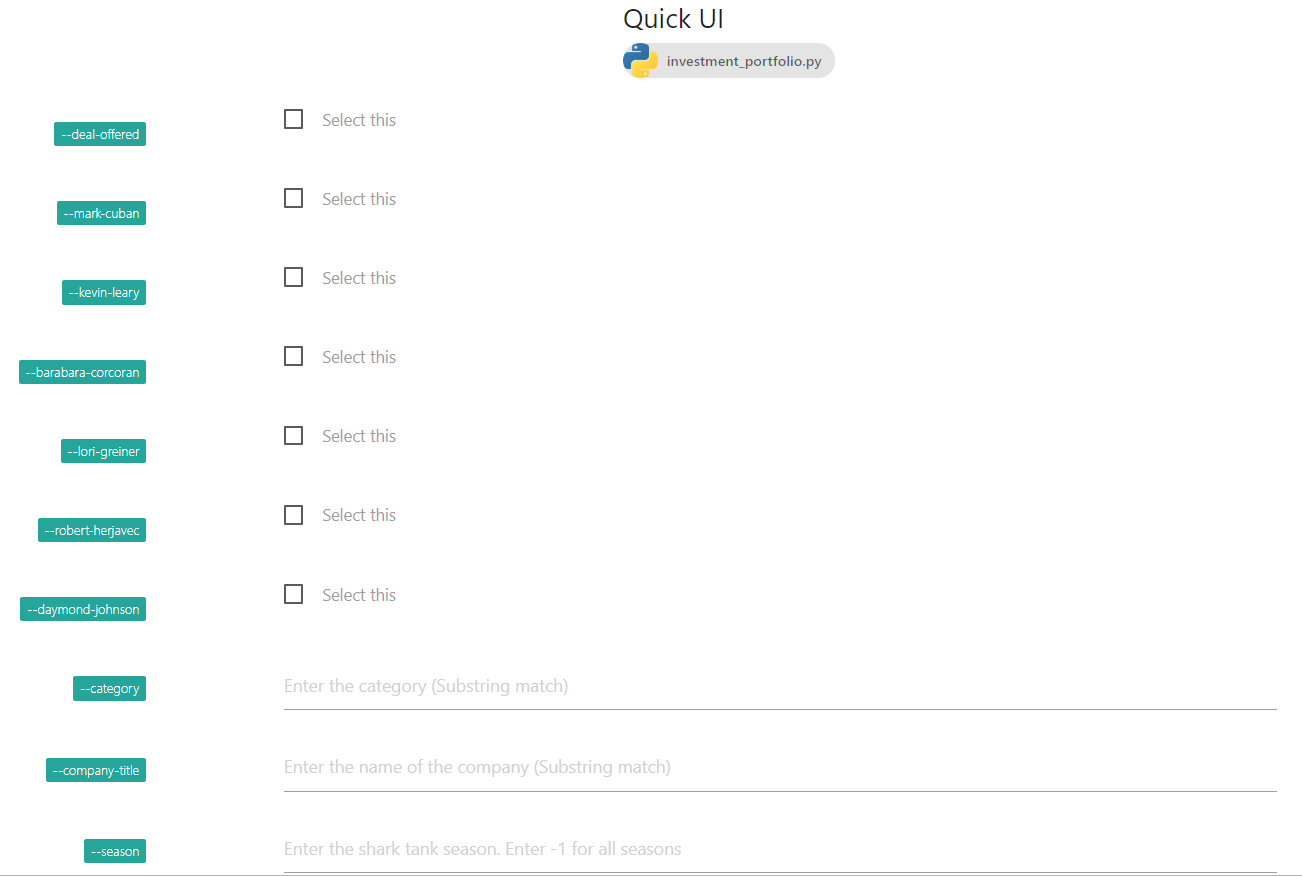
Demo friendly!
Once all the required criterion is met, you can use quickUI to run the program and view the output in a
friendly terminal like interface!. This is great for early internal demos.

In-built Static Type Checking
QuickUI adds static checks on data types as well. Along with the checks, it
auto-fills the entries with default values and can also show help fields as a placeholder.

Required*
In case, your parser mentions that a particular field is required, QuickUI adds a compulsory check as well.

Error Checking
In case there is an error, it will be shown in the interface itself highlighted in red!

Watch it in action!

Developer: Aadesh M Bagmar
Metadata
Owner
 cardwizard
Metadata
Quickly create a UI for any python file with a CLI