
carbone
 carbone copied to clipboard
 carboneio
[Bug Report]: Excel template, empty cells/rows get removed
Environment
Carbone Version: npm ls shows [email protected]
Node Version: v12.18.1
Browsers: Not applicable
Desktop OS: Windows Server 2012 R2
Expected Behaviour In an excel template, empty cells or rows should not get removed
Actual Behaviour When there are empty cells or rows, they are getting removed when rendering the template.
Steps to reproduce
- Create a new xlsx file called
in.xlsx - Go to cell
C4and put the stringa - Save the file
- Use
carbone.render()(see code snippet below) - Open the output file
out.xlsx - The
ain cellC4has been moved to cellA1
Screenshots
If applicable, add screenshots to help explain your problem.
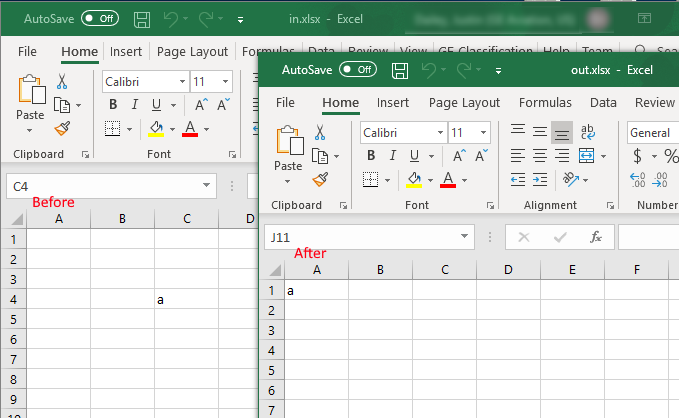
Reproduction Link / Code example
const fs = require('fs');
const carbone = require('carbone');

// Data to inject
var data = {};

carbone.render('./in.xlsx', data, function(err, result){
	if (err) {
		return console.log(err);
	}

	fs.writeFileSync('out.xlsx', result);
});

Hi @dail8859, thank you for reaching us! The issue is known since Carbone supports XLSX files, it's an architecture choice but we plan to rework this part. Until the fix, I advise you to create an ODS templates and export as a XLSX.

@steevepay Thanks for the information!
I can confirm that using ODS and converting it to XLSX does keep empty cells. However, our use case has an XLSX file that has custom formatting/drawings/etc that using plain LibreOffice just isn't able to convert to XLSX and keep everything successfully.
I look forward to seeing this issue addressed in the future. Thanks!
Hi @steevepay, I wrote a very ugly hack to fix this problem, maybe it can be helpful when fixing the xlsx file handling.
The idea is:
preprocessor
each time you find a row, replace the "r=" attribute to keep track of the delta (the difference from the current row index and the previous. Preserve also the information about the index of the row.
postprocessing (since there is not a postprocessing function, I needed to add the code in the builder.buildXML function)
each time you find a row, check if the previous row index is less/equal/greater than this row index
- if previous row index < this row index, use the delta stored in the preprocessing stage
- if previous row index >= this row index, we are inside a loop. The delta is the delta of the rows with the i+1 index, that has been removed and replaced with the repeating rows. To get that value, I saved in the
spaceRightobject, for each row, the delta of the next row.
Same for the columns!
Here is the code, maybe it can be helpful to others.
// HACK: fix excel empty columns/rows disappears
let _excelRowR = null
const ACharCode = 'A'.charCodeAt(0)
function columnLettersToNumber (letters) {
  let n = 0
  letters.split('').forEach(letter => {
    const v = letter.charCodeAt(0) - ACharCode + 1
    n = n * 26 + v
  })
  return n
}
function columnNumberToLetters (n) {
  let letters = ''
  do {
    n = n - 1
    const v = n % 26
    letters = String.fromCharCode(ACharCode + v) + letters
    n = (n - v) / 26
  } while (n > 0)
  return letters
}
preprocessor.removeRowCounterInWorksheet = function (xml) {
  if (typeof (xml) !== 'string') {
    return xml
  }

  if (!_excelRowR) {
    const prefix = '_t_' + new Date().getTime() + '_' + Math.round(Math.random() * 100000) + '_'

    _excelRowR = {
      prefix: prefix,
      bothRegexp: new RegExp(`<(?:c|row)[^>]*\\s(${prefix}="([rc])([0-9]+)_([0-9]*)_([0-9]+)")[^>]*>`, 'g')
    }
  }

  let lastRowIndex = 0
  let lastColIndex = 0
  let lastRowKey = null
  let lastColKey = null
  const spaceRight = {}
  let hasSpaceRight = false

  let content = xml.replace(/<(?:c|row)[^>]*\s(r="([A-Z]*)([0-9]+)")[^>]*>/g, function (m, rowValueString, columnValue, rowValue) {
    let what
    let value
    rowValue = parseInt(rowValue, 10)
    if (!columnValue) {
      what = 'r'
      value = rowValue - lastRowIndex// delta
      lastRowIndex = rowValue
      lastColIndex = 0
      if (lastRowKey) {
        spaceRight[lastRowKey] = value
        hasSpaceRight = true
      }
      lastRowKey = 'r' + rowValue
    } else {
      columnValue = columnLettersToNumber(columnValue)
      what = 'c'
      value = columnValue - lastColIndex
      lastColIndex = columnValue
      if (lastColKey) {
        spaceRight[lastColKey] = value
        hasSpaceRight = true
      }
      lastColKey = 'c' + columnValue
    }
    return m.replace(rowValueString, `${_excelRowR.prefix}="${what}${value}_${columnValue}_${rowValue}"`)
  }).replace(/<(?:c|row)[^>]*(spans="\S+")[^>]*>/g, function (m, rowValue) {
    return m.replace(rowValue, '')
  })

  if (hasSpaceRight) {
    content = _excelRowR.prefix + '_spaceRight=' + JSON.stringify(spaceRight) + '#' + content
  }
  return content
}
const _buildXML = builder.buildXML
builder.buildXML = function (xml, data, options, callback) {
  return _buildXML.call(this, xml, data, options, (err, xmlResult) => {
    if (_excelRowR && typeof xmlResult === 'string') {
      let spaceRight = {}
      if (xmlResult.startsWith(_excelRowR.prefix + '_spaceRight=')) {
        const start = xmlResult.indexOf('=')
        const end = xmlResult.indexOf('#')
        const objString = xmlResult.substring(start + 1, end)
        spaceRight = JSON.parse(objString)
        xmlResult = xmlResult.substring(end + 1)
      }

      let realRowIndex = 0
      let realColIndex = 0
      let lastRow = 0
      let lastCol = 0
      let foundRows = false
      const oldToNewCellsMap = {}
      xmlResult = xmlResult.replace(_excelRowR.bothRegexp, function (m, rowValueString, what, delta, columnValue, rowValue) {
        foundRows = true
        delta = parseInt(delta, 10)
        // console.log(rowValueString, what, delta, columnValue, rowValue)

        if (what === 'r') {
          rowValue = parseInt(rowValue, 10)
          if (lastRow >= rowValue) {
            const s = spaceRight['r' + lastRow]
            if (s) {
              delta = s
            }
          }
          realRowIndex += delta
          realColIndex = 0
          lastCol = 0
          lastRow = rowValue
          return m.replace(rowValueString, `r="${realRowIndex}"`)
        } else if (what === 'c') {
          rowValue = parseInt(rowValue, 10)
          columnValue = parseInt(columnValue, 10)
          if (lastCol >= columnValue) {
            const s = spaceRight['c' + lastCol]
            if (s) {
              delta = s
            }
          }
          realColIndex += delta
          lastCol = columnValue
          const oldCellName = `${columnNumberToLetters(columnValue)}${rowValue}`
          const newCellName = `${columnNumberToLetters(realColIndex)}${realRowIndex}`
          oldToNewCellsMap[oldCellName] = oldToNewCellsMap[oldCellName] || []
          oldToNewCellsMap[oldCellName].push(newCellName)
          return m.replace(rowValueString, `r="${newCellName}"`)
        }

        return m
      })

      if (foundRows) {
        // check merge
        xmlResult = xmlResult.replace(/<mergeCells[^>]*>(.*)<\/mergeCells>/g, function (m, content) {
          const matches = [...content.matchAll(/<mergeCell[^>]*\sref="([A-Z0-9]+):([A-Z0-9]+)"[^>]*>/g)]
          const newContent = []
          matches.forEach(match => {
            const cell1 = match[1]
            const cell2 = match[2]
            const newCells1 = oldToNewCellsMap[cell1]
            const newCells2 = oldToNewCellsMap[cell2]
            if (newCells1 && newCells2) {
              if (newCells1.length === newCells2.length) {
                for (let index = 0; index < newCells1.length; index++) {
                  const newCell1 = newCells1[index]
                  const newCell2 = newCells2[index]
                  // console.log(cell1, cell2, newCell1, newCell2)
                  newContent.push(`<mergeCell ref="${newCell1}:${newCell2}"/>`)
                }
              } else {
                console.log(cell1, cell2, newCells1, newCells2)
              }
            }
          })
          return `<mergeCells count="${newContent.length}">${newContent.join('')}</mergeCells>`
        })
      }
    }
    return callback(err, xmlResult)
  })
}
UPDATE: code changed to fix the merged cells problem in #90

Just in case anyone wants a work around until this bug is fixed. If you paint the Excel rows.

The cells will keep their position. This is something we are doing and works a charm!

