

 carboneio
[Bug Report]: slight variations in pdf text line spacing + paragraph spacing after
Environment Carbone Version: [email protected] Node Version: v16.11.1 Browsers: Brave Version 1.36.109 Chromium: 99.0.4844.51 (Official Build) (x86_64) Desktop OS: Mac Os Other: LibreOffice: 7.3.1.3
Expected Behaviour Have the same one page pdf in Carbone Studio like I get on my local machine when exporting.
Actual Behaviour In carbone studio I get an extra blank page. For the same template and data I get on my local machine only one page. I figured out that my text and frame sizes vary slightly and this is causing the extra empty page. But still it's something I haven't expected and would like to report / hear about.
Steps to reproduce Design a template locally, export to pdf. Upload template to carbone studio, paste same data, save previewed pdf and compare both pdfs.
Screenshots
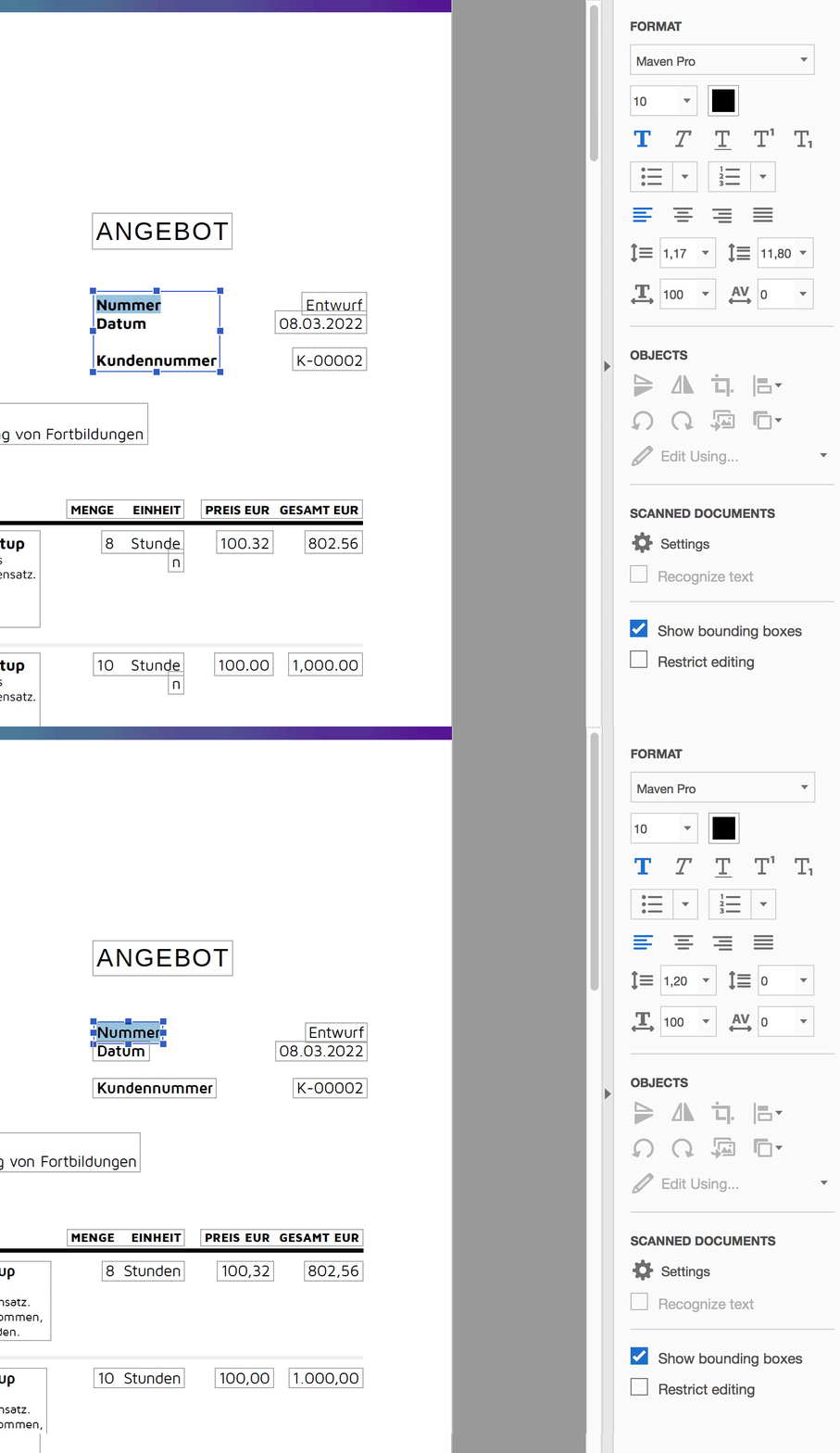
Other comments This might be a small problem compared to other solutions for pdf creation which function very badly compared to carbone. I just want to know if there is something I could do differently to be able to design on my laptop, upload to carbone studio and have the exact same output. If not, I could always make an extra adjustment until I get it right in Studio as well...
In LibreOffice I have made use of character styles, paragraph styles, and page styles.
This is my index.js that renders the report:
/** 1 . dependencies */
const carbone = require("carbone");
const fs = require("fs");

/** 2 . input template file name and output file name */
const _fileInputName = "./Angebot-Rechnung.odt";

/** 3 . Data to inject */
const _data = require("./invoice-data.json");

/** 4 . Options object */
const _options = {
  convertTo: "pdf",
  reportName: _data.Typ.substring(0, 1) + "-{d.Nummer}.pdf",
  lang: "de-de",
  timezone: "Europe/Berlin"
};

/** 5 . Call carbone render function */
carbone.render(_fileInputName, _data, _options, (err, result, reportName) => {
  if (err) {
    console.log(err);
  } else {
    fs.writeFileSync("./PDFs/" + reportName, result);
  }
  process.exit();
});

Same thing happened with another document. This is preventing me from using Carbone Studio / Render in a smooth manner. I had to keep decreasing font size of multiple elements until the result resembled the locally produced layout more closely.
Would be great to know if I could prevent that myself!