
ibm-security
 ibm-security copied to clipboard
 carbon-design-system
RadioButton/RadioButtonGroup Accessibility Issues w/ Keyboard Navigation
Bug
RadioButton components within RadioButtonGroup components should be able to be selected with the 'Space' key when navigating to them using the keyboard.
Description
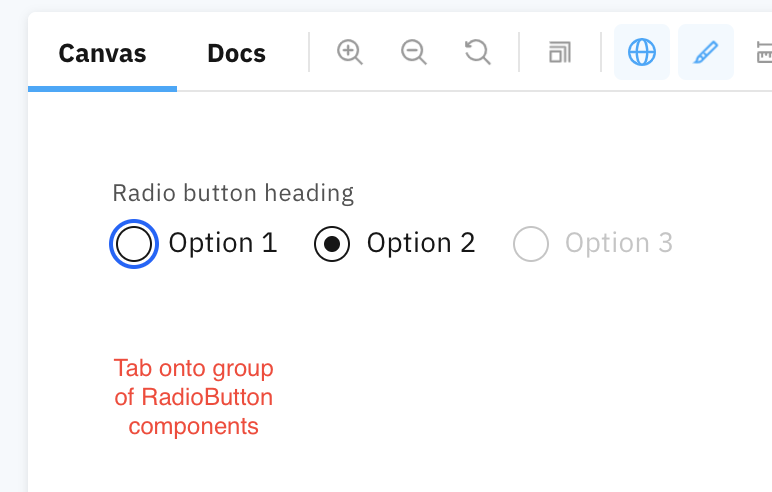
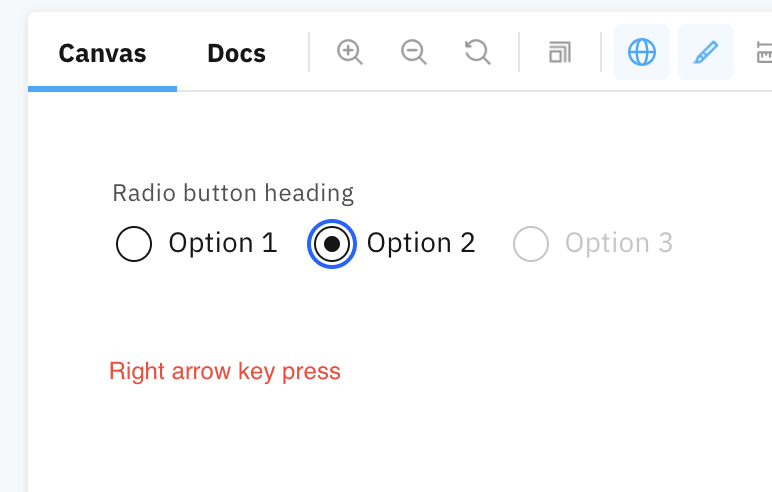
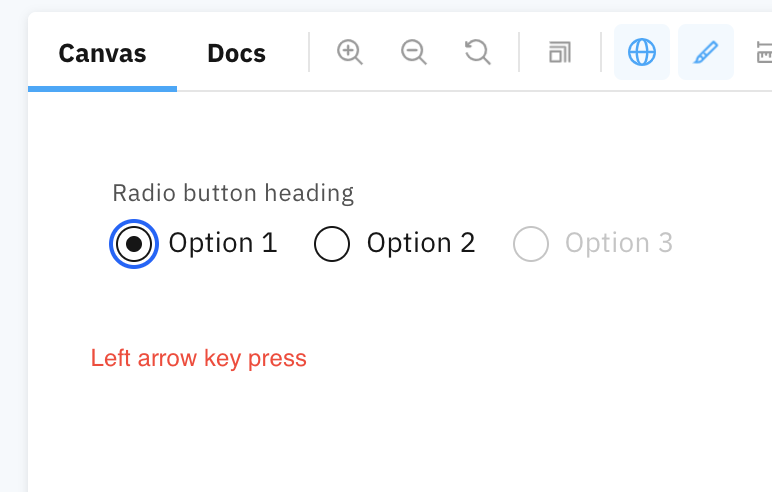
While navigating using the keyboard, the either first or last RadioButton in the RadioButtonGroup is focused & not selected depending on whether you're tabbing forward or shift-tabbing backward to it. The only way to select the first or last radio button if you've tabbed to it, is to use the arrow keys. The focus and selection follow the arrow keys once the arrow keys are pressed, so you have to focus off of the first/last RadioButton and then back on to actually get the button selected. This ticket proposes that when tabbed over to, the RadioButton components should be selected on pressing 'Space', but pressing 'Space' on an already selected RadioButton should still leave it selected, with only the focus following the arrow keys.
<RadioButtonGroup
    orientation={
        parameter.Orientation === 'vertical'
            ? parameter.Orientation
            : 'horizontal'
    }
    valueSelected={String(defaultValue)}
    onChange={selectedValue => {
        handleValueChange(
            parameter.ConfigurationKey,
            String(selectedValue),
            warning
        );
    }}>
    {parameter.ParameterValues.map((element, index) => {
        if (typeof element === 'object') {
            // allow objects as radio button item
            return (
                <RadioButton
                    key={String(element)}
                    id={Object.keys(element)[0]}
                    labelText={formatUnitLabel(
                        t(`global_settings:${Object.values(element)[0]}`),
                        unit
                    )}
                    value={Object.keys(element)[0]}
                />
            );
        } else {
            // normal case of string or numbers
            return (
                <RadioButton
                    key={String(element)}
                    id={parameter.ParameterName + String(index)}
                    labelText={formatUnitLabel(element, unit)}
                    value={String(element)}
                />
            );
        }
    })}
</RadioButtonGroup>
Expected behavior
When tabbed over to, the RadioButton components should be selected on pressing 'Space', but pressing 'Space' on an already selected RadioButton should still leave it selected, with only the focus following the arrow keys.
Actual behavior
When tabbed over to, the RadioButton components are focused and selected based on the arrow keys, with the focus and selection both following the arrow keys once pressed.
Steps for reproducing
- Tab onto the RadioButtonGroup
- See that the focus is on either the first or last element depending on whether you tabbed forward or backward to the RadioButtonGroup
- Press the arrow key to change focus to another RadioButton and then back onto the previous RadioButton to see that focus and selection follow the arrow keys
Affected browsers
All supported browsers

Is this still relevant? If so, what is blocking it? Is there anything you can do to help move it forward?
This issue has been automatically marked as stale because it has not had recent activity. It will be closed if no further activity occurs.
![stale[bot] avatar](https://avatars.githubusercontent.com/in/1724?v=4 "Published by a pub.dev verified publisher")